English - 74
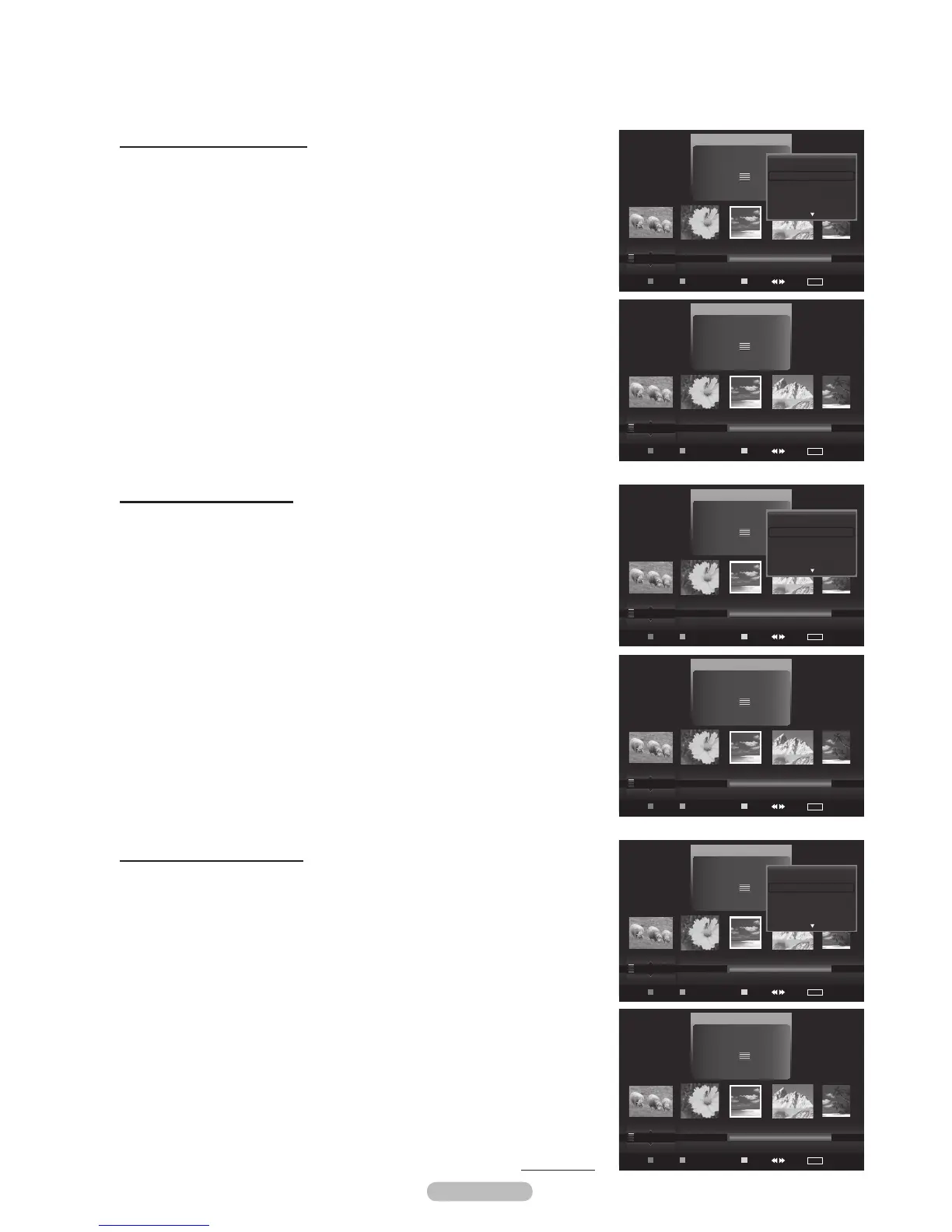
Sorting the photos by month
1 Select Monthly as the sorting standard in the Photo List.
2 Press the or buttons to select from the sublist of files grouped by
Month.
3 Press the Tools button.
4 Press the or button to highlight Play Current Group.
5 Press ENTER button to play the the selected group of photo files from the
sublist.
Sorting the photos by time
1 Select Timeline as the sorting standard in the Photo List.
2 Press the or buttons to select from the sublist of files grouped by
Timeline.
3 Press the Tools button.
4 Press the or button to highlight Play Current Group.
5 Press ENTER button to play the the selected group of photo files from the
sublist.
Sorting the photos by folder
1 Select Folder as the sorting standard in the Photo List.
2 Press the or buttons to select from the sublist of files grouped by
Folder.
3 Press the Tools button.
4 Press the or button to highlight Play Current Group.
5 Press ENTER button to play the the selected group of photo files from the
sublist.
Continued...
Photo
USB
Device
Favorites Setting
Select Jump
TOOLS
Option
image_1.jpg
Month : Jan
Date : Jan.01.2008
Color :
Gray
Composition :
Folder : P-other
Favorite :
(((
Preference
Monthly
Timeline
Jan Nov
Slide Show
Play Current Group
Delete
Information
Photo
USB
Device
Favorites Setting
Select Jump
TOOLS
Option
image_1.jpg
Month : Jan
Date : Jan.01.2008
Color : Gray
Composition :
Folder : P-other
Favorite :
(((
Monthly
Timeline
Color
Jan Nov
Photo
USB
Device
Favorites Setting
Select Jump
TOOLS
Option
image_1.jpg
Month : Jan
Date : Jan.01.2008
Color :
Gray
Composition :
Folder : P-other
Favorite :
(((
Preference
Monthly
Timeline
Jan Nov
Slide Show
Play Current Group
Delete
Information
Photo
USB
Device
Favorites Setting
Select Jump
TOOLS
Option
image_1.jpg
Month : Jan
Date : Jan.01.2008
Color : Gray
Composition :
Folder : P-other
Favorite :
(((
Monthly
Timeline
Color
Jan Nov
Photo
USB
Device
Favorites Setting
Select Jump
TOOLS
Option
image_1.jpg
Month : Jan
Date : Jan.01.2008
Color : Gray
Composition :
Folder : P-other
Favorite :
(
((
Composition
Folder
Preference
Jan Nov
Slide Show
Play Current Group
Delete
Information
Photo
USB
Device
Favorites Setting
Select Jump
TOOLS
Option
image_1.jpg
Month : Jan
Date : Jan.01.2008
Color : Gray
Composition :
Folder : P-other
Favorite :
(
((
Composition
Folder
Preference
USB Trash







 To Next Page