EasyManua.ls Logo

Samsung 560 - Viewing the Menus; Navigating Menus with Remote Control; Setting Picture Brightness

Samsung 560
108 pages
Print Icon
To Next Page IconTo Next Page
To Previous Page IconTo Previous Page
Loading...
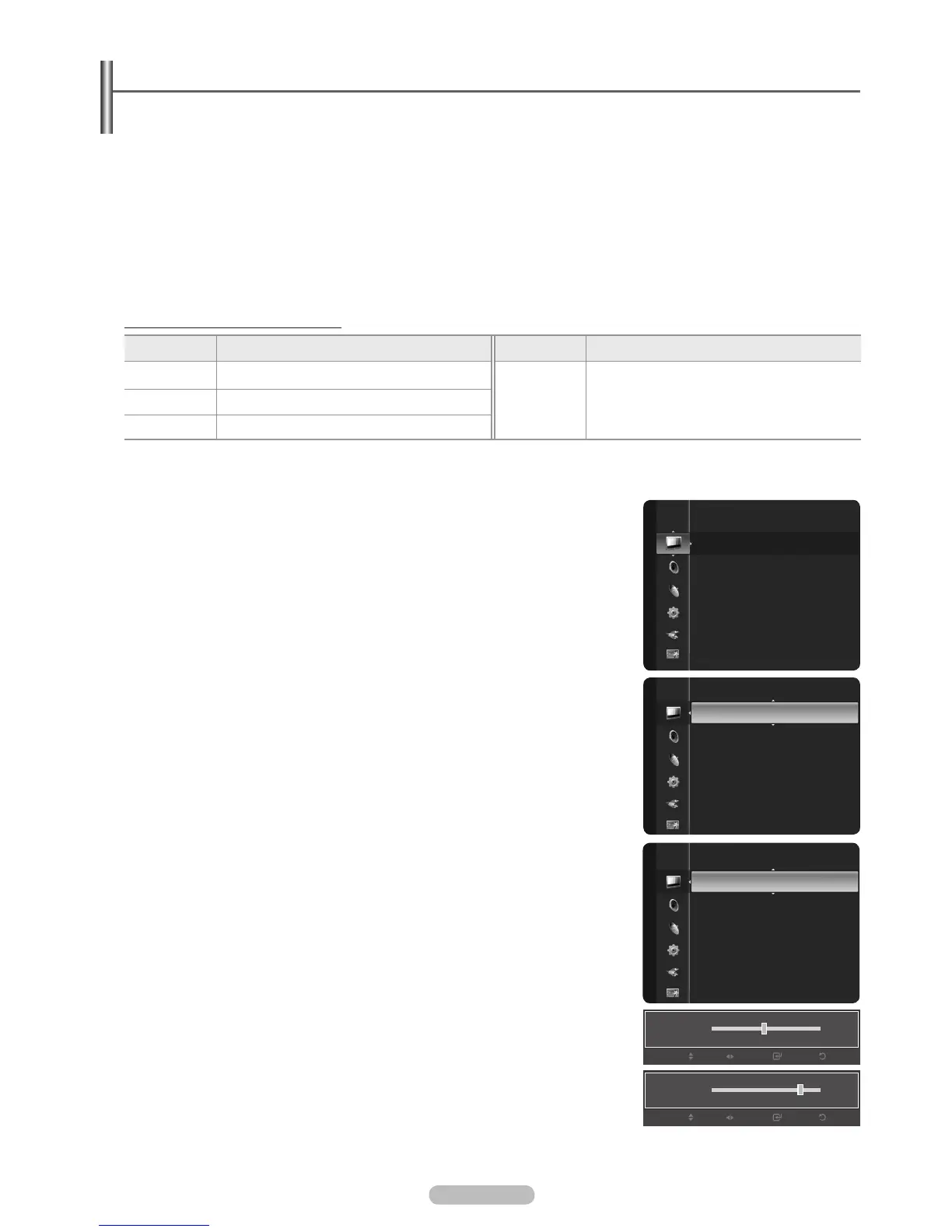
Viewing the Menus
Before using the TV, follow the steps below to learn how to navigate the menu in order to select and adjust different functions.
1. Press the MENU button.
The main menu is displayed on the screen. Its left side has the following icons: Picture, Sound, Channel , Setup, Input,
Application, Support.
2. 

3. 
Press the ENTER
E
button to enter items in the menu.
4. 
Press the RETURN button to return to the previous menu.
5. Press the EXIT button to exit from the menu.
Using the remote control buttons
Button Operations Button Operations
MENU Display the main on-screen menu.

ENTERE
Move the cursor and select an item.
Select the currently selected item.
Confirm the setting.
RETURN Return to the previous menu.
EXIT Exit the on-screen menu.
Example: Setting the TV’s Brightness in the Picture Menu
Adjusting the Brightness to 80
1. Press the MENU button to display the menu.
2. Press the ENTERE button to select Picture.
3. Brightness.
4. Press the ENTERE button.
5. 
6. Press the ENTERE button.
Press the EXIT button to exit from the menu.
N
English - 19
Mode : Standard
Cell Light : 4
Contrast : 95
Brightness : 45
Sharpness : 50
Color : 50
Tint (G/R) : G50/R50
Picture
Brightness
45
Enter
Return
Adjust
Move
Mode
:
Standard
Cell Light : 4
Contrast : 95
Brightness : 45
Sharpness : 50
Color : 50
Tint (G/R) : G50/R50
Picture
Cell Light : 4
Contrast : 95
Brightness : 45
Sharpness : 50
Color : 50
Tint (G/R) : G50/R50
Advanced Settings
Picture Options
Picture Reset
Picture
Brightness
80
Enter
Return
Adjust
Move
BN68-02221B.indb 19 2009-03-13 오후 6:45:47

Table of Contents

Other manuals for Samsung 560

Related product manuals