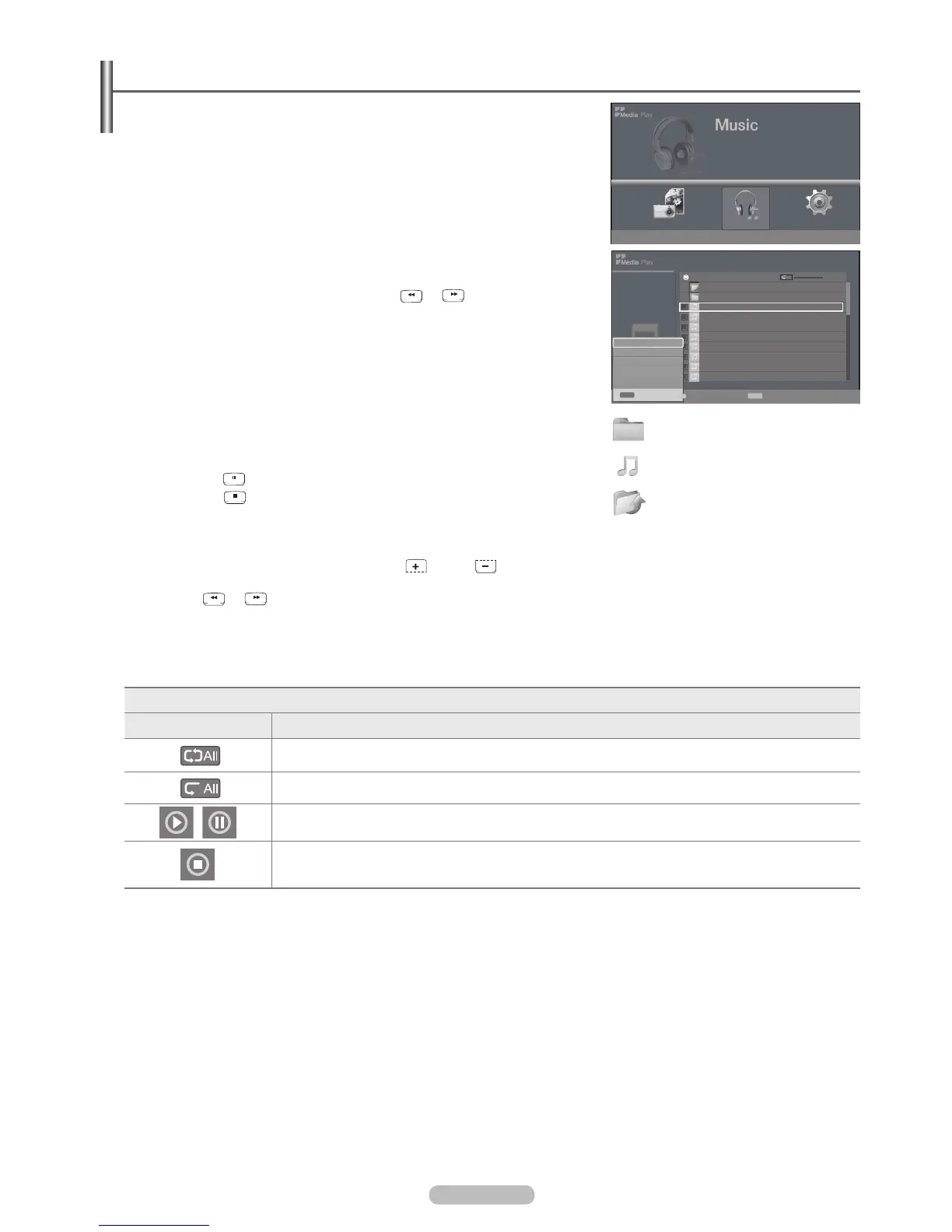
Using the MP3 List
This menu shows MP3 files from among the files saved on a USB memory
device.
1. Complete Steps 1 to 2 of Using the Media Play Menu. (Refer to page 38)
2. Music, then press the ENTER
E
button.
3. button to move to an icon, then press the ENTER
E
button.
Pressing the ENTERE button over a musical note icon immediately plays the
Pressing the ENTERE
in the folder.
or button to move to the
next or previous page.
4. INFO button to display the Music menus.
Press the ENTER
E
button to select Play, Repeat Music, Delete, Delete All or
Deselect All.
To exit Media Play mode, press the MEDIA.P button on the remote control.
Using the Option Menu
Play
Press the
Press the
button to exit Play mode.
extensions are not displayed, even if they are saved on the same USB device.
To adjust the music volume, press the VOL or VOL button on the remote control. To mute the sound, press the
MMUTE button on the remote control.
Press
or buttons to change pages.
Repeat Music
You can select On or Off
Music function information icon
Icon Function
When all music files in the folder (or the selected file) are repeated.
Repeat Music is On.
When all music files in the folder (or the selected file) are played once.
Repeat Music is Off.
When pressing the PLAY/PAUSE button on the remote control while music is playing.
When pressing the STOP button on the remote control, the music stops.
N
N
N
❑
N
N
N
N
N
N
▶▶
▶▶
Music Setup
Memorycard
315.0MB/495.0MB Free
Photo
L
Move
E
Enter
R
Return
Music
5.9MB
Jan 14, 2009
1/20
Upper Folder
Folder 1
001 Swan Song feat.TBNY.mp3 00:04:01
002 Beatles-Yesterday.mp3 00:04:28
003 Fall in Love.mp3 00:04:12
004 Tom Waits-Time.mp3 00:05:39
005 Chuk Mangione-Feel So good.mp3 00:04:30
006 Nat King Cole-Fly me to the moon.mp3 00:05:25
007 Ryuichi Sakamoto-Rain.mp3 00:04:30
008 Bon jovi-This ain’t a love song.mp3 00:03:54
001 Swan Song feat.TB...
00:00:00
1/3 Page
▶▶
▶▶
All
INFO
Exit
Repeat Music : Off
Delete
Delete All
Deselect All
INFO
Exit
Select U
Move
INFO
Option
E
Enter
R
Return
: Folder icon
: Music list icon
: Move to the previous
folder stage icon
BN68-02221B.indb 41 2009-03-13 오후 6:46:23








 To Next Page