Using the Setup Menu
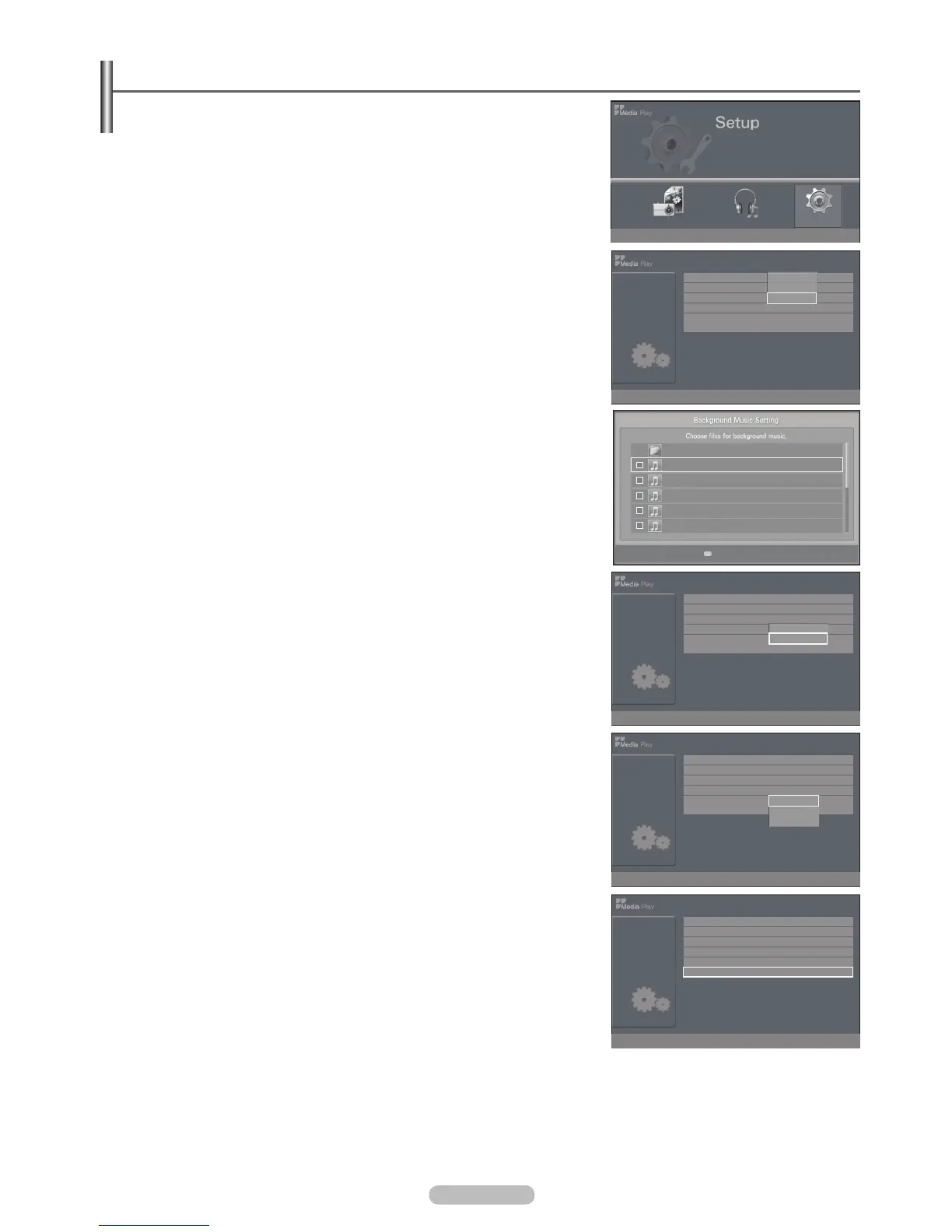
Setup display settings you can make in the Media Play menu.
1. Complete Steps 1 to 2 of Using the Media Play Menu. (Refer to page 38)
2. Setup, then press the ENTER
E
button.
3. ENTER
E
button.
(Slide Show Speed, Background Music, Background Music Setting, Repeat
Music, Screen Saver, Safe Remove)
4. ENTER
E
button.
To exit Media Play mode, press the MEDIA.P button on the remote control.
Slide Show Speed
Select to control the slide show speed.
You can select Fast, Normal, or Slow.
Background Music
You can select Music On or Music Off.
Background Music Setting
While a slide show is in progress, use the Background Music Setting to select a
Repeat Music
current folder have been played.
You can select On or Off
Screen Saver
Select to set the waiting time before the screen saver appears.
The screensaver will appear when no button is pressed for 10min., 20min., or 1hour.
Safe Remove
The message USB device can now be safely removed from TV. is displayed.
You can remove the device safely from the TV.
N
English - 42
Slide Show Speed : Slow
Background Music : On
Background Music Setting
Repeat Music : Off
Screen Saver : 10 min.
Safe Remove
Setup
Fast
Normal
Slow
Music Setup
Memorycard
315.0MB/495.0MB Free
Photo
L
Move
E
Enter
R
Return
Select
U
Move
E
Enter
R
Return
1/2 Page
Upper Folder
001 Swan Song feat.TBNY.mp3
002 Beatles-Yesterday.mp3
003 Fall in Love.mp3
004 Tom Waits-Time.mp3
005 Chuk Mangione-Feel So good.mp3
U
Move
E
Enter
R
Return
Slide Show Speed : Slow
Background Music : On
Background Music Setting
Repeat Music : Off
Screen Saver : 10 min.
Safe Remove
Setup
On
Off
U
Move
E
Enter
R
Return
Slide Show Speed : Slow
Background Music : On
Background Music Setting
Repeat Music : Off
Screen Saver : 10 min.
Safe Remove
Setup
10 min.
20 min.
1 hour
U
Move
E
Enter
R
Return
Slide Show Speed : Normal
Background Music : On
Background Music Setting
Repeat Music : Off
Screen Saver : 10 min.
Safe Remove
Setup
U
Move
E
Enter
R
Return
BN68-02221B.indb 42 2009-03-13 오후 6:46:25







 To Next Page