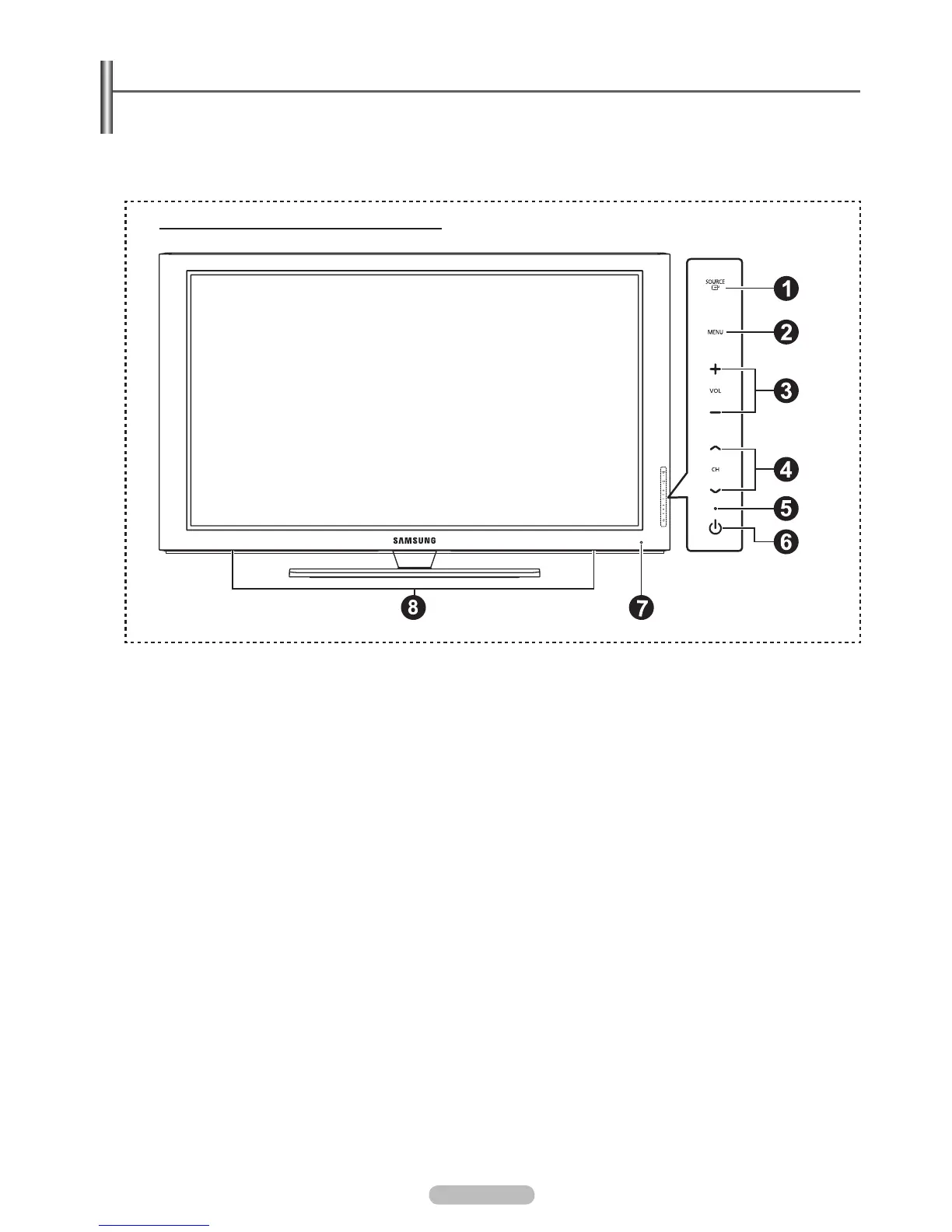
Viewing the Control Panel
The buttons on the lower-right panel control your TV’s basic features, including the on-screen menu.
To use the more advanced features, you must use the remote control.
The product color and shape may vary depending on the model.
If you touch the front panel button, the each button will be operated.
1
SOURCE
E
Toggles between all the available input sources
(TV, AV1, AV2, Component1, Conponent2, PC, HDMI1, HDMI2/DVI, HDMI3, HDMI4).
In the on-screen menu, use this button as you use the ENTER
E
button on the remote control.
2
MENU
Press to see an on-screen menu of your TV’s features.
3
+ VOL –
Press to increase or decrease the volume. In the on-screen menu, use the + VOL – buttons as you would use the
4
<
CH
>
Press to change channels. In the on-screen menu, use the
<
CH
>
remote control.
5
POWER INDICATOR
Blinks and turns off when the power is on and lights up in stand-by mode.
6
P
(POWER)
Press to turn the TV on and off.
7
REMOTE CONTROL SENSOR
Aim the remote control towards this spot on the TV.
8
SPEAKERS
N
N
English - 6
PN50B550T2F/PN58B550T2F/PN63B550T2F
BN68-02221B.indb 6 2009-03-13 오후 6:45:37







 To Next Page