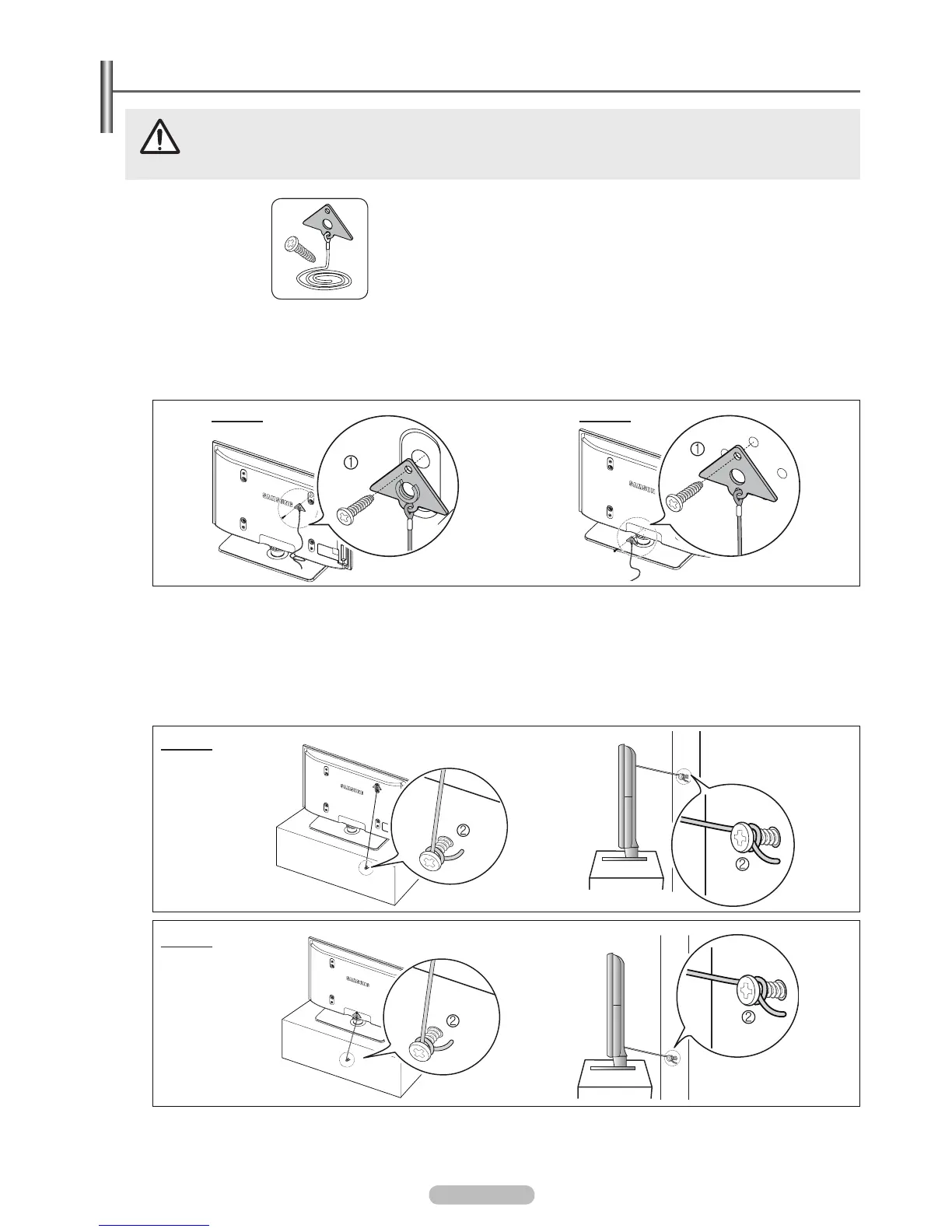
Pulling, pushing, or climbing on the TV may cause the TV to fall. In particular, ensure your children do not hang
over or destabilize the TV; doing so may cause the TV to tip over, causing serious injuries or death. Follow all safety
precautions provided on the included Safety Flyer. For added stability, install the anti-fall device for safety purposes,
as follows.
Accessaries
TV-Holder /
Screw
1
To prevent the TV from falling
1. Attach the TV-Holder to the TV by fastening the screw 1 (M4*16) into the holes in the center of the TV.
: Unscrew a screw attached 0n the back of your TV before attaching the TV-Holder.
Make sure to only use the supplied screw.
2. Firmly fasten the screws to the wall or cabinet where the TV is to be installed. Tie the TV-Holder attached to the TV and the
Purchase the screws to be used on the wall or cabinet separately.
Install the TV close to the wall so that it does not fall.
When attaching the TV to the wall, tie the cord level with the ground or slanted downwards for safety purposes.
3. Verify all connections are properly secured. Periodically check connections for any sign of fatigue or failure. If you have any
doubt about the security of your connections, contact a professional installer.
N
N
N
N
N
N
N







 To Next Page