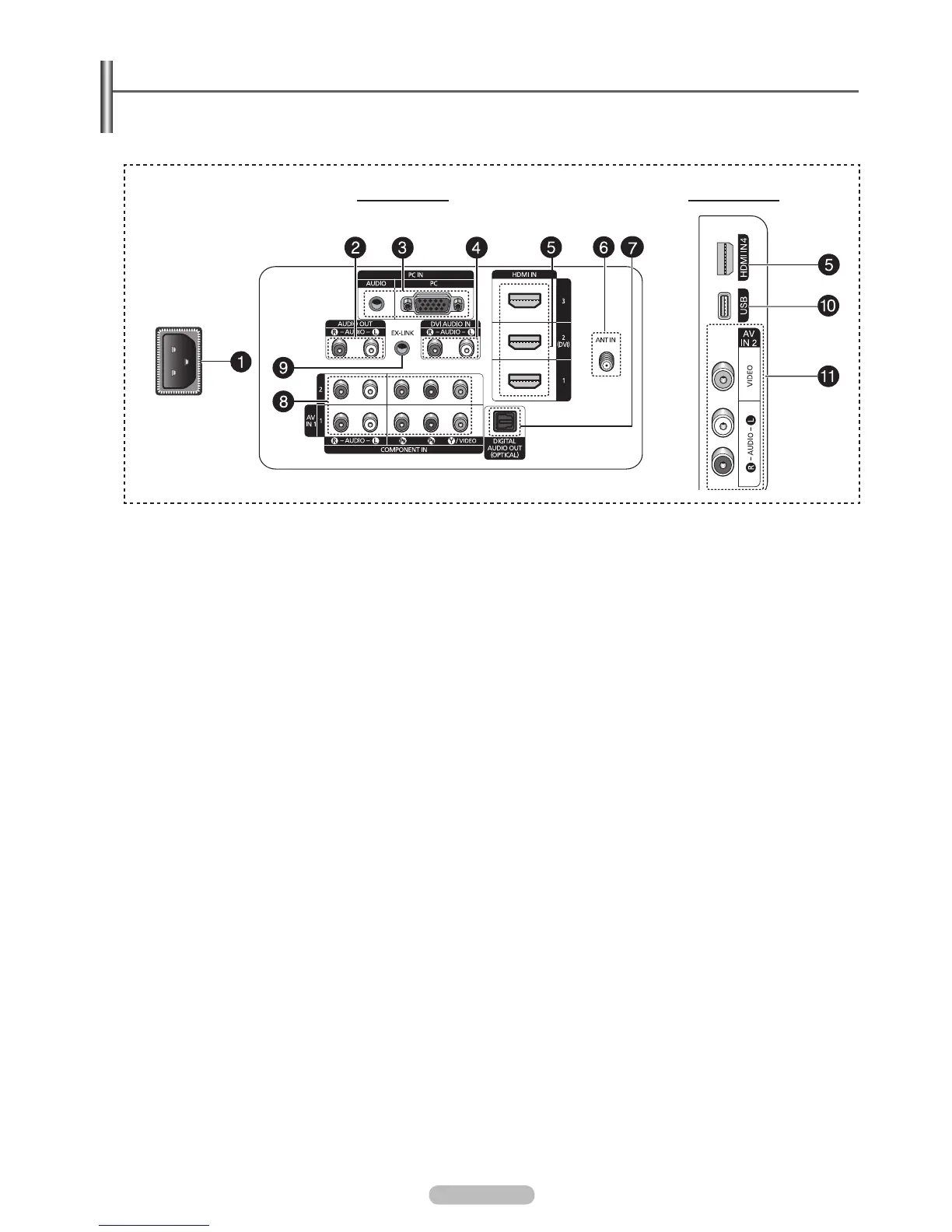
Viewing the Connection Panel
Use the connection panel jacks to connect A/V components that will be connected continuously, such as Blu-Ray/DVD players
or a VCR.
The product color and shape may vary depending on the model.
N
1
POWER IN
Connects the supplied power cord.
2
AUDIO OUT
Connect to a Digital Audio component.
3
PC IN [PC] / [AUDIO]
Connects to the video and audio output jacks on your PC.
4
DVI AUDIO IN (AUDIO-R/L)
Connect to the DVI audio output jack of an external device.
5
HDMI IN 1, 2(DVI), 3, 4
Connect to the HDMI jack of a device with an HDMI output.
(HDMI 2 supports HDMI-DVI IN and connection from a PC.)
HDMI 2 can also be used as a DVI connection with
separate analog audio inputs. An optional HDMI/DVI
cable will be necessary to make this connection.
When using an optional HDMI/DVI adapter, the DVI
analog audio inputs on your TV allow you to receive left
and right audio from your DVI device.
6
ANT IN
7
DIGITAL AUDIO OUT (OPTICAL)
Connects to a Digital Audio component.
-
-
8
COMPONENT IN 1, 2 / AV IN 1
Connects Component video / audio. The COMPONENT IN 1
jack is also used as the AV IN 1 jack.
Connect the video cable to the COMPONENT IN 1
[Y/VIDEO] jack and the audio cable to the COMPONENT
IN 1 [R-AUDIO-L] jacks.
9
EX-LINK
Used for service only.
0
USB
!
AV IN 2
Video and audio inputs for external devices.
N
English - 8
TV Rear Panel TV Side Panel
BN68-02221B.indb 8 2009-03-13 오후 6:45:37







 To Next Page