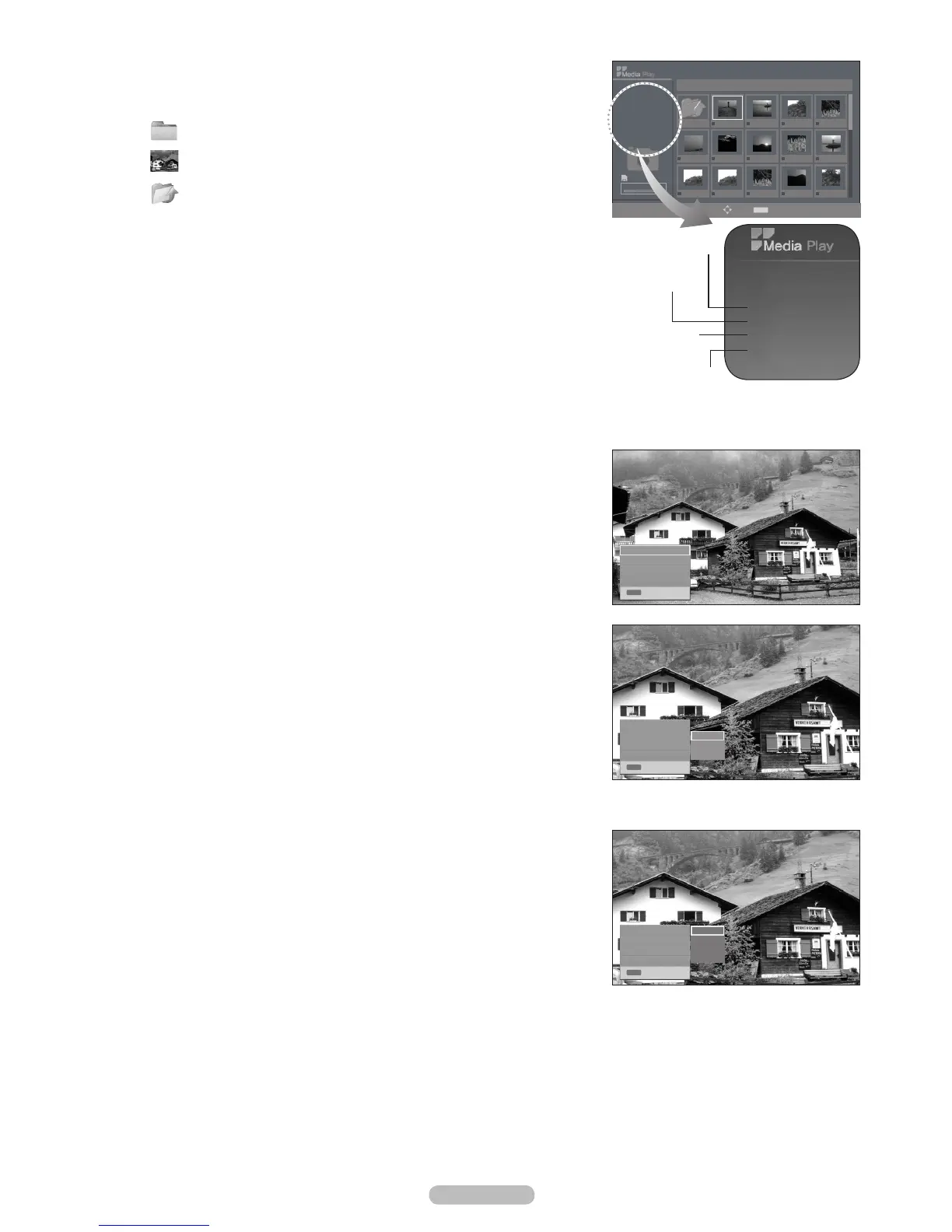
the current directory (e.g. 10th out of 15).
Using the Option Menu
1. Complete Steps 1 to 2 of Using the Media Play Menu. (Refer to page 38)
2. Photo, then press the ENTER
E
button.
3. ENTER
E
button. Pressing the button over a photo thumbnail displays the photo in full
screen.
4. Press the INFO button to display the option
(Start Slideshow, Zoom, Rotate, List)
Zoom
Zoom, then press the ENTER
E
button.
(x1x2x4 )
x1 : Restore a photo to its original size.
x2 : Zoom-in to a photo x2.
x4 : Zoom-in to a photo x4.
To pan up/down/left/right in the zoomed-in photo, press the INFO button to
The Start Slideshow, Rotate option is disabled when the Zoom option is
selected.
Rotate
ENTER
E
button.
0º : This rotates a photo to its original position
90º : This rotates a photo by 90 degrees
180º : This rotates a photo by 180 degrees
270º : This rotates a photo by 270 degrees
The Start Slideshow, Zoom option is disabled when the Rotate option is
selected.
List
List, then press the ENTER
E
button.
Move to the photo list.
N
❑
•
•
-
-
-
•
N
•
•
-
-
-
-
N
N
•
•
English - 40
Photo
400*340
53 KB
Jan 18, 2009
1 / 40
Start Slideshow
Zoom : x1
Rotate : 0º
List
x1
x2
x4
INFO
Exit
Start Slideshow
Zoom : x1
Rotate : 0º
List
INFO
Exit
Start Slideshow
Zoom : x1
Rotate : 0º
List
0º
90º
180º
270º
INFO
Exit
315.0MB/495.0MB
1/3 Page
Memorycard
Select
Move
INFO
Option
E
Enter
R
Return
IMG_0550.JPG
Photo
400*340
53 KB
Jan 18, 2009
1 / 40
Upper Folder
IMG_0335.JPG IMG_0343.JPG IMG_0344.JPG
IMG_0557.JPG IMG_0563.JPG IMG_0566.JPG IMG_0572.JPGIMG_0556.JPG
IMG_0577.JPG IMG_0578.JPG IMG_0579.JPG IMG_0580.JPG
▶▶
▶▶
IMG_0344.JPG
IMG_0576.JPG
Order of the file in the
current directory
Such as the resolution
Date modified
File size
: Folder icon
: Photo icon
: Move to the previous
folder stage icon
BN68-02221B.indb 40 2009-03-13 오후 6:46:16








 To Next Page