Viewing a Slide Show
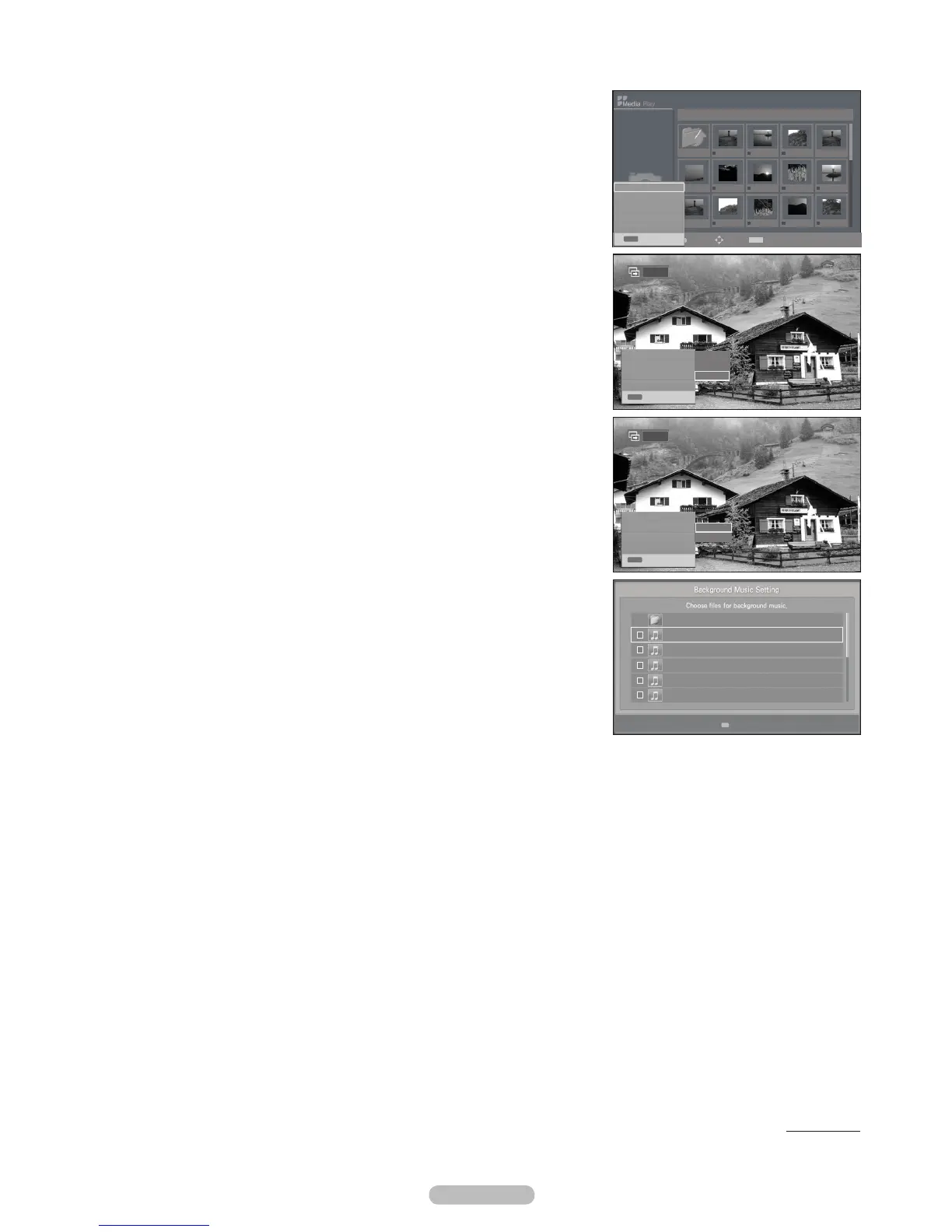
4. Press the INFO button to display the option
(View, Start Slideshow, Delete, Delete All, Deselect All).
5. Start Slideshow then press the ENTERE
button.
Background Music is set to On
6. Press the INFO button during the slide show to set the following options
(Slide Show Speed, Background Music, Background Music Setting, List).
ENTERE button.
After setting the option, press the ENTERE button to make a change.
Using the Menu during a Slide Show
Slide Show Speed
Select to control the slide show speed.
Fast, Normal, Slow), then
press the ENTER
E
button.
Background Music
On, Off), then press the
ENTER
E
button.
Background Music Setting
are displayed.
ENTER
E
button.
Press the ENTER
E
button again to return to the slide show screen. The selected
background music is played.
If you turn Off the Background Music, even if the Background Music Setting
have been set up, the background music will not be played.
List
To exit Media Play mode, press the MEDIA.P button on the remote control.
Continued...
❑
N
N
❑
N
N
▶▶
▶▶
Select
U
Move
E
Enter
R
Return
1/2 Page
Upper Folder
001 Swan Song feat.TBNY.mp3
002 Beatles-Yesterday.mp3
003 Fall in Love.mp3
004 Tom Waits-Time.mp3
005 Chuk Mangione-Feel So good.mp3
1/3 Page
IMG_0550.JPG
IMG_0572.JPG
Upper Folder
IMG_0335.JPG IMG_0343.JPG IMG_0344.JPG
IMG_0580.JPG
IMG_0557.JPG IMG_0563.JPG IMG_0566.JPGIMG_0556.JPG
IMG_0577.PG IMG_0578.JPG IMG_0579.JPG
▶▶
▶▶
Select
Move
INFO
Option
E
Enter
R
Return
Photo
400*340
53 KB
Jan 18, 2009
1 / 40
IMG_0576.JPG
INFO
Exit
View
Start Slideshow
Delete
Delete All
Deselect All
INFO
Exit
IMG_0550.JPG
Slide Show Speed : Slow
Background Music : Off
Background Music Setting
List
INFO
Exit
Fast
Nomal
Slow
Pause
Slide Show Speed : Slow
Background Music : On
Background Music Setting
List
INFO
Exit
On
Off
Pause
BN68-02221B.indb 39 2009-03-13 오후 6:46:10








 To Next Page