16 _ Disassembly and Reassembly
Part Figure Description
Clutch Assembly
(continued)
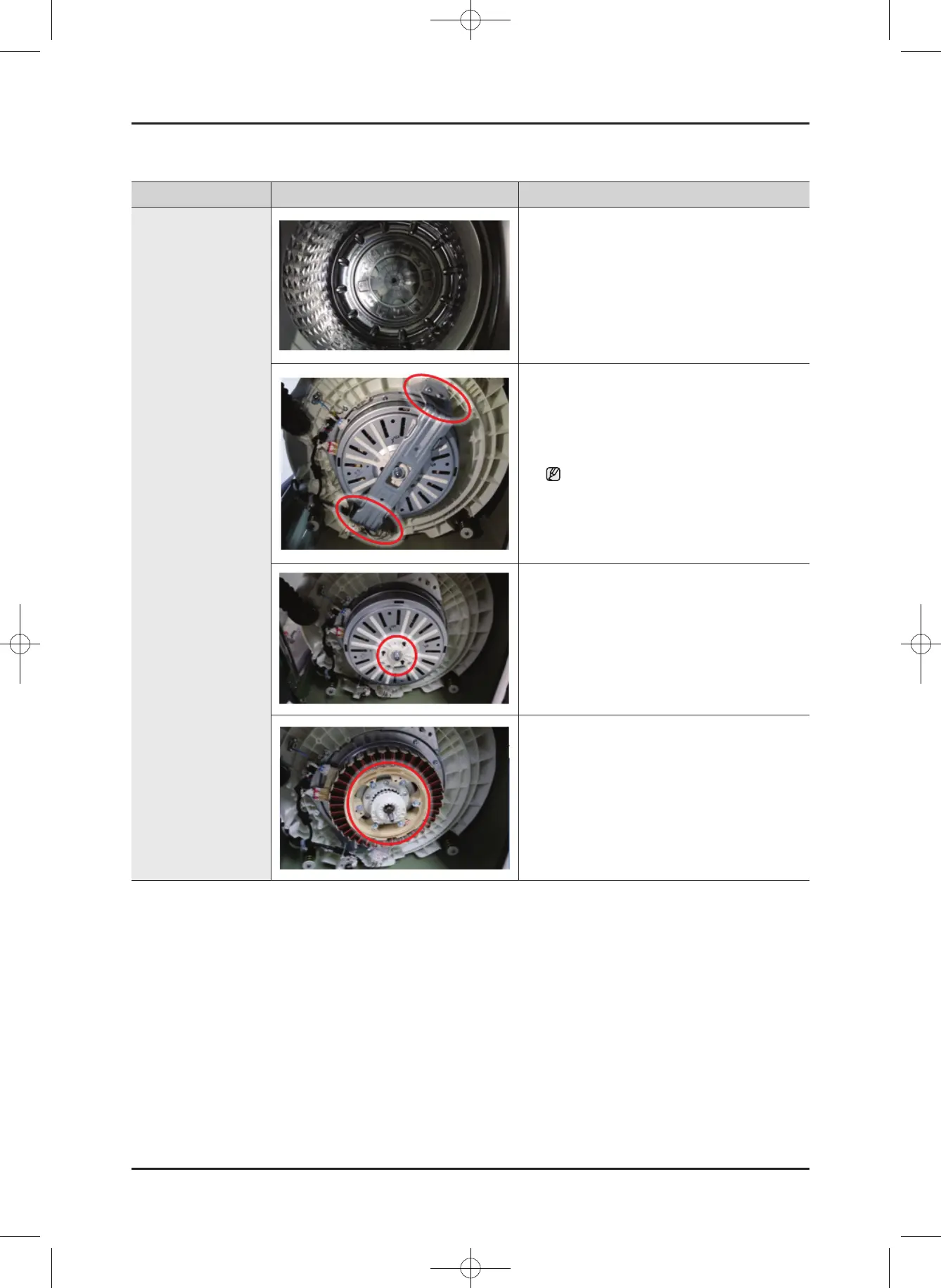
6. Remove the shaft with the jig wrench.
-Releasethenutinaclockwisedirection.
-Fastenthenutinacounterclockwise
direction.
7. Place the main body so that the front frame
faces upward and remove the 4 bolts holding
the saddle with a 10mm wrench.
Whenyouplacethewasherontheoor,
takecarethatyoudonotdamageor
scratch the product.
8. Remove the bolt holding the DD-motor
housing with a 17mm wrench and then
remove the motor housing.
9. Remove the 6 bolts holding the DD-motor
with a 10mm wrench.
WA8700K Washer.indb 16 2016/2/4 16:56:13
This document can not be used without Samsung's authorization.
SAMSUNG PROPRIETARY. DO NOT COPY OR DISTRIBUTE WITHOUT PERMISSION





 To Next Page