48
Setting indoor unit installation options
SEG 3, 4, 5, 6, 8, 9 additional information
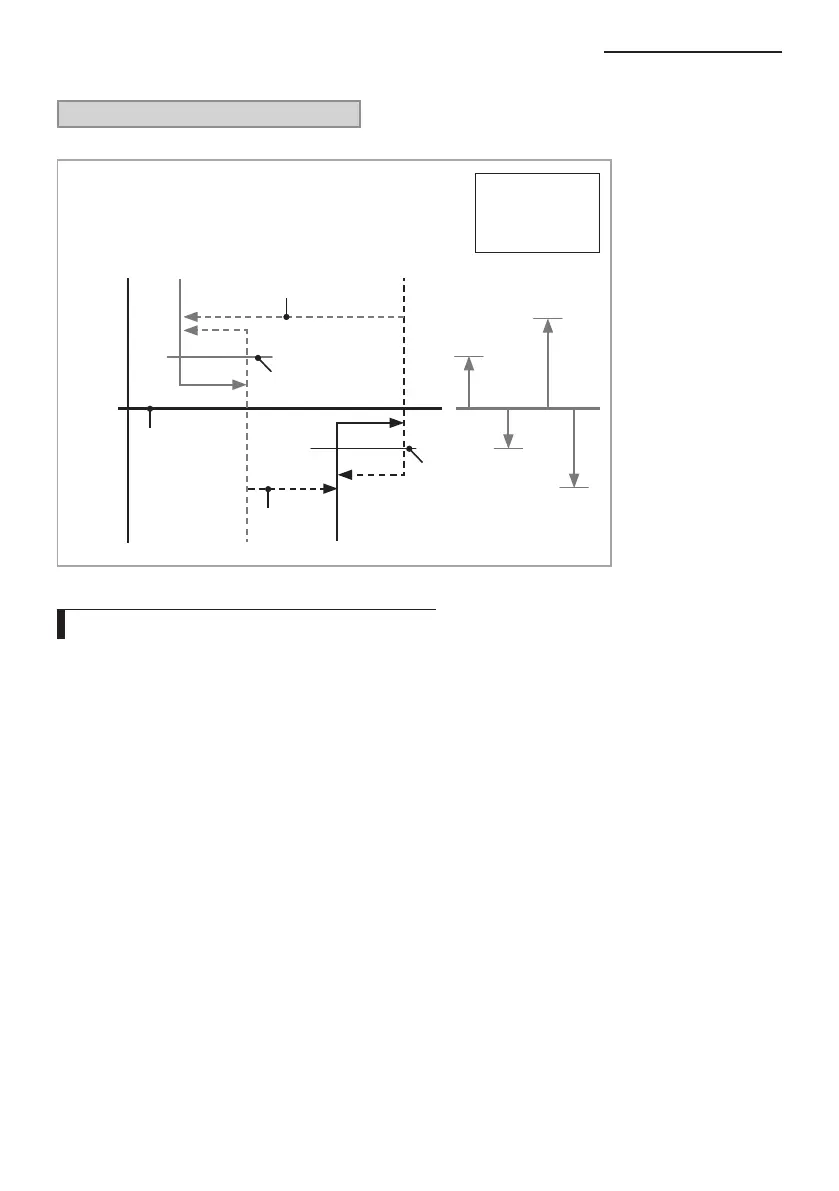
When the SEG 3 is set as “1” and follow Auto Change Over for HR only operation, it will operate as follows.
Cooling
Thermo Off
Heating
Thermo Off
Cooling
Thermo On
Heating
Thermo On
B C
D
Ts
A
c
a
Temp.
d
b
Standard temp.
for Heating
Standard temp.
for Cooling
Standard temp. for
Heating Cooling
Standard temp.
for Cooling
Heating
Set temp. for
Auto mode
A : Set with SEG4
B : Set with SEG5
C : Set with SEG6
D : Set with SEG8
Cooling/Heating mode can be changed when Thermo Off status is maintained during the time with SEG9.
Setting an indoor unit address (MAIN/RMC)
1. Check whether power is supplied or not.
When the indoor unit is not plugged in, there should be additional power supply in the indoor unit.
2. The panel(display ) should be connected to an indoor unit to receive option.
3. Before installing the indoor unit, assign an address to the indoor unit according to the air conditioning system plan.
4. Assign an indoor unit address by wireless remote controller.
The initial indoor unit ADDRESS is set as “MAIN : 0, RMC : 0”.
Set Main and RMC Address only the setting is required.
There is no need to assign the indoor unit Main Address if the outdoor unit is addressing automatically.
The indoor unit Main address will follow the outdoor unit’s automatically.
Assign 12 digit when setting the indoor unit address.
No need to assign SEG4, 5, 8, 10 which are non applicable. Even though those segments are set, they will be
ignored.
If you set the applicable segments with numbers other than the indiciated, the initial setting will be maintained.



 To Next Page