49
ENGLISH
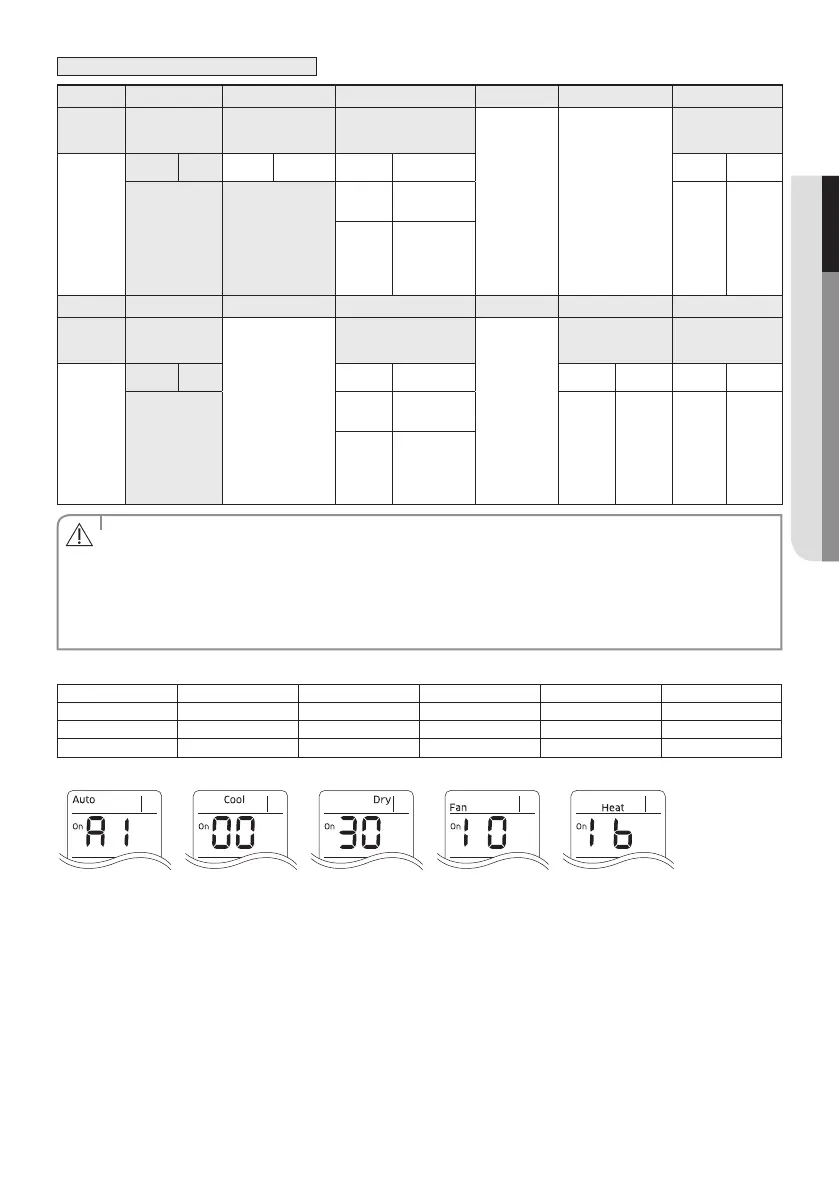
Option No. : 0AXXXX-1XXXXX-2XXXXX-3XXXXX
Option SEG1 SEG2 SEG3 SEG4 SEG5 SEG6
Explanation PAGE MODE Setting Main address
RESERVED RESERVED
The unit digit of an
indoor unit
Indication
and Details
Indication Details Indication Details Indication Details Indication Details
0 A
0 No Main address
0~3
A single
digit
1
Main address
setting mode
Option SEG7 SEG8 SEG9 SEG10 SEG11 SEG12
Explanation PAGE
RESERVED
Setting RMC address
RESERVED
Group channel(*16) Group address
Indication
and Details
Indication Details Indication Details Indication Details Indication Details
1
0 No RMC address
RMC1 0~2 RMC2 0~F
1
RMC address
setting mode
• You can set the Main address(SEG6) 0~3 range and if you set other numbers,”communication error”will
occur.
• If you set the SEG 3 as 0, the indoor unit will maintain the previous MAIN ADDRESS even if you input the
option value of SEG6.
• If you set the SEG 9 as 0, the indoor unit will maintain previous RMC ADDRESS even if you input the option
value of SEG11~12.
CAUTION
Example) If you want to set as “MAIN : 3, CHANNEL : 1, RMC : B”,
SEG1 SEG2 SEG3 SEG4 SEG5 SEG6
0 A 1 - - 3
SEG7 SEG8 SEG9 SEG10 SEG11 SEG12
1 - 1 - 1 B
assign option codes except SEG 1, 7 which are page options.



 To Next Page