CHAPTER THREE: TV OPERATION 3.11
OPERATION
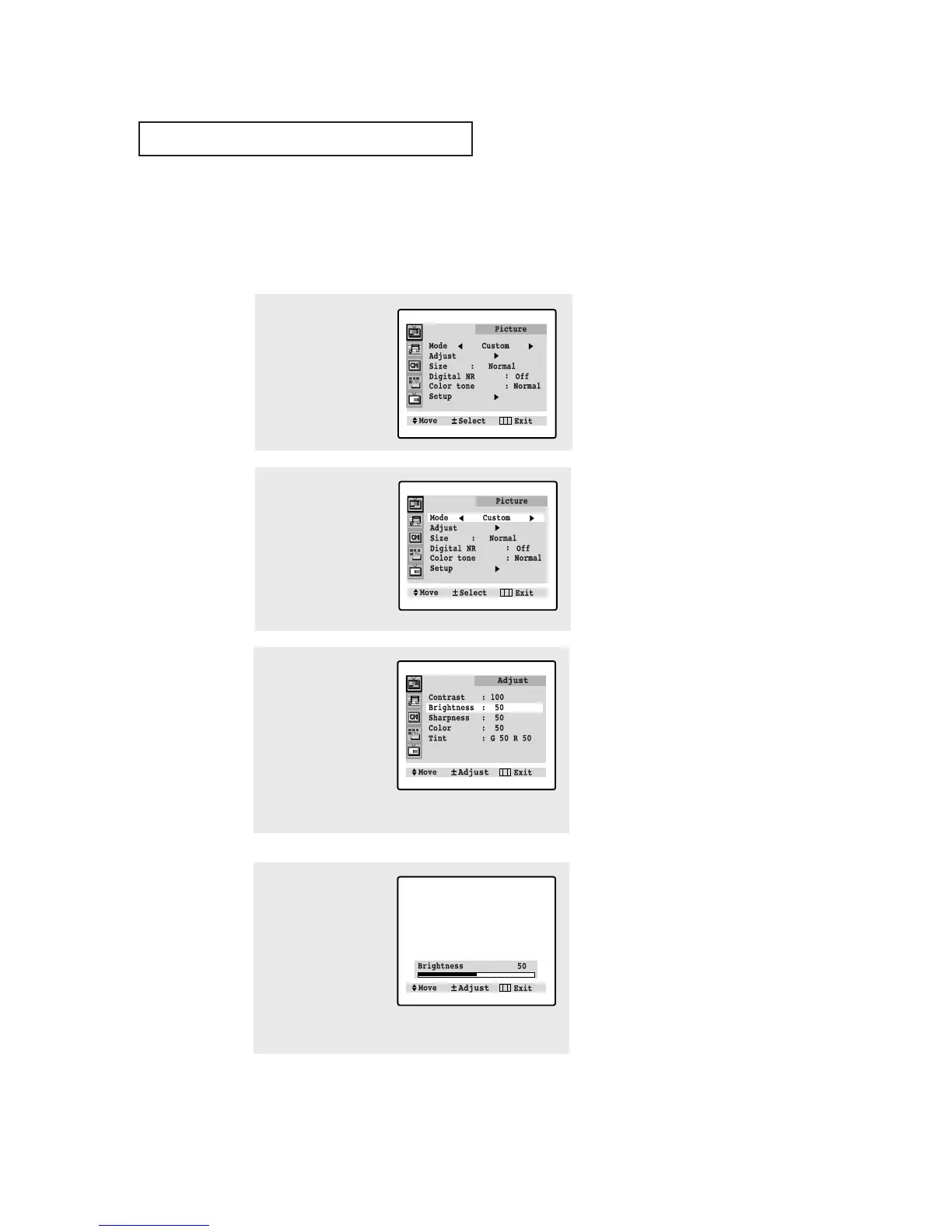
1
Press MENU to display
menu.
Customizing the Picture
You can use the on-screen menus to change the contrast, brightness, tint, color, and
sharpness according to personal preference. (Alternatively, you can use one of the
“automatic” settings. See next page.)
2
Press
VOL – or VOL +
repeatedly, until the word
“Custom” is selected.
(When Custom is high-
lighted, the words
“Adjust” will appear on
the screen.)
4
Press VOL – or VOL + to
increase or decrease
the value of a particular
item. For example, if you
select “Brightness,”
pressing VOL + increas-
es it.
Press MENU four times
to exit.
▼
After adjusting an item, the gauge
will automatically disappear (after
about 5 seconds).
3
Press CH ▼ to select a
“Adjust”, then press
VOL+. (The words
Contrast, Brightness,
Sharpness, Color, and
Tint will appear on the
screen.)
Press CH ▲ or CH ▼ to
select a particular item.
▼
There is no Tint in PAL System.
▼
The customer can select
“Normal”, “Warm”, or “Cool” accord-
ing to personal preference.






 To Next Page