3.16 CHAPTER THREE: TV OPERATION
OPERATION
Viewing a VCR or Camcorder Tape
You must select the appropriate mode in order to view the VCR or
Camcorder signal on the TV.
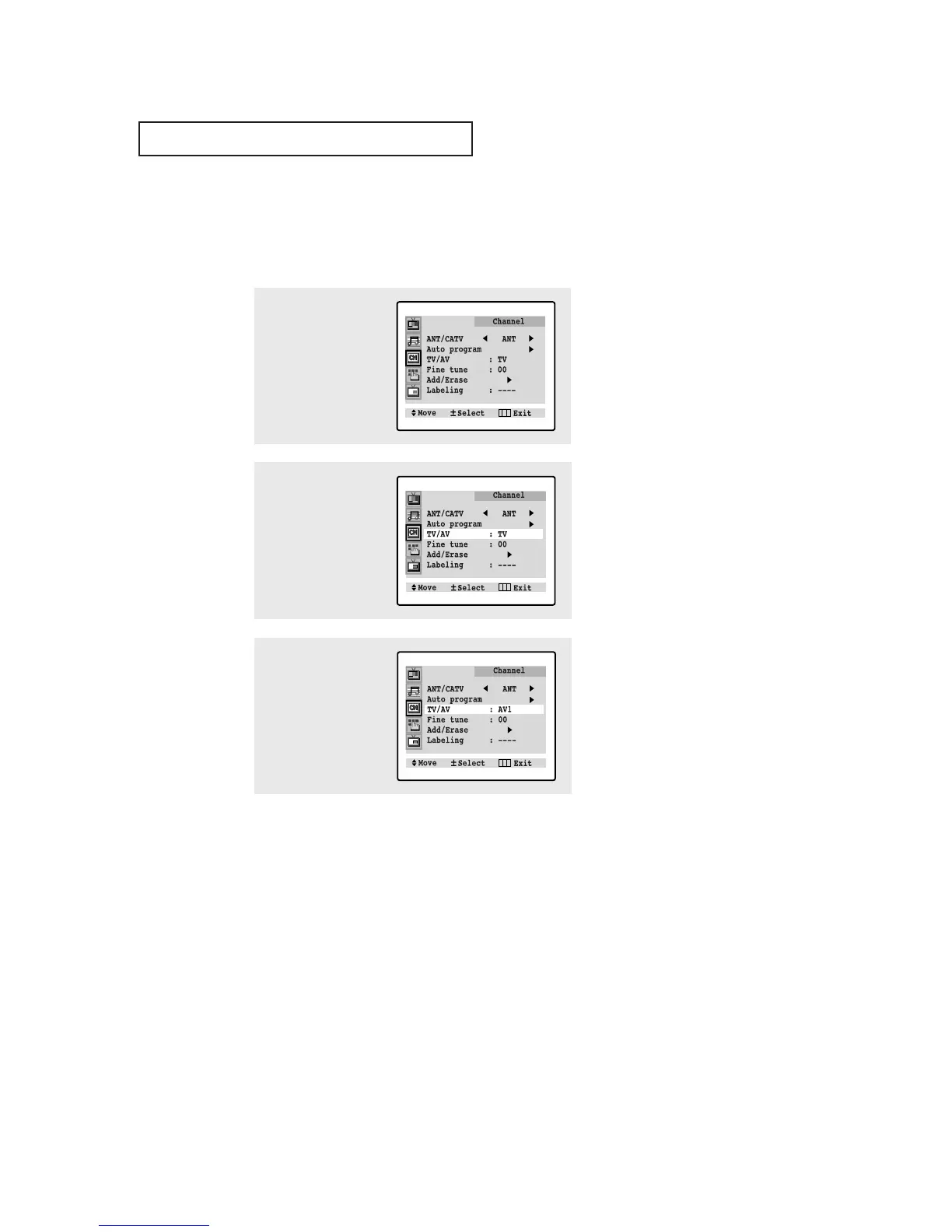
1
Press MENU to display
the menu.
Press CH ▼ twice to
select “Channel”, then
press VOL+.
2
Press CH ▼ twice to
select “TV/AV”.
3
Press VOL+ or VOL-.
You will switch
between viewing the
signals coming from
equipment connected
to the TV’s A/V jacks,
and the TV signal.
Note: In the AV mode, the software available in all of the NTSC, PAL & SECAM
devices is displayed on the screen after automatically judging the TV system
(For models CT-29A7PW/CT-29K3W/CT-29M6P/CT-29K5W).






 To Next Page