4.16 CHAPTER FOUR:SPECIAL FEATURES
S
PECIAL FEATURES
When you press the SWAP button:
The image in the PIP window will appear on the main
screen, and vice versa.
Swapping the Contents of the PIP image and Main image
Press the PIP CH▲ or CH▼ button to change the channel
that appears in the PIP window.
Changing the PIP Channel
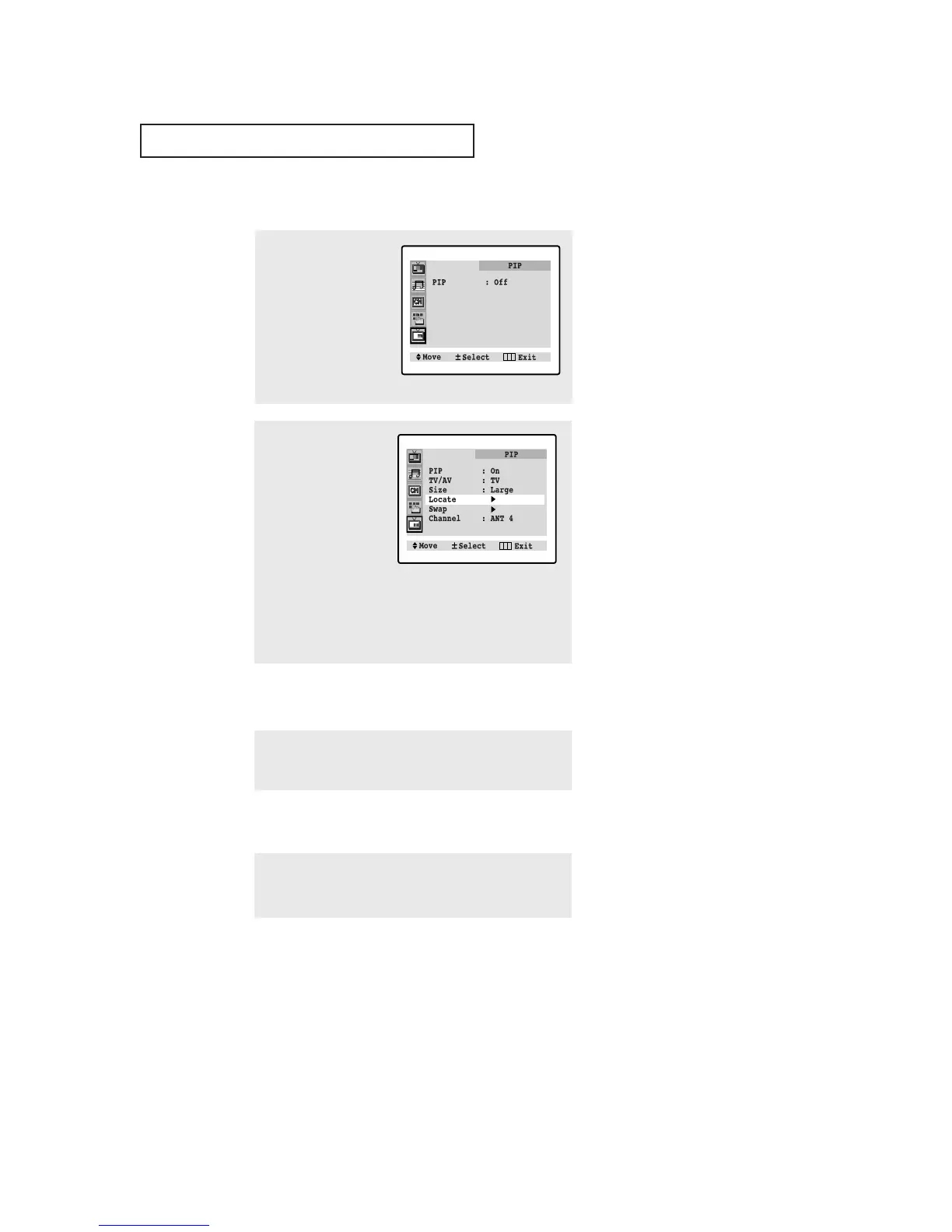
1
Press the Menu button to
display the menu.
Press the CH▼ four times
to select the PIP menu.
Press the VOL + button to
select the PIP menu.
2
Press the VOL + button
to select PIP “On.”
Press the CH▼ three
times to select the
Locate.
When you press VOL +
repeatedly, the PIP win-
dow moves from corner
to corner on the TV
screen.
Press the Menu button
twice to exit.
Changing the Location (Rotating) the PIP Window





 To Next Page