CHAPTER THREE: TV OPERATION 3.13
OPERATION
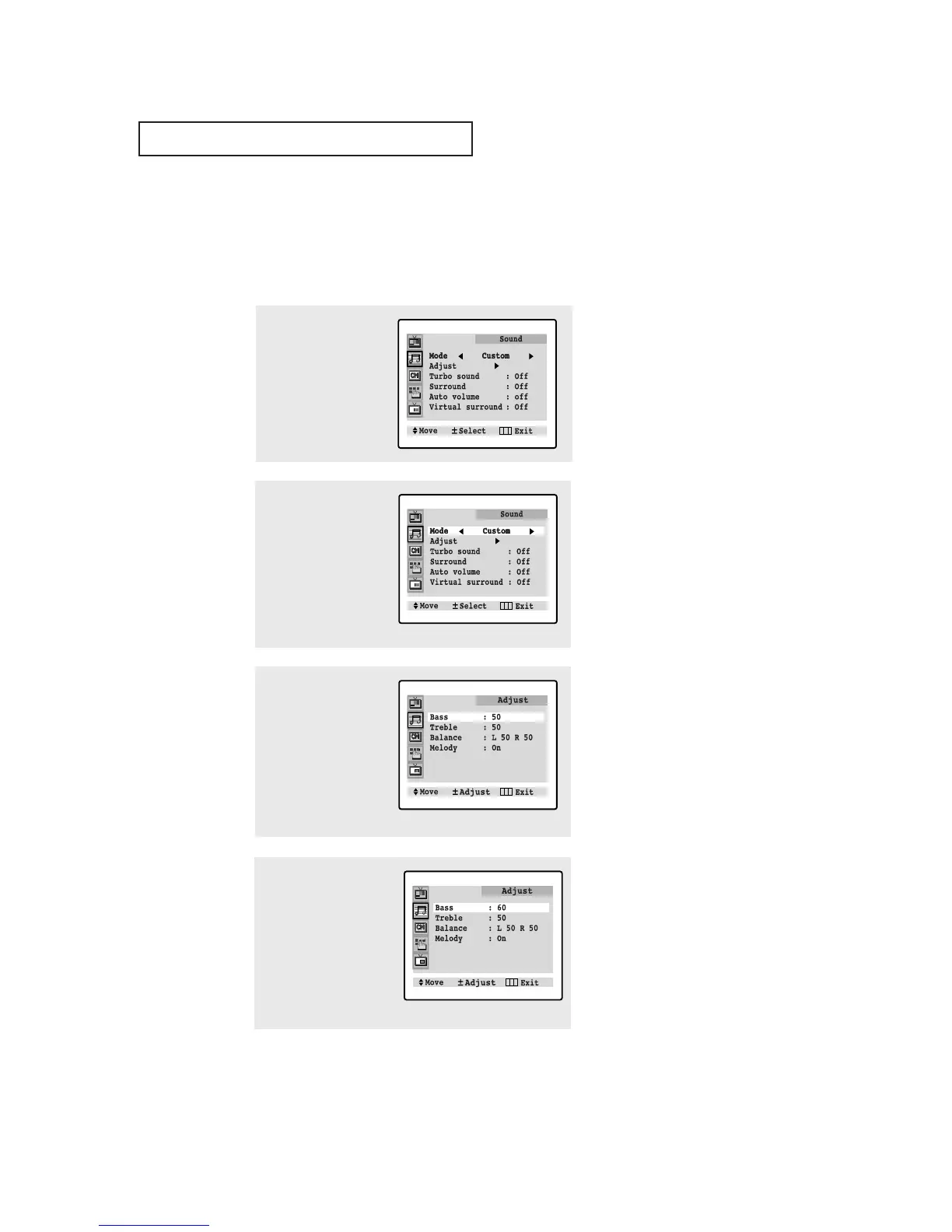
2
Press VOL - or VOL +
repeatedly, until the
word “Custom” is
selected. (When Custom
is selected, the words
“Adjust” will appear on
the screen.
3
Press CH ▼ to select
“Adjust”, then press
VOL+. (The words Bass,
Treble, and Balance will
appear on the scree.)
Press the CH ▲ or CH ▼
to select a particular
item to be changed.
1
Press MENU to display
the menu.
Press CH ▼ to select
“Sound” menu.
Customizing the Sound
You can use the on-screen menus to adjust the bass, treble, and balance according to
individual preference. (Alternatively, you can use one of the “automatic” settings. See
next page.)
4
Press VOL – or VOL + to
increase or decrease the
value of a particular item.
For example, if you select
“Bass,” pressing VOL +
increases it.
Press MENU three times
to exit.
▼
Virtual surround models :
CL-29A5P/ CL-29A5W/CL-29A6P/
CL-29A6W/CL-29A7P/CL-29A7W/
CL-29M6P/ CL-29M6W/CT-29A7PW/
CL-34M9P
Surround models :
CT-29K3W/CT-29M6P/ CT-29K5W








 To Next Page