24_ running the program
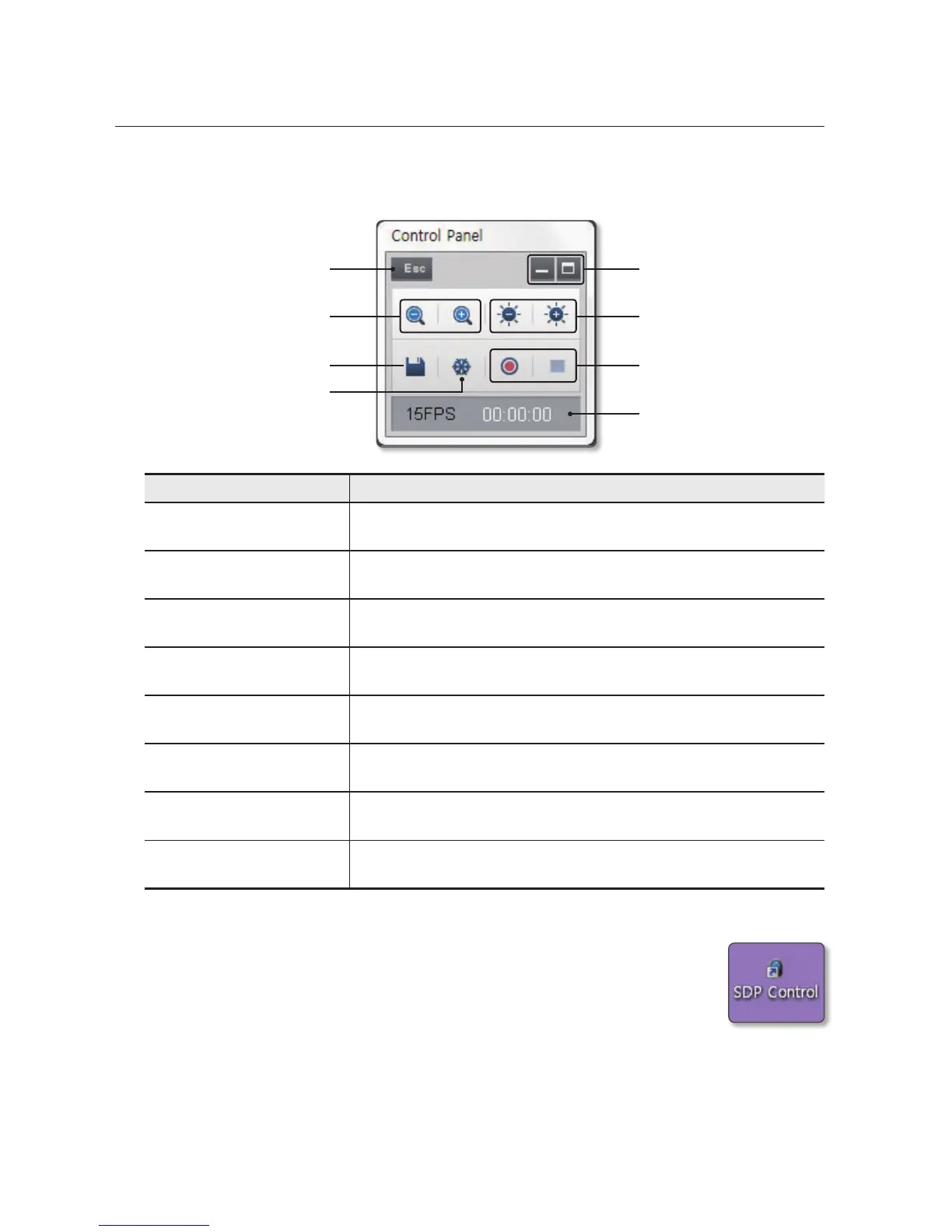
Using the mini control panel
• In full screen mode, the mini control panel smaller than the normal will be displayed.
Item Description
a
Show/Hide Window Show or hide the mini control panel, or switch to the normal control panel view.
b
Brightness + / - Open or close the iris of the digital presenter to adjust the screen brightness.
c
Video Setup Record or stop recording a selected video.
d
Video Status Display Show the video information such as the current frame rate or recording time.
e
Freeze Each time you press this button, it will toggle between Freeze On and Off.
f
Quick save Save the current video quickly.
g
Wide / Tele Zoom in or out the current image.
h
ESC Switch from Full Screen mode to normal mode.
Using only the control panel
• You can use other programs (Skype, Twain, AMCAP) than the provided SDP USB
Viewer to view the USB video of the digital presenter. If this is the case, click the SDP
Control icon on your desktop to launch the control panel only.
J
`
The SDP Control program will run only if the digital presenter is turned on and connected to the
PC using the USB cable.
h
g
f
e
a
b
c
d



 To Next Page