Installer reference guide / Mono tank integrated type 53
NOTE
If you remove the Wired Remote Controller, also disconnect the cables from the back of the Wired Remote
Controller to prevent damage.
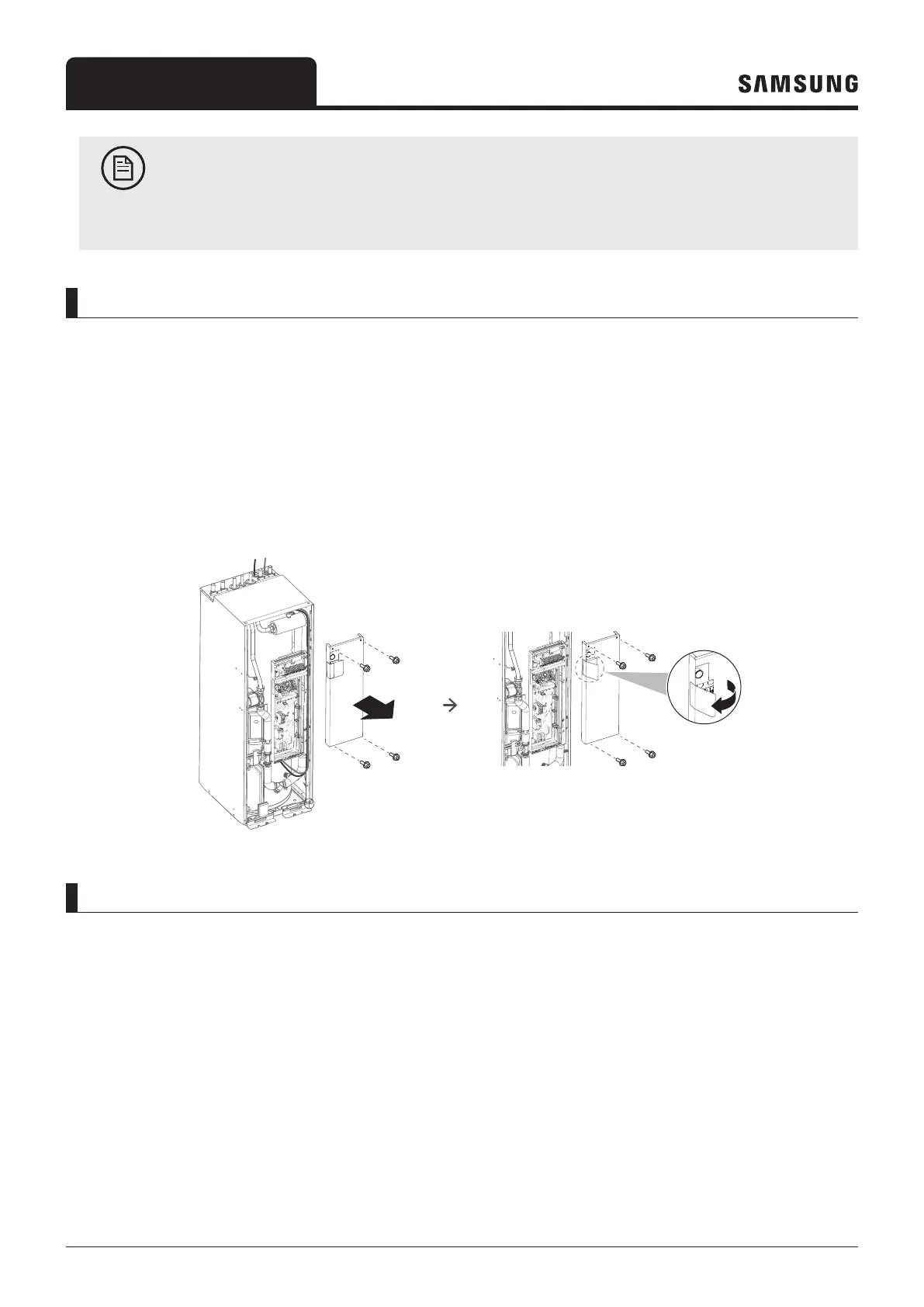
To open, unhinge and close off the control box in the indoor unit
During the installation, access to the inside of the indoor unit is needed. For increased accessibility to parts, it is possible
to unhinge the control box and move it from its mounting position for the required service space.
Prerequisite: The user interface panel and front panel have been removed.
1
Unscrew the 4 corner screws.
2 Remove the control box cover.
3 Tilt the control box to the front and lift it out of its hinges.
To close off the indoor unit
1 If unhinged, put the control box back in its hinges.
2 Put the control box cover plate back in place.
3 Close the cover of the control box with the 4 screws.
4 Reinstall the front panel with the 4 screws at the corners.
5 Reconnect the cables to the user interface panel.
6 Reinstall the user interface panel.



 To Next Page