6 - English
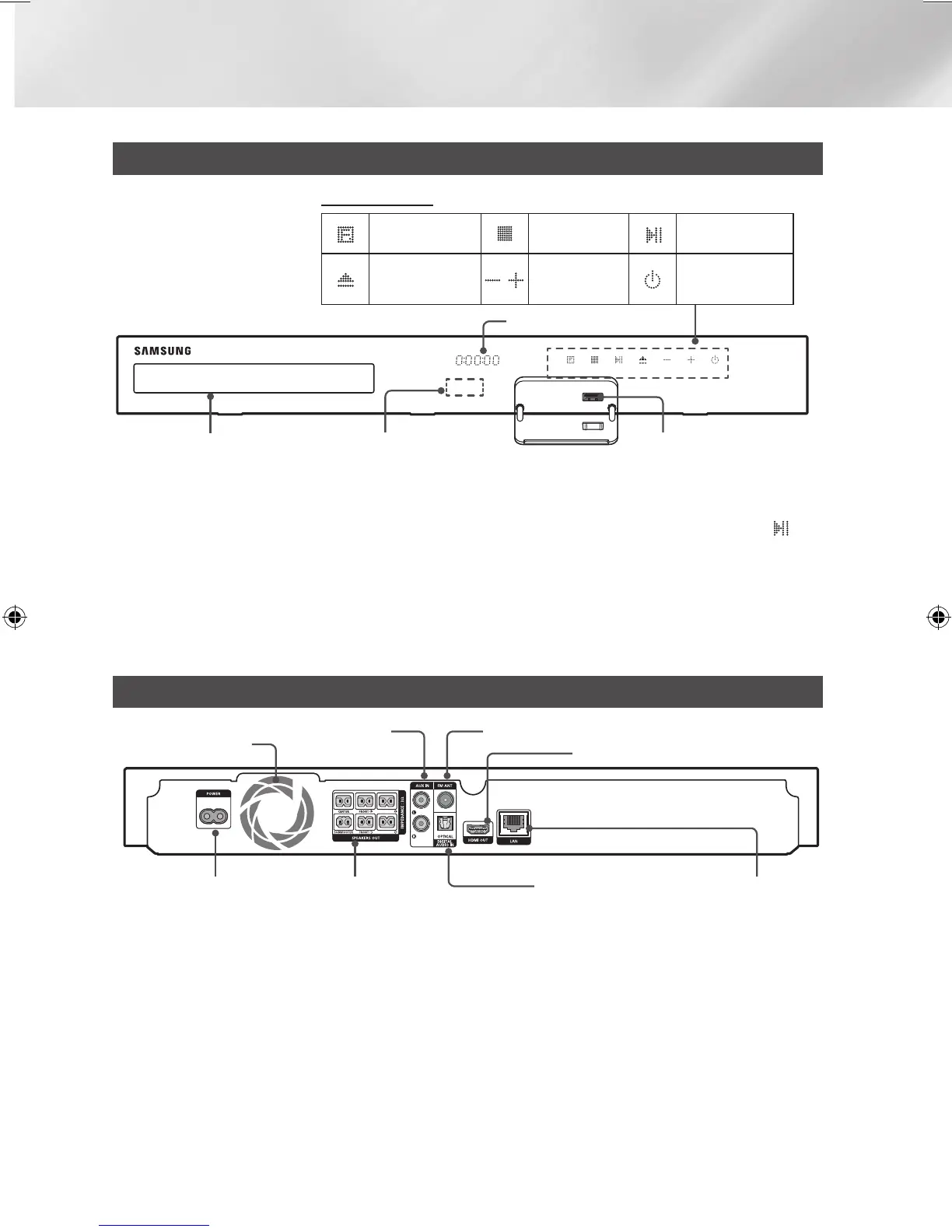
Front Panel
✎
When the product is on, do not let children touch the product's surface. It will be hot.
✎
To upgrade the product's software through the USB jack, you must use a USB flash drive.
✎
When the product displays the Blu-ray Disc menu, you cannot start the movie by pressing the
/
6
button on the product or the remote. To play the movie, you must select Play Movie or Start in the
disc menu, and then press the
v
button.
✎
If you are using the Internet or are playing content from a USB device on your TV through the home
cinema, you cannot select the BD/DVD mode with the FUNCTION button. To select the BD/DVD
mode, exit the Internet or stop the content you are playing on the TV, and then select the BD/DVD
mode.
Rear Panel
SURROUND
SURROUND
COOLING FAN
* FM ANTENNA
AUX IN
HDMI OUT
SPEAKER OUTPUT
CONNECTORS
POWER CORD LAN TERMINALEXTERNAL DIGITAL
AUDIO IN (OPTICAL)
* Connecting the FM Antenna
1.
Connect the supplied FM antenna to the FM ANT Jack.
2.
Slowly move the antenna wire around until you find a location where reception is good, then fasten
it to a wall or other rigid surface.
✎
Maintain a minimum of 10cm of clear space on all sides of the home cinema to ensure adequate
ventilation.
Do not obstruct the cooling fan or ventilation holes.
✎
This product does not receive AM broadcasts.
FUNCTION
STOP
PLAY/PAUSE
OPEN/CLOSE
VOLUME
CONTROL
POWER
DISPLAY ICONS
USBREMOTE CONTROL SENSOR
DISPLAY
DISC TRAY
HT-J4500_XU-ECO_0306.indd 6 2015/3/9 14:38:43






 To Next Page