7 - English
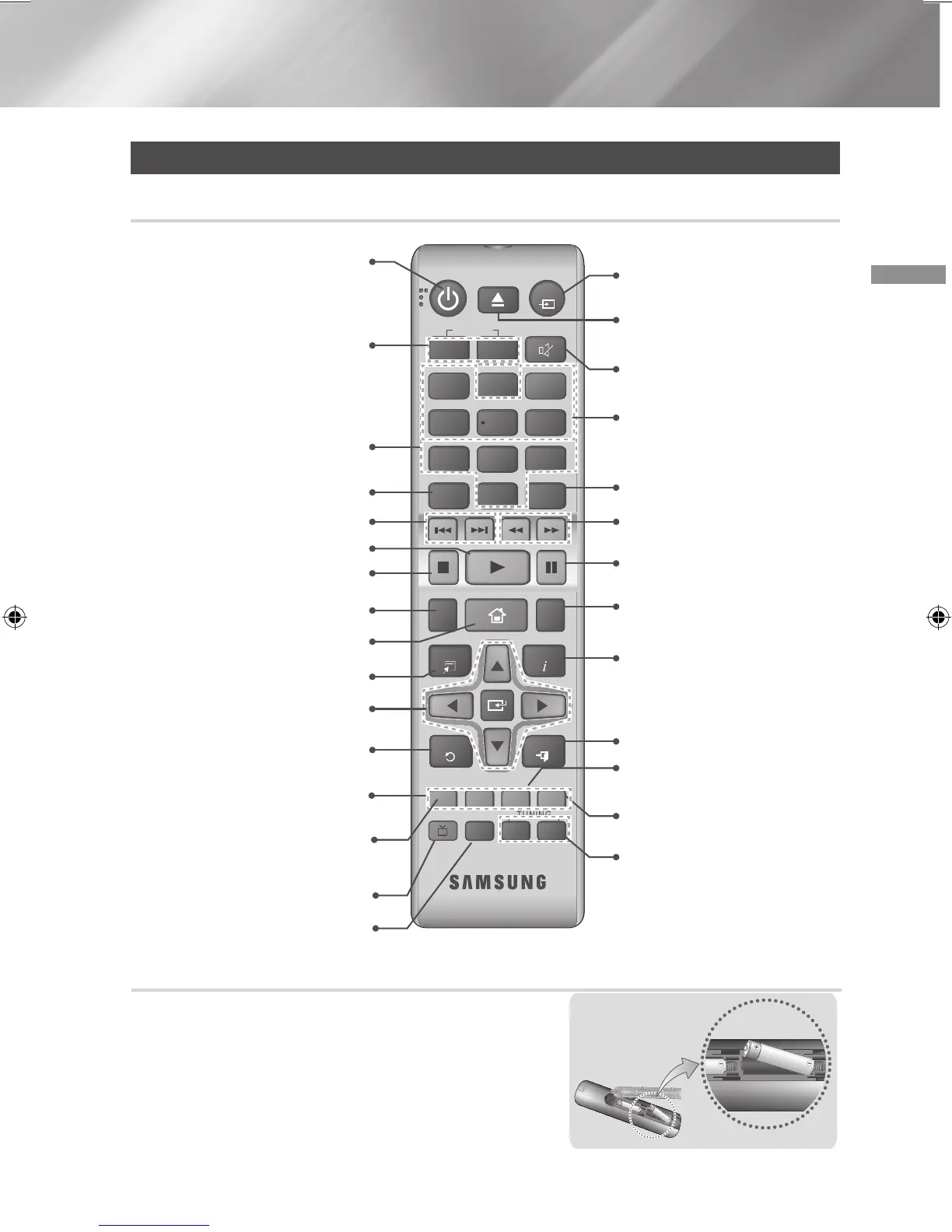
Installing batteries in the Remote Control
✎
Make sure to match the “+” and “–” ends of the batteries
with the diagram inside the compartment.
✎
Assuming typical usage, the batteries last for about one
year.
✎
The remote control can be used up to approximately 7
meters from the product in a straight line.
Battery size: AAA
Remote Control
Tour of the Remote Control
Press to record FM radio
broadcast.
Press to direct audio signal to home
theater speaker or TV speaker.
(See page 29)
Select the desired DSP/EQ
audio mode.
Turn the product on and off.
Adjust the volume.
Press numeric buttons to operate
options.
Press to skip backwards or forwards.
Selects the disc subtitle language.
Press to move to the Home screen.
Select on-screen menu items and
change menu value.
Return to the previous menu.
These buttons are used both for
menus on the product and also
several Blu-ray Disc functions.
Press to view the disc menu.
Press to use the Tools menu.
Press to play a disc.
Press to stop a disc.
Cut off the sound temporarily.
Press to search backwards or
forwards.
Press to pause a disc.
Allows you to repeat a title,
chapter, track or disc.
Use to enter the Popup
menu/Title menu.
Use the RDS function to
receive FM stations.
Select MONO or STEREO for radio
broadcasts.
Search for active FM stations and
to change channels.
Use to display the playback
information when playing
a Blu-ray/DVD disc.
To open and close the disc tray.
Press to exit the menu.
Press to select Blu-ray's mode.
(BD/DVD, D. IN, AUX, etc.).
Use to set a preset radio
frequency.
TOOLS
RETURN
EXIT
INFO
SUBTITLE HOME
REPEAT
FUNCTION
1
2
3
7
8 9
DISC MENU
PTY - PTY SEARCH PTY +
RDS DISPLAY TA
TITLE MENU
0
POPUP
4
5 6
MUTE
MO/ST
TUNER
MEMORY
DSP/EQTV SOUND
A B C D
TUNING
DOWN
UP
VOLUME
-
+
HT-J4500_XU-ECO_0306.indd 7 2015/3/9 14:38:44






 To Next Page