9 - English
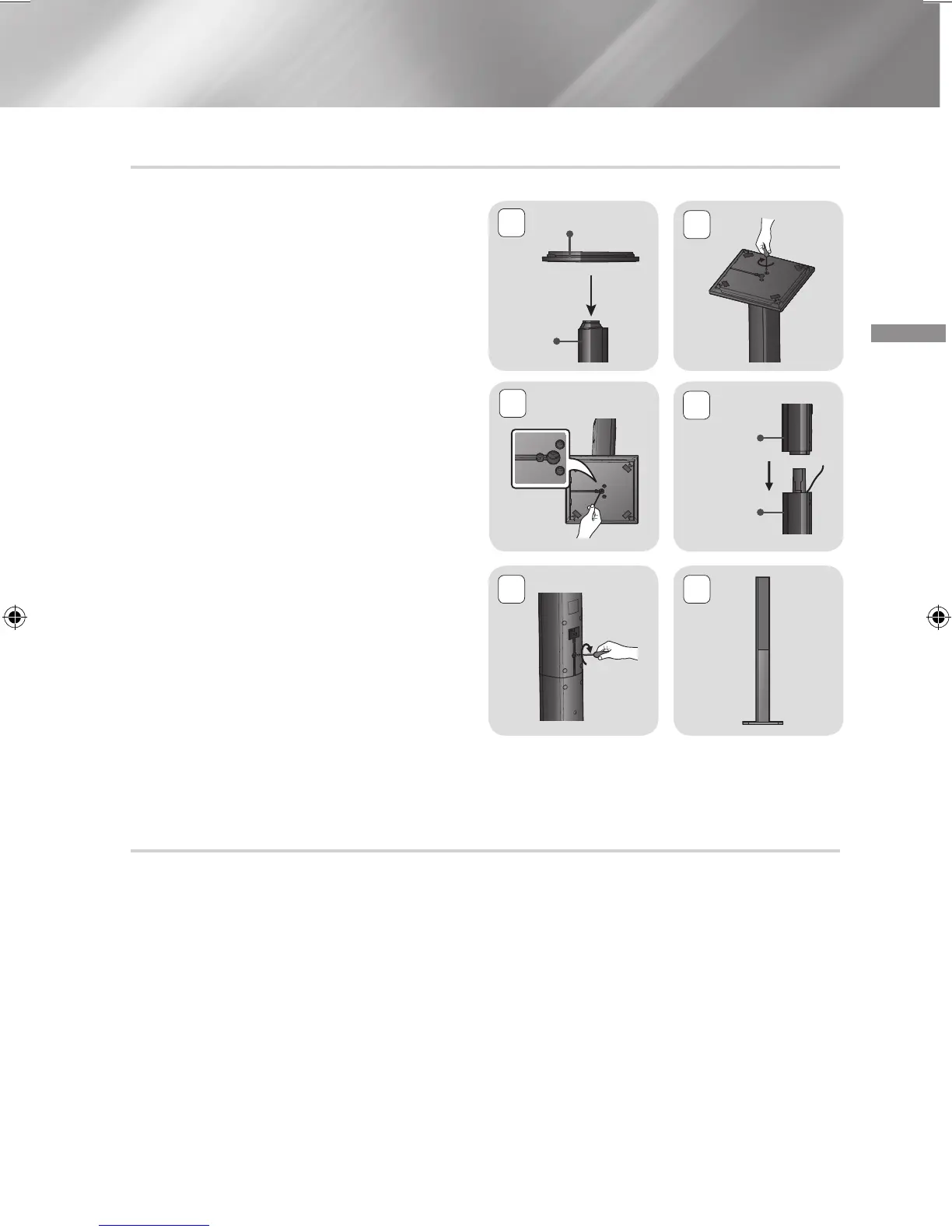
Installing the Speakers on the Tallboy Stand
* HT-J4530 only - Front Speakers
* HT-J4550 only - Front/Surround Speakers
1.
Turn the Stand Base upside-down and
connect it to the Stand.
2.
Use the driver to combine the screws on the 3
marked holes.
3.
Straighten a supplied speaker wire and put in
the hole on the centre of Stand Base.
4.
Connect the upper Speaker to the assembled
Stand.
5.
Insert a screw clockwise into the hole on the
rear of the speaker using a screwdriver.
And then connect a speaker cable.
6.
This is the appearance after the speaker is
installed.
Follow this steps to install other speaker.
Speaker Cable Connections
1.
Match each speaker cable bundle to the correct speaker by matching the colour coded plug on
each bundle to the coloured sticker on the bottom of each speaker.
2.
Connect the speaker wire plugs from each speaker to the back of the product by matching the
colours of the speaker plugs to the colours of the speaker jacks.
1
Stand Base
Stand
2
3
4
Speaker
Stand
5 6
HT-J4500_XU-ECO_0306.indd 9 2015/3/9 14:38:46













 To Next Page