14 English
Connections
Connecting the Speakers
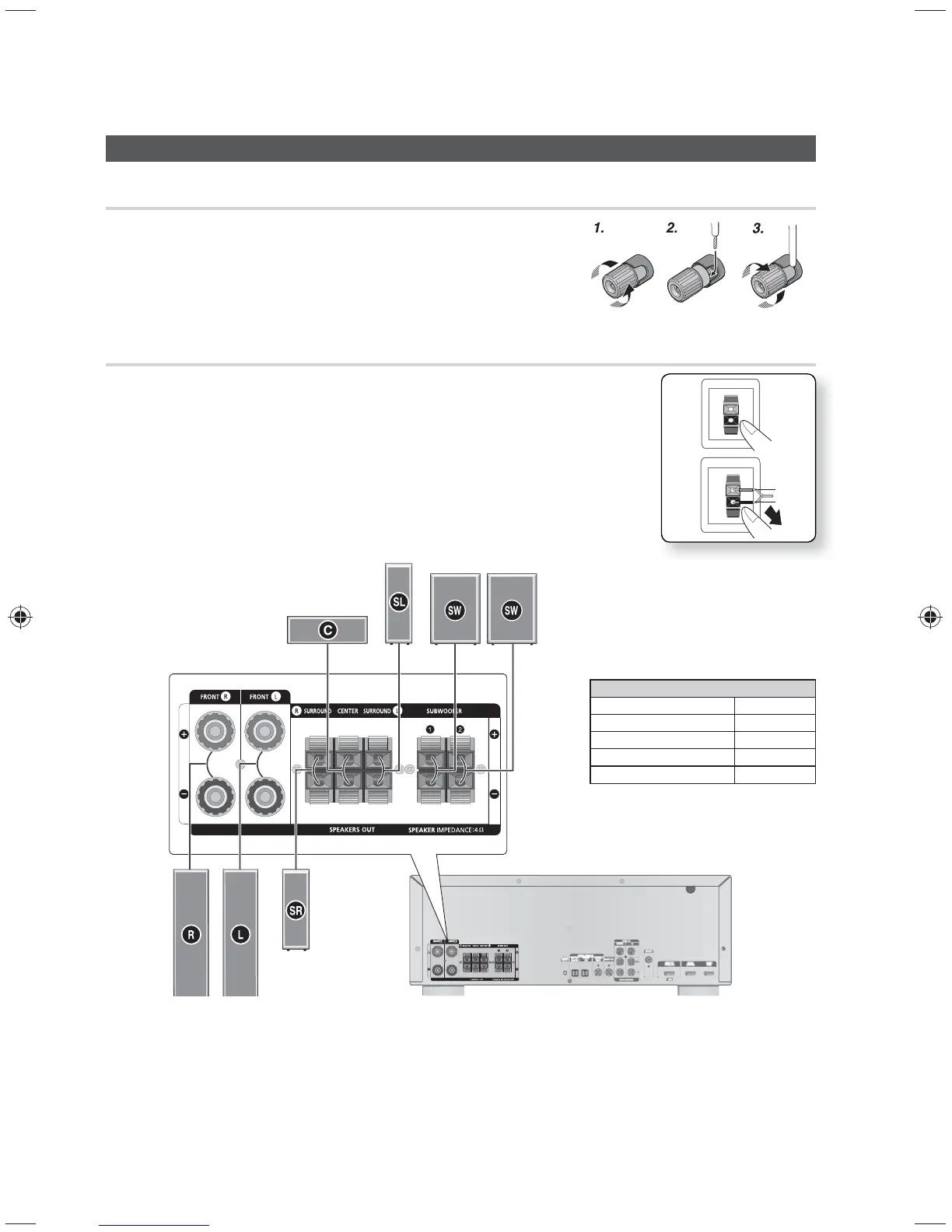
Connecting Speaker Wire
1. Loosen the knob by turning counterclockwise.
2. Insert the bare part of the wire into the hole in the side of each
terminal.
3. Tighten the knob by turning clockwise to secure the wire.
Connecting the Speakers
1. Press down the terminal tab on the back of the speaker.
2. Insert the black wire into the black terminal (–) and the red wire into the red
terminal (+), and then release the tab.
3. Connect the speaker wire plugs to the back of the product by matching
the Colors of the speaker plugs to the speaker jacks.
Model HW-E6500
AV Receiver HW-E6500
FRONT SPEAKER PS-FE6500
CENTER SPEAKER PS-CE6500
SURROUND SPEAKER PS-SE6500
SUBWOOFER PS-WE6500
✎ NOTE
Speakers are provided with model HW-E6500 only.
Keep the subwoofer speaker out of reach of children to prevent them from inserting their hands or
objects into the duct (hole).
Never touch speaker terminals while the power is on. Doing so could result in electric shock.
Make sure the polarities (+ and -) are correct.
SURROUND (R)
FRONT (R)
CENTER
SURROUND (L)
FRONT (L)
SUBWOOFER SUBWOOFER
Red
Black



 To Next Page