ENGLISH-16
Operating basic mode
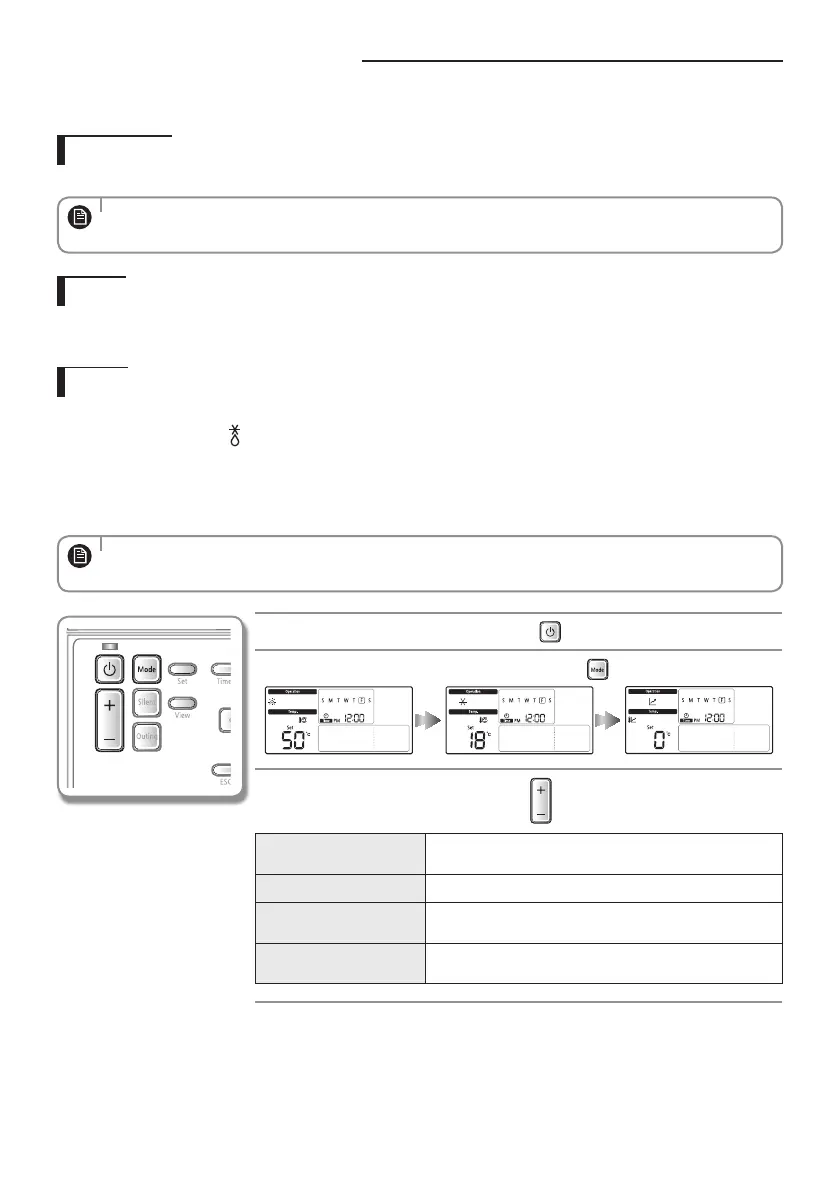
Operate basic mode by pressing the [Mode] button.
Water Law
CONTROL KIT will automatically adjust the temperature of discharge water with auto mode for indoor heating.
• When “Water Law” is active, the target supply water temperature will be determined automatically depending on
the outdoor temperature: For heating mode, colder outdoor temperatures will result in warmer water.
NOTE
Cool
You can adjust cooling temperature as you like with cool mode to cool indoor place.
When selecting the heat mode during the cool mode, the cool mode will be canceled.
Heat
Floor heating is available with heat mode by providing hot water in the spring, autumn and winter.
Frost removal indicator (
)
- The frost removal indication will be displayed when the frost formed around the outdoor unit starts being removed
during the heat mode and then the indication will disappear when the frost removal is nished. (When frost is being
removed, hot water does not come out from CONTROL KIT.)
When selecting cool mode during the heat mode, heat mode will be canceled.
• When setting standard cooling & heating temperature as indoor temperature, auto mode cannot be selected.
NOTE
Start CONTROL KIT operation by pressing the
button.
Select the mode you want to operate by pressing the
button.
Adjust desired temperature by pressing the button.
Temperature of cooling
discharge water
You can adjust the desired temperature by 0.5°C.
Indoor cooling temperature You can adjust the desired temperature by 0.5°C.
Temperature of heating
discharge water
You can adjust the desired temperature by 0.5°C.
Indoor heating
temperature
You can adjust the desired temperature by 0.5°C.
BASIC OPERATION
EHS_MONO- KIT_IB_05402A-01_BOOK.indb 16 2016-03-29 오후 5:44:05



 To Next Page