ENGLISH-32
Use of wired remote controller installation / service mode
Use of installation/service mode
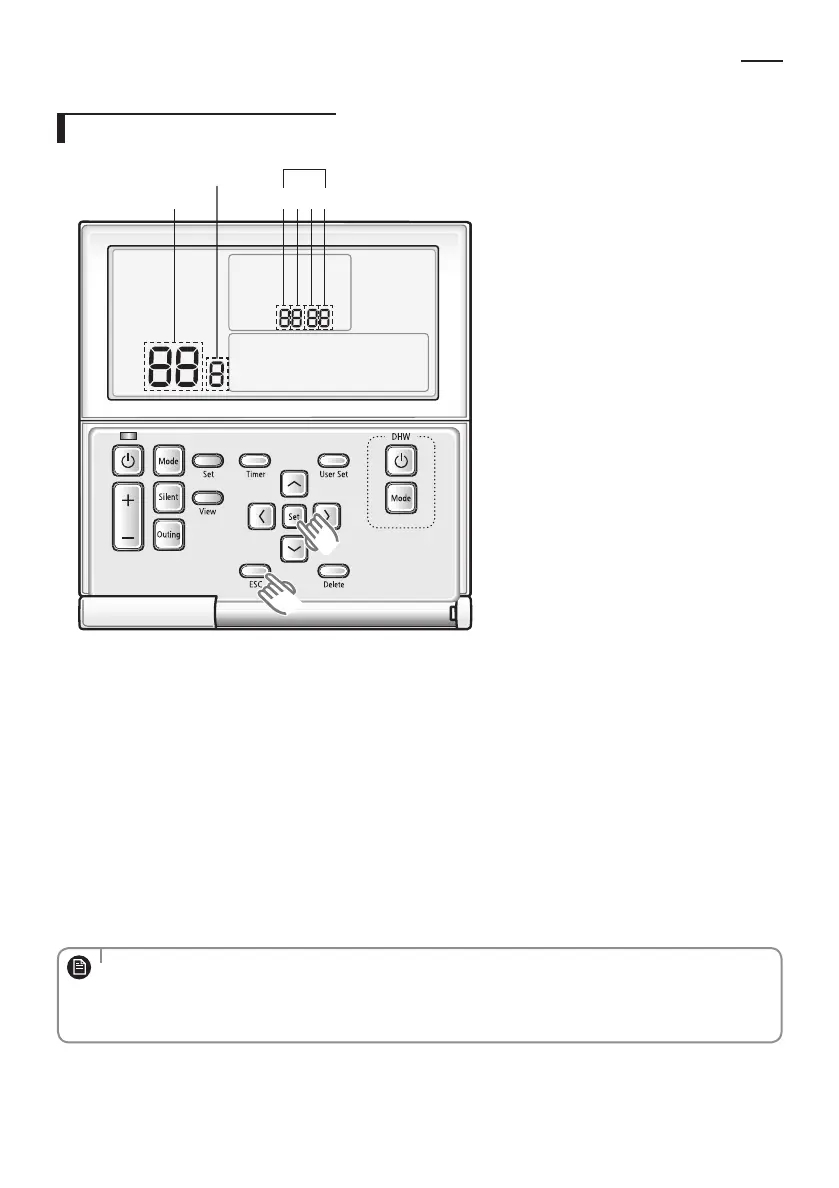
1 2 3 4
Main menu
Sub-menu
SEG Used
1. If you want to use the installation/service mode for your wired remote controller, press the Set and ESC buttons at
the same time for more than 3 seconds.
You will enter the installation/service settings, and the ‘main menu’ will be displayed.
2. Refer to the list of installation / service setting mode for your wired remote controller on the next page, and select
the desired menu.
Using the [∧]/[∨] buttons, select a main menu number and press the [>] button to enter the sub-menu setting
screen.
Using the [∧]/[∨] buttons, select a sub-menu number and press the [>] button to enter data setting screen.
When you enter the setting stage, the current setting value will be displayed.
Refer to the chart for data settings.
Using the [∧]/[∨] buttons, change the setting value. Press the [>] button to move to the next setting value.
Press the Set button to save the setting value and exit to the sub-menu setting screen.
Press the ESC button to exit to normal mode.
• When setting the data, you can move SEG range with
[<]
/
[>]
buttons.
• While conguring the setting, press the ESC button to exit to the sub-menu setting screen without saving your
changes.
• When you don't enter any buttons for more than 3 minutes, you will be back to normal mode.
NOTE
EHS_MONO- KIT_IB_05402A-01_BOOK.indb 32 2016-03-29 오후 5:44:20



 To Next Page