ENGLISH-28
Setting current time (example)
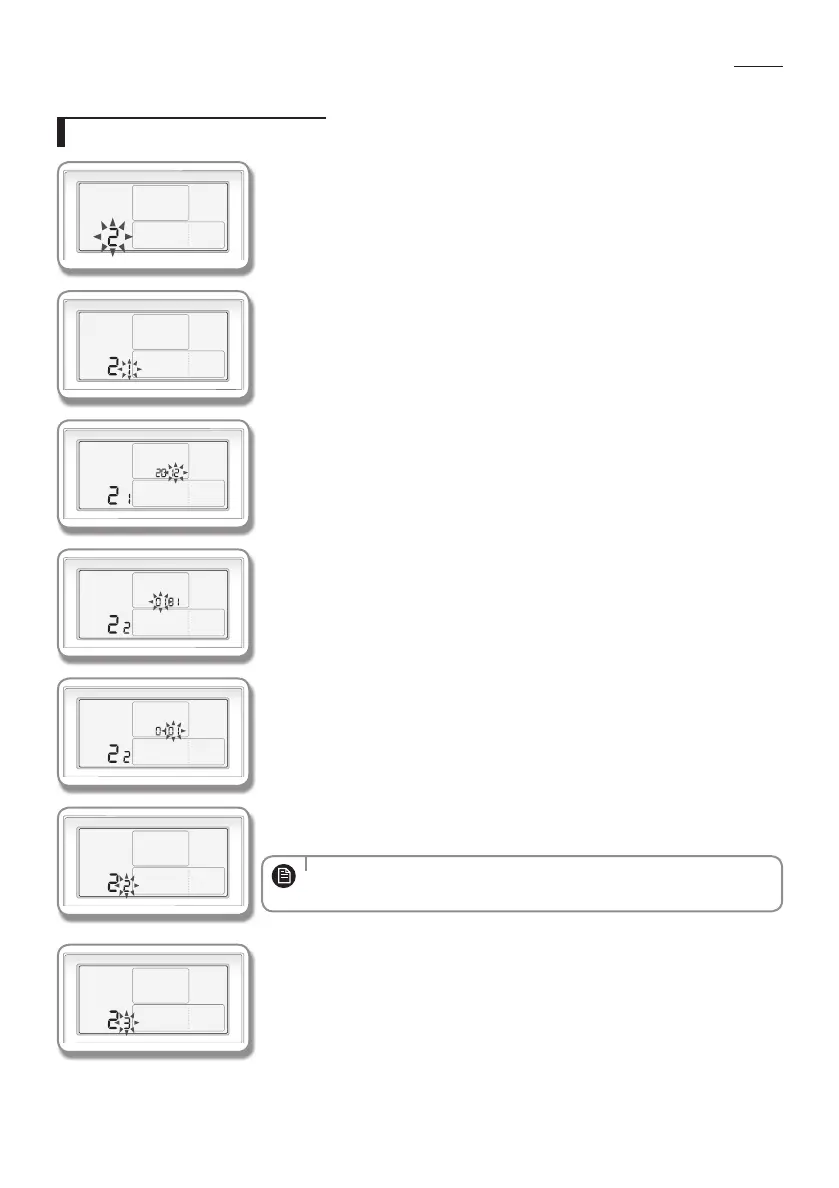
1. Press the User Set button.
'Main Menu' will be displayed and current time can be set by pressing the [∧]/[∨]
buttons and selecting No.2.
2. Select the number to set 'year, month, date' in sub-menu by pressing the [>]
button.
You can select 'year, month and date' by pressing the [∧]/[∨] buttons and
selecting No.1.
3. Select the 'year' you want to set by pressing the [>] button.
You can select 'year(2000~2099)' by pressing the [∧]/[∨] buttons.
4. Select the 'month' you want to set by pressing the [>] button.
You can select 'month(01~12)' by pressing the [∧]/[∨] button.
5. Select the 'date' you want to set by pressing the [>] button.
You can select 'Date(01~31)' by pressing the [∧]/[∨] button.
6. Complete the setting for 'year, month, and date' by pressing the Set button.
The setting value will be applied and you can exit to the sub-menu.
• When not using the summer time function, you don't need to set "Year",
"Month" and "Day".
NOTE
7. Select 'day, AM/PM, hour, and minute' in the 'sub-menu'.
You can set 'day, AM/PM, hour, and minute' by pressing the [∧]/[∨] buttons and
selecting No.3.
How to set the detailed setting (User setting mode)
EHS_MONO- KIT_IB_05402A-01_BOOK.indb 28 2016-03-29 오후 5:44:18








 To Next Page