ENGLISH-35
03 ADVANCED OPERATION
Use of eld specication checking mode
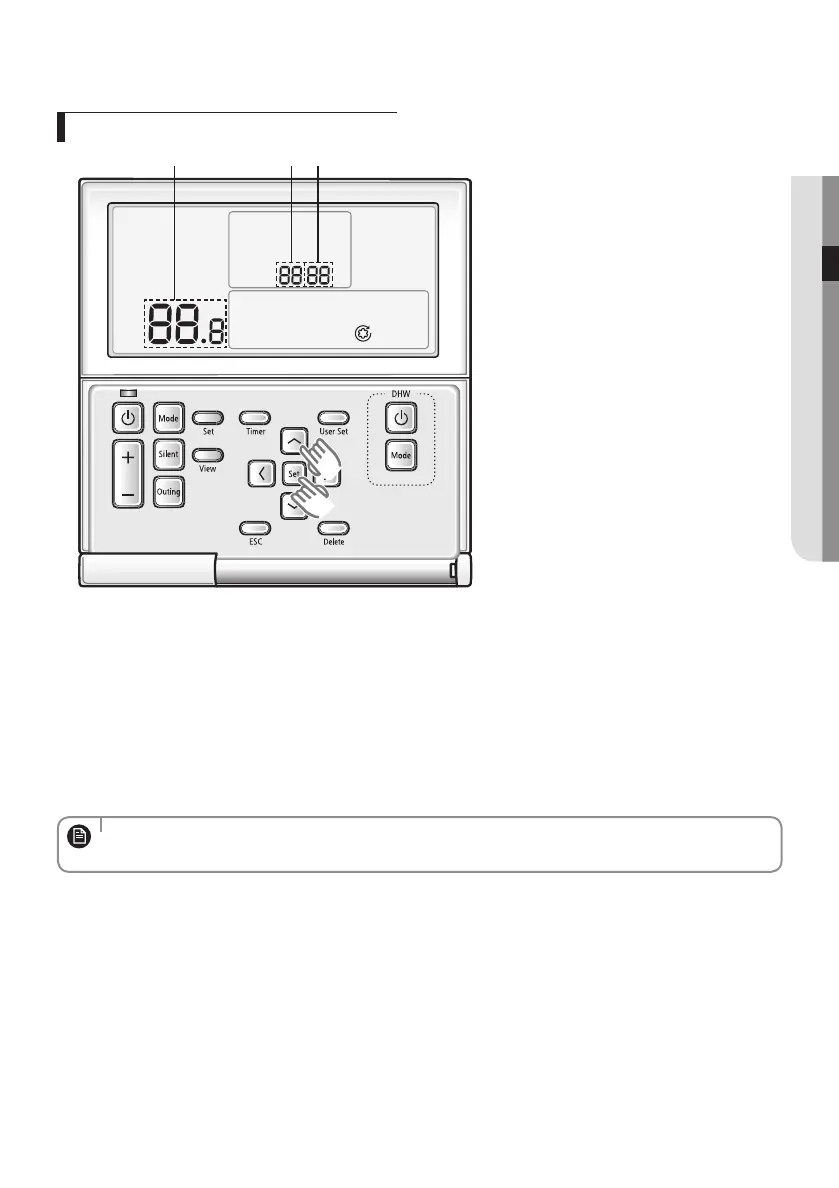
Data
Sub-menuMain menu
1. If you want to use the eld specication checking mode for your wired remote controller, press the Set and [∧]
buttons at the same time for more than 3 seconds.
2. Refer to the list of eld specication for your wired remote controller on the next page, and select the desired menu.
Using the [∧]/[∨] buttons, select a main menu number and press the [>] button to enter the sub-menu checking
screen.
Using the [∧]/[∨] buttons, select a sub-menu number and press the [>] button to enter data checking screen.
When you enter the checking stage, the current setting value will be displayed.
Press the [<] button to move previous setting value.
While conguring the sub manu setting, press the ESC button to exit to normal menu.
• While conguring the checking, press the ESC button to exit to the sub-menu setting screen.
• When you don't enter any buttons for more than 3 minutes, you will be back to normal mode.
NOTE
EHS_MONO- KIT_IB_05402A-01_BOOK.indb 35 2016-03-29 오후 5:44:21



 To Next Page