16_ Checking the function
Checking the function of buttons and indicators
Checking the function of buttons and indicators
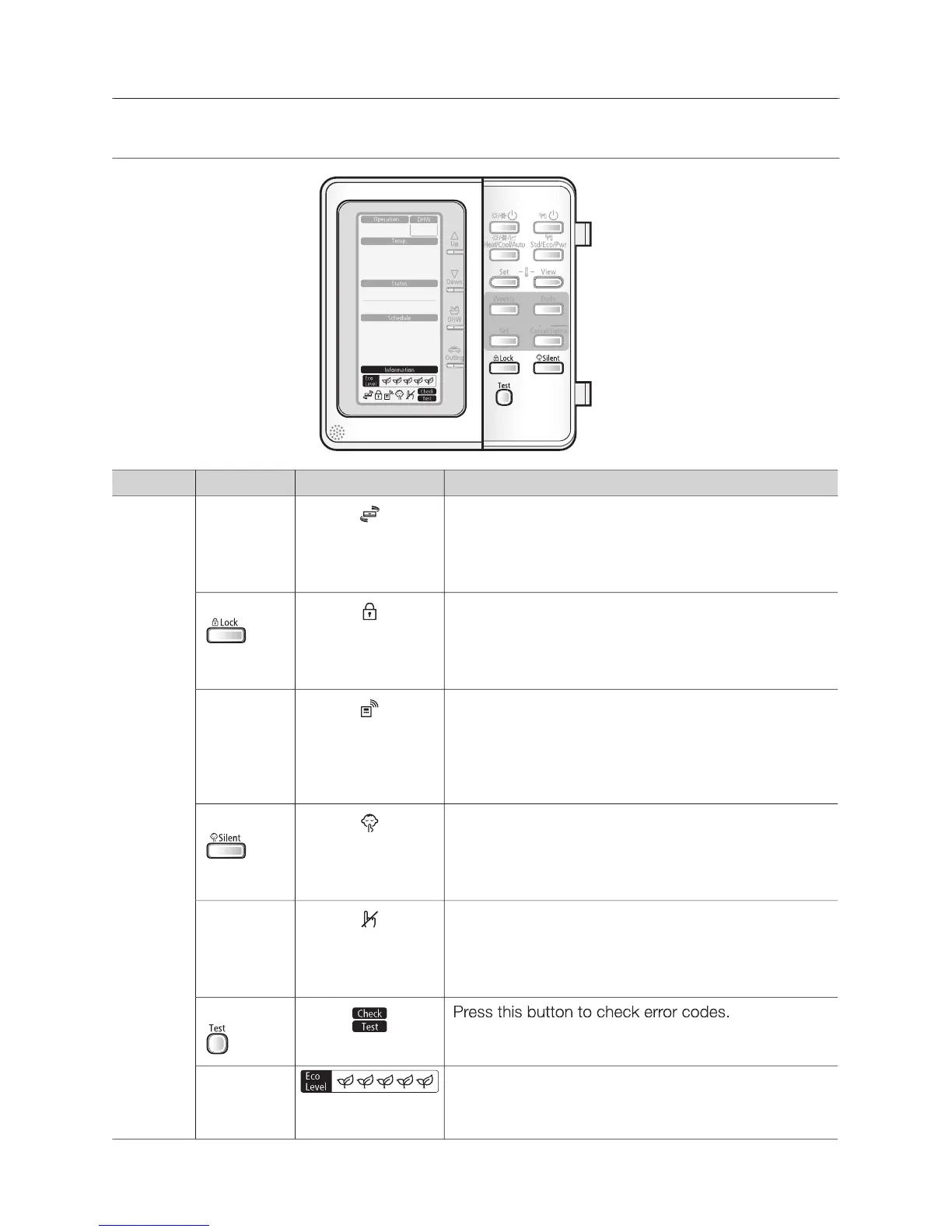
OPTIONAL FUNCTION INDICATOR
The priority of operating heat pump is allowed to A2A
while it demands both A2A and A2W. When this A2A
operating sign is on, it is assured that the heat pump
The remote controller buttons can be locked to
prevent children from changing the settings or from
pressing the buttons by accident.
When the room thermostat is connected, the Water-
Law operation is active and the water temperature
is determined automatically depends on the outdoor
temperature. The more cold the outdoor temperature,
the more warm water will be supplied. vice versa.
To maintain the outdoor unit to operate quietly, fan
and compressor speed will be limited to a certain
value of the speed at a normal operating.
This icon is displayed whenever a non-installed
option is addressed or a function is not available.
Press this button to check error codes.
It indicates 5 Eco-level of energy consumption
according to heat resources (Solar thermal, Backup
boiler and heat pump) and outdoor temperature.



 To Next Page