Operating advanced function _25
SETTING THE 7-DAY(WEEKLY) SCHEDULE
Set the 7 schedule to reserve the On/Off timer to be repeated every week.
At most 7 schedules may be set for each day.
• When using room thermostat, it is impossible to reserve
• If weekly schedule reserved 7 items is on same day, it is impossible to reserve.
In that case, When press the
button, change the View mode of reservation.
Weekly button, change the View mode of reservation.Weekly
• Setting the weekly schedule is for “Cool & Heat” Mode only.
• It is impossible to reserve several times for same day and same time.
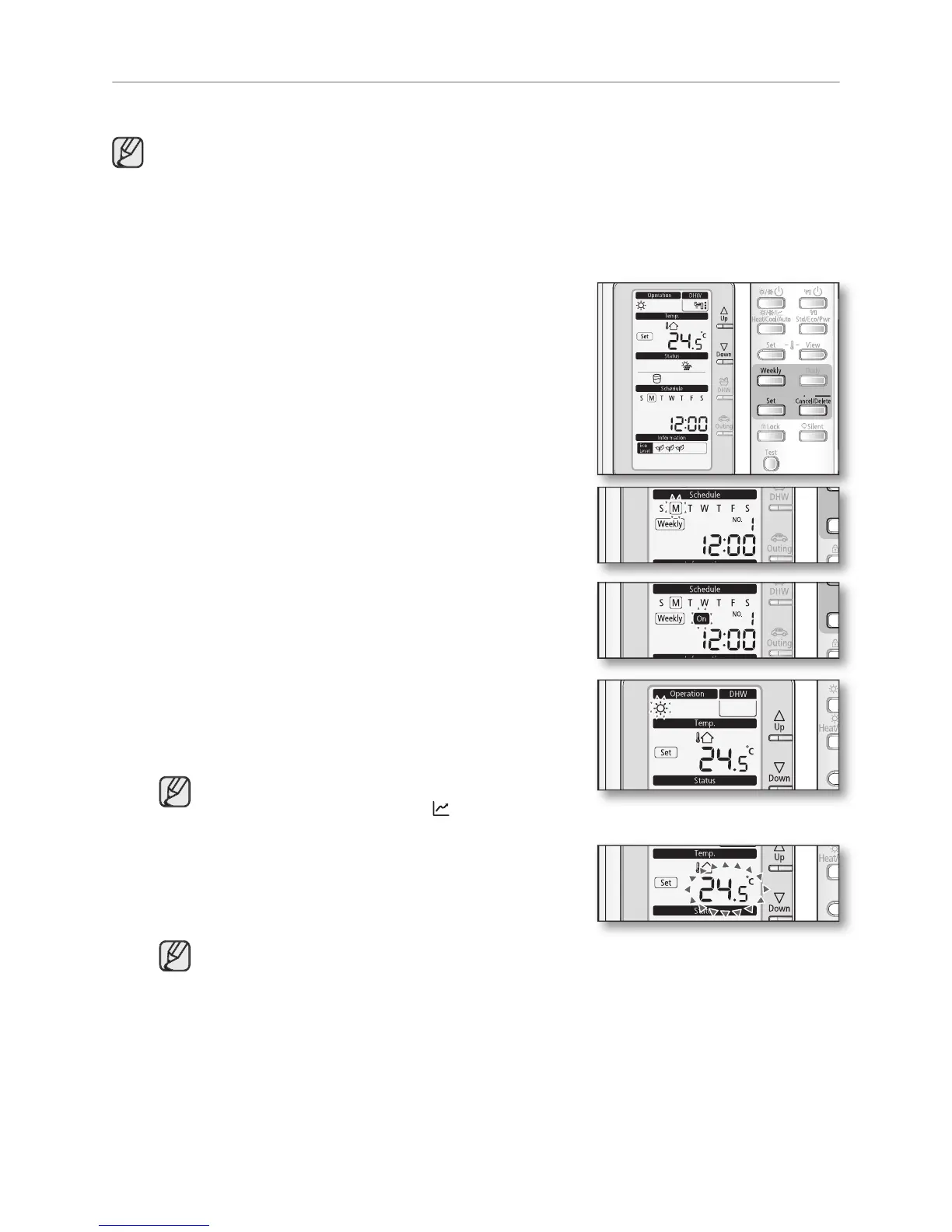
The mode changes to the weekly schedule.
In this mode, you can only use
To cancel the setting, press the
The On/Off indicator will blink. Set the On/Off status and
button to save the setting.
Set the On/Off by pressing
The ‘On/Off’ indicator will blink. Set the On/Off status
button to save the setting.
Set the operation mode by pressing
The ‘operation indicator’ will blink. Set the day and press
button to save the setting.
• To set the “Off” reservation, move to the step 6.
• It is impossible to set the Auto(
Set the temperature by pressing the
The ‘temperature’ will blink. Set the temperature and
button to save the setting.
The setting temperature is decided according to Dip S/W #2 of remote controller.
- Dip S/W #2 On : Setting the temperature of indoor.
- Dip S/W #2 Off : Setting the temperature of water outlet.



 To Next Page