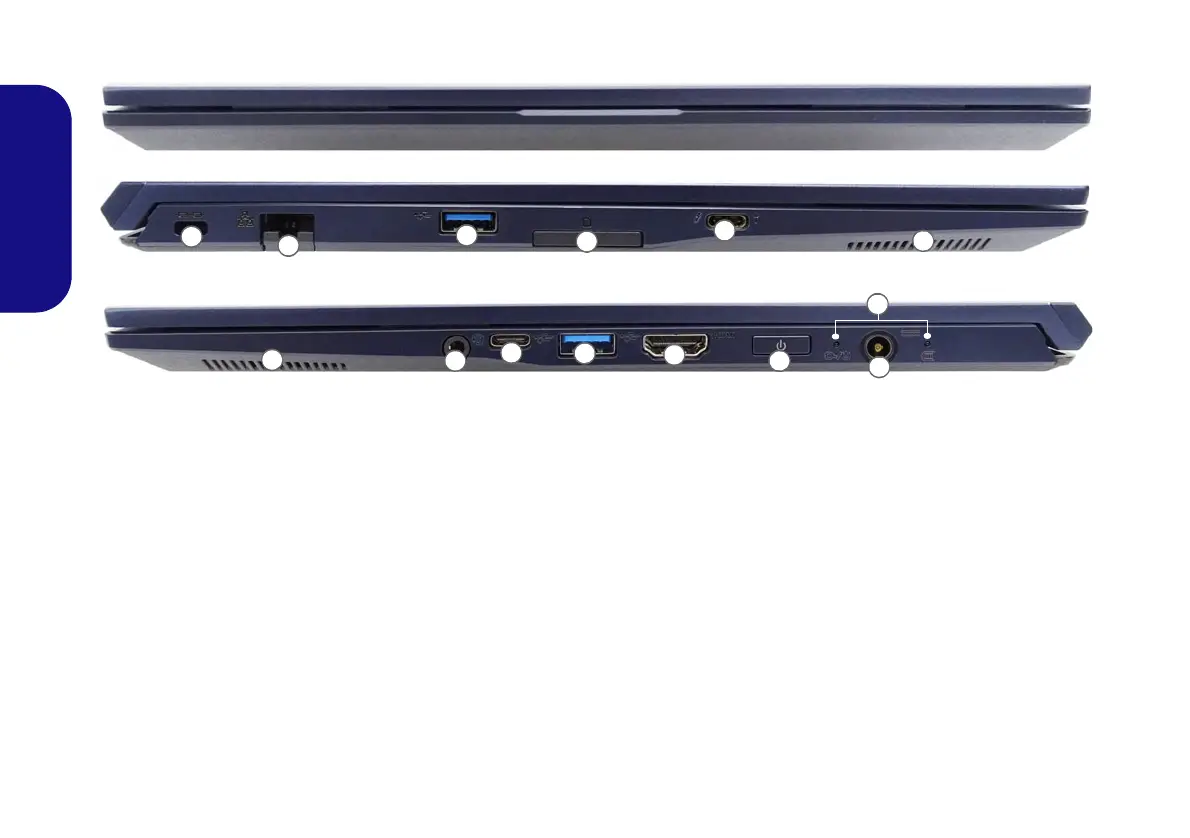
Figure 4 - Front, Left & Right Views
1. Security Lock Slot
2. RJ-45 LAN Jack
3. USB 3.2 Gen 1 Type-A Ports
4. SD Card Reader
5. Thunderbolt 4 Port with Power Delivery (DC-In)*
*This port allows you to use a third party AC/DC adapter/
power bank plugged into the port as a power supply. If you are
using a power bank make sure that it complies with the USB-C
PD (Power Delivery) standard specification (20V/65W - 20V/
100W). If you are using a third party AC/DC adapter, the rating
of the adapter must be at least 20Volts, 3.25A (65 Watts) and it
should be appropriately certified.
6. Speakers
7. 2-In-1 Audio Jack (Headphone /
Microphone)
8. USB 3.2 Gen 2 Type-C Port
9. HDMI-Out Port
10. Power Button
11. LED Indicators
12. DC-In Jack
Front
Left
Right
1
3
4
5
6
7
2
6
8
9
10
11
12
3












 To Next Page