EasyManua.ls Logo

Samsung Notebook NV40 - System Map: Front View; Component Identification: Front View

Samsung Notebook NV40
153 pages
Print Icon
To Next Page IconTo Next Page
To Previous Page IconTo Previous Page
Loading...
6
English
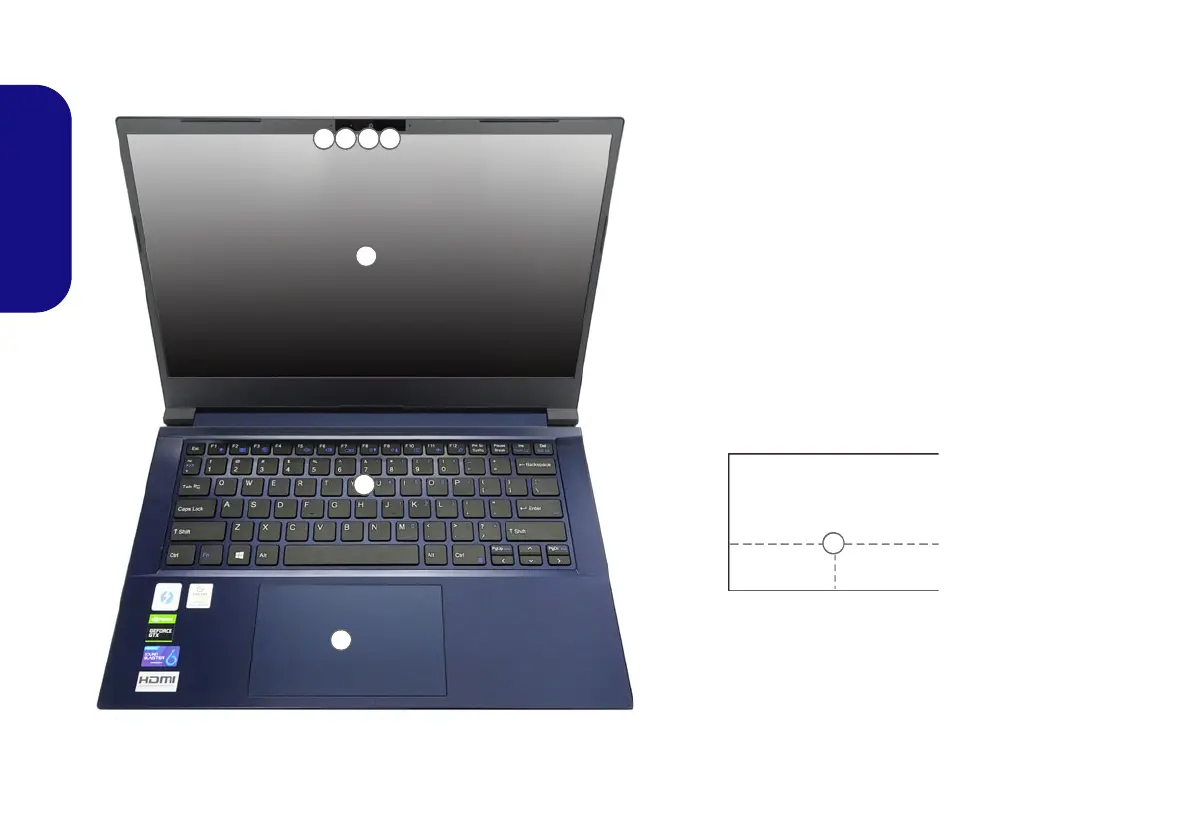
System Map: Front View with Display Open
Figure 2
Front View with Display Open
1. PC Camera
Or
(Factory Option) Windows Hello Camera
2. *Camera LED
*When the camera is in use, the LED will be
illuminated.
3. Built-In Array Microphone
4. Display
5. Keyboard
6. Touchpad & Buttons
Note that the Touchpad and But-
tons valid operational area is
that indicated within the dotted
lines above.
12 33
6
5
4
6

NV40 MBMEMZ(-D) book.book Page 6 Friday, September 4, 2020 3:55 PM

Table of Contents

Related product manuals