SMT-i5220 IP Phone User Manual
43
ⓒ
SAMSUNG Electronics Co., Ltd.
42
In case of forwarding the message
Enter or select the recipient phone number, and
press the Enter[OK] or Send soft button.
To Save the message, press the Yes soft button.
Search
Back
Send
Del.
1 0123
2 2345
3 4321
4 1232
4
Message Box
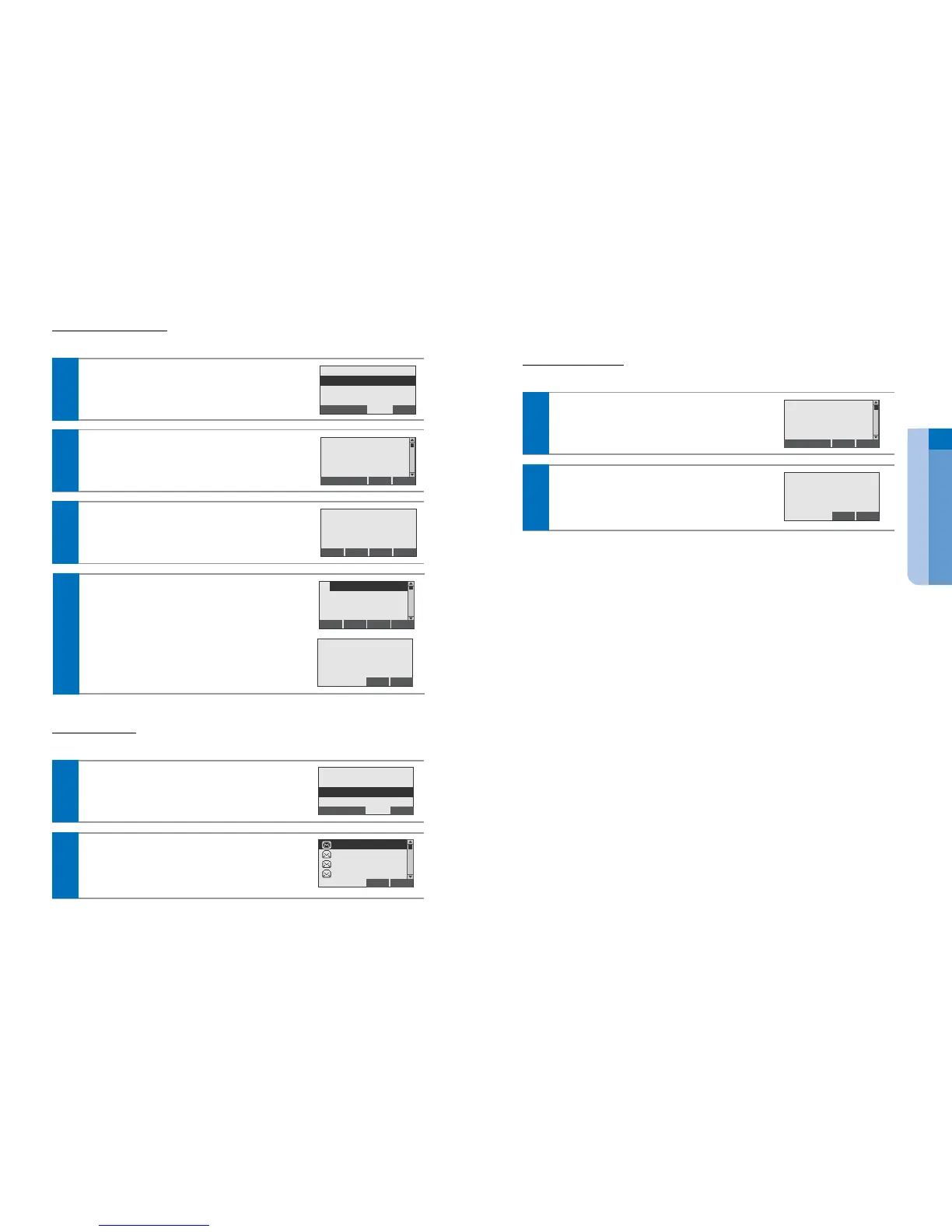
You can review the saved messages.
In the Message Menu screen, press the MsgBox soft
button to display the message list.
Back
New Msg.
InBox [0/0]
OutBox [16]
MsgBox [5]
1
Select the desired list to show the message, and
press the Enter[OK] button.
Back
:
OPT
:
Welcome
User Guide
Information of
Some features
2
Message Delete
You can delete the saved messages.
In the Message Menu screen, select the desired list
to delete the message, and press the OPT > Delete
or Del. soft button.
BackDel.
Welcome to my world
10/05 8 : 15 AM
FROM : 4321
Delete All
1
To delete the message, press the Yes soft button.
Options for incoming Message
To resend : press the Resend soft button
To forward : press the Fwd. soft button
To delete : press the OPT(Option) > Delete soft button
3
Back
Resend
Fwd. :
OPT
:
Welcome to my world
10/05 8 : 15 AM
From : 4321
Outgoing Message
You can view the outgoing message and the resend.
In the Message Menu screen, press the OutBox soft
button to display the outgoing message list.
1
Back
New Msg.
InBox [0/0]
OutBox [16]
MsgBox [5]
Select a desired list to show the message, and press
the Enter[OK] button.
2
BackDel.
Welcome to my world
10/05 8 : 15 AM
FROM : 4321
Delete All


 To Next Page