Need help?
Do you have a question about the Samsung OfficeServ SMT+i5220 and is the answer not in the manual?
Defines text conventions like WARNING, CAUTION, and NOTE for user guidance.
Explains symbols used for general caution, restrictions, and instructions.
Details on safe usage of the power adapter and connections to prevent electrical hazards.
Guidelines for safe installation and maintenance, avoiding environmental hazards and damage.
Guides on initiating calls using the handset, speakerphone, last call, and phonebook.
Instructions for receiving incoming calls via handset and speakerphone.
Details on call waiting, muting, and forwarding calls during an active conversation.
Lists available options within the Function Menu, like Phonebook and Messages.
Details settings available under Phone Settings and System Settings.
Guides the user through the simplified setup process for network and system information.
Details on entering IP address, subnet mask, and gateway for static IP network setup.
Instructions for setting up dynamic IP network configuration, including system ID and password.
Steps for configuring PPPoE connection, including user ID and password.
Guides setting up static IP, subnet mask, and gateway addresses.
Details on configuring dynamic IP settings, including DHCP mode.
Configuration of TFTP server IP address for firmware upgrade.
Steps to start the firmware upgrade process and reboot the phone.
Instructions for setting System IP, ID, and password for main and sub systems.
Describes how the phone connects to the corporate IP telephony network.
Details the information displayed on the phone's LCD screen, such as time and caller ID.
Explains how to navigate menus and select features using the Enter [OK] button.
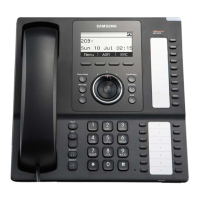
Identifies all buttons and parts visible on the front of the IP phone.
Details the specific functions of each button and key on the phone.
Instructions on how to increase or decrease the volume for the handset.
Instructions on how to increase or decrease the volume for the speakerphone.
Instructions on how to adjust the volume of the phone's ringer.
Step-by-step guide on how to make calls using the handset in normal or mobile modes.
Instructions for saving, searching, and managing phonebook entries and groups.
Guide to receiving calls using the handset and starting the conversation.
Instructions for answering calls using the speakerphone.
Explains how to place calls on hold and reactivate them.
How to toggle the microphone's mute state on or off during a call.
Details options available in the Function Menu like Phonebook, Message, and Scheduler.
Explains settings for Phone and System Settings, including call functions and absent messages.
Guides on saving new phone numbers and contact details.
Instructions on how to search for contacts by name or number.
Procedures for deleting individual entries or all entries from the phonebook.
Steps to compose and send new text messages.
Guide to accessing and managing incoming text messages.
Guides for managing outgoing messages, message box contents, and message deletion procedures.
Instructions for creating new schedule entries and setting alarms.
Details on setting up call functions like Call Forward and CID Display.
Configuration to enable or disable viewing message content on the screen.
Guides on setting clock display type and screen contrast level.
Instructions for choosing the desired font type for the display.
Overview of the Service Menu interface and soft button functions.
Solutions for phone not booting, no display, or other boot-related issues.
Troubleshooting steps for no dial tone, no ring tone, or unwanted noises during calls.
 General
| Brand | Samsung |
|---|---|
| Model | OfficeServ SMT+i5220 |
| Category | Cordless Telephone |
| Language | English |

 To Next Page