SMT-i5220 IP Phone User Manual
53
Service Menu usage
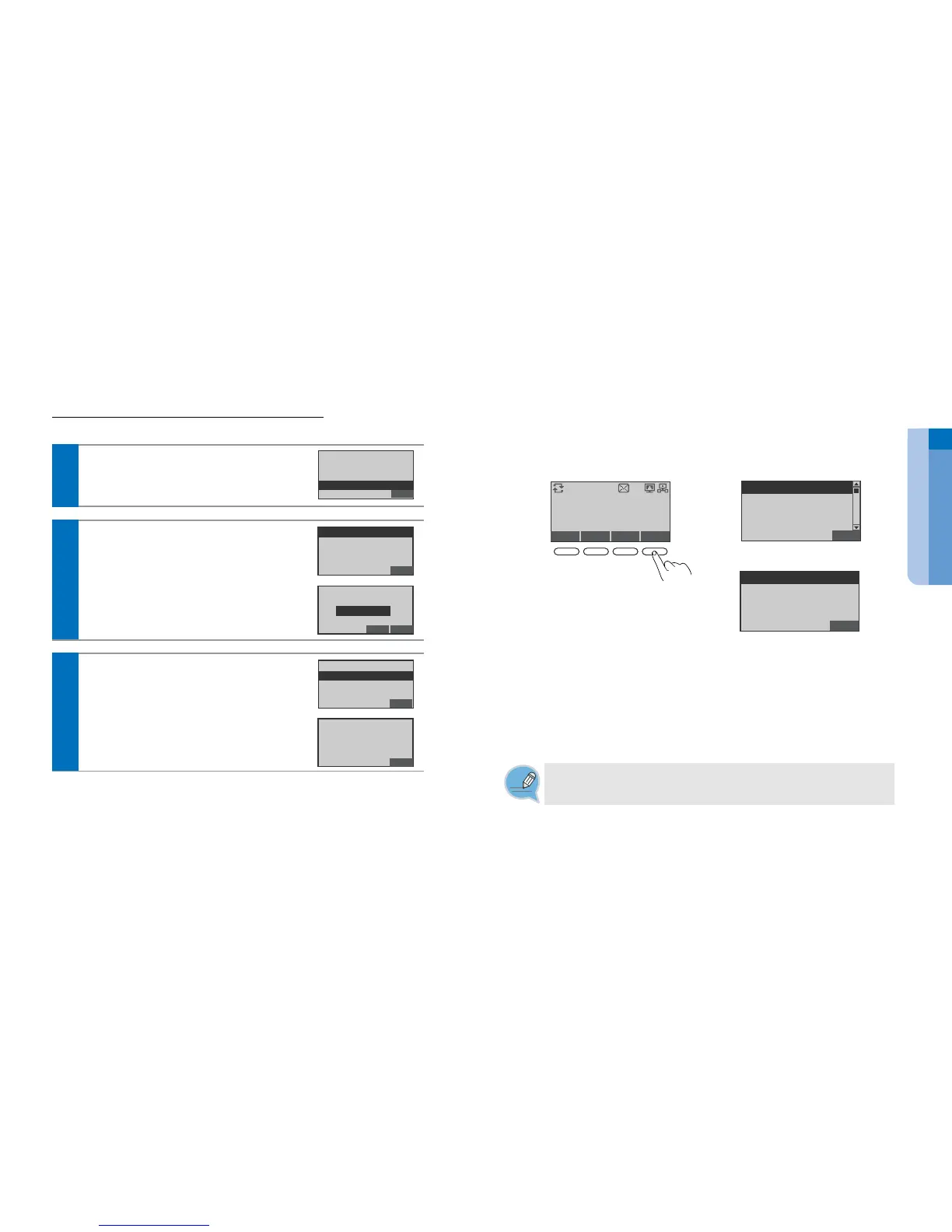
Screen of Service Menu
- Service Menu correspond to the option tabs displayed along the bottom of your LCD screen. Service Menu change
depending on the status of your IP phone. It is provided via interworking with the system.
LAST/REDIAL
SAVE/REPEAT
SPEED DIAL
DIRECTORY
back
Conference Call
Group Listen
Mute On
Back
[During idle]
[During a call]
Service
Menu Set.
Calllog
T.1234
Sat 09 May 17:34
ⓒ
SAMSUNG Electronics Co., Ltd.
52
2 System Setting 4 Firmware Upgrade
You can upgrade the your phone firmware.
In idle mode, press the Setting soft button.
Select the 2 System Setting 4 Firmware Upgrade
press the Enter[OK] button.
Back
1 Call Forward
2 Absent Msg
3 My Phone Info
4 Firmware Upgrade
Firmware Upgrade
1
Select the 1 TFTP Server setting Enter the
Server IP address press the Enter[OK] button.
- The Firmware information inquires to administrator.
Back
1 TFTP Server Setting
2 Upgrade Start
2
Select the 2 Upgrade start press the Enter[OK]
button.
Press the Enter[OK] button again to confirm the
upgrade.
Back
1 TFTP Server Setting
2 Upgrade Start
BackDel.
[TFTP Setting]
Press the Enter Button
165.213.110.59
Back
[Upgrade Start]
Press Enter Button
Service Menu
- The Service Menu may be changed according to Call type, System version or system
administrator’s establishment.
- For more information of the Service Menu, inquires to administrator.
You can use the functions by pressing the
Service soft button on the buttom side of
a LCS screen.


 To Next Page