9-1
Chapter 9 Installing Keyset
Daughterboards
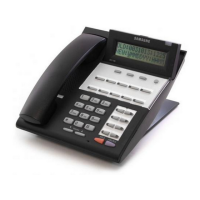
OfficeServ500 Keyset Daughterboards
One of three types of daughterboard can be installed in a DS-5014D or DS-5021D keyset only: a
KDB-D, KDB-S, or KDB-F.
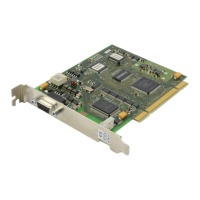
KDB-Digital Line Interface (KDB-D)
The KDB-D provides one additional DLI circuit for the connection of any digital station device
such as another keyset, an add-on module or door phone interface module. The KDB-D will only
operate when the keyset is connected to an 8-port DLI card so that it can use the second B
channel. Each port on this card is intended for connection to one telephone.
CAUTION: Connecting multiple telephones to a port may result in incorrect operation or
damage to the card.
Read Installation Procedure
, below.
KDB-Single Line Interface (KDB-S)
The KDB-S provides one additional SLI circuit for the connection of any standard telephone
(SLT). The KDB-S will only operate when the keyset is connected to an 8-port DLI card so that it
can use the second B channel. Each port on this card is intended for connection to one tele-
phone.
CAUTION: Connecting multiple telephones to a port may result in incorrect operation or
damage to the card.
NOTE: The circuitry on a KDB-S does not provide a loop open disconnect signal or
have the over-voltage protection necessary for OPX operation.
Read Installation Procedure
, below.
KDB-Full Duplex (KDB-F)
The standard speakerphone mode of operation for a keyset is “half duplex”. This means that you
cannot transmit and receive speech at the same time. Adding a KDB-F to your keyset will con-
vert the speakerphone into full duplex mode, enhancing its operation. In addition, the KDB-F
may have up to three external microphones attached to it for conference room type applications.
These microphones require an “EXTMIC” key programmed on the keyset to activate or deacti-
vate them (refer to the Samsung Combined Systems Programming Manual for details).



 To Next Page