4-8
Chapter 4
Installing Processor and Interface Cards
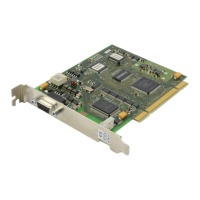
A maximum of nine TEPRI cards can be provided per system (three per cabinet). Push firmly in
the middle of both card ejectors on each card to ensure that it is fully inserted into the backplane
connector.
The TEPRI card has a recessed RESET button that will initialize the card manually if required.
The RS-232 DB9 connector on the face of the TEPRI card allows trace monitoring of TEPRI
functions. This is for testing purposes and should only be used under the supervision of
Samsung Technical Support.
TEPRI CARD DIP SWITCHES
To access the DIP switches, you must remove the case by removing the four screws (Figure
4-17
) and splitting the case.
Switch Number Function ON OFF PRI (EU)
1 T1/E1 T1 E1 Off
2 PRI/T1/E1 PRI T1/E1 On
3 NFAS24B/NFAS 23B+D Off
4 Network/User N/W User Off
5 AFT/Normal Off
6 Not Used Off
7
Not Used
Off
8
Card ID
On On
LED INDICATIONS
There are a number of LED indicators on the front of the TEPRI card showing the status of the
card. The indications are described in Appendix A.
8BSI Card
CAUTION: Do not
insert the card with system power on. Switch the power OFF.
The 8BSI—Base Station Interface—card (Figure 4-15) must be inserted in slot 1, 2 or 3 of the
cabinet. ‘S’ and ‘M’ systems support one 8BSI card but up to three cards can be installed in an
‘L’ system (in the same cabinet).
Push firmly in the middle of both card ejectors on each card to ensure that it is fully inserted into
the backplane connector. MDF connections for the card are shown in Figure 4-18
.
NOTE: If you are connecting TEPRI cards using the Q-SIG network protocol, it is
recommended that the cable between the cards is not more than 150m long.



 To Next Page