4-9
AC15 Card
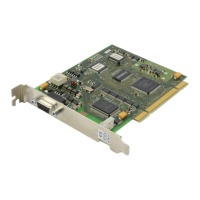
This card (Figure 4-15) has no selectable options. Insert as many AC15 cards as are needed
into any universal slots (Figure 4-2
). Push firmly in the middle of both card ejectors on each card
to ensure that it is fully inserted into the backplane connector.
DLI Card
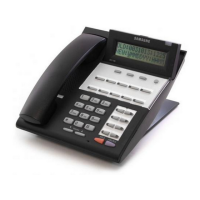
There are no options to select on this card (Figure 4-15). Insert up to and including seven DLI
cards per cabinet as needed into any universal slots. Push firmly in the middle of both card
ejectors on each card to ensure that it is fully inserted into the backplane connector.
NOTE: Keyset daughterboards will only work with the DLI card.
16DLI Card
There are no options to select on this card (Figure 4-15). Insert up to and including seven DLI
cards per cabinet as needed into any universal slots (see note, below). Push firmly in the middle
of both card ejectors on each card to ensure that it is fully inserted into the backplane connector.
NOTE: Keyset daughterboards will not work if connected to this card.
SLI Card
There are no options to select on this card (Figure 4-15). Insert as many SLI cards as are
needed into universal slots 1 to 9 (Figure 4-2
). Push firmly in the middle of both card ejectors on
each card to ensure that it is fully inserted into the backplane connector.
This card will automatically detect DTMF or dial pulse signals from a single line telephone (SLT).
There are no software or hardware settings required.
NOTE:
1. Do not connect devices with a total REN greater than 2.5 to any port on this card.
2. Ring Frequency: 25 Hz square wave
Ring Voltage: 120 volts peak to peak, 20 milliamps of current
3. SLI port feed voltage is nominally 50VDC.
8SLI Card
There are no options to select on this card (Figure 4-15). Insert as many 8SLI cards as are
needed into universal slots 1 to 9 (Figure 4-2
). Push firmly in the middle of both card ejectors on
each card to ensure that it is fully inserted into the backplane connector.



 To Next Page