Your PDP Monitor has several setting options that allow you to
control the picture quality.
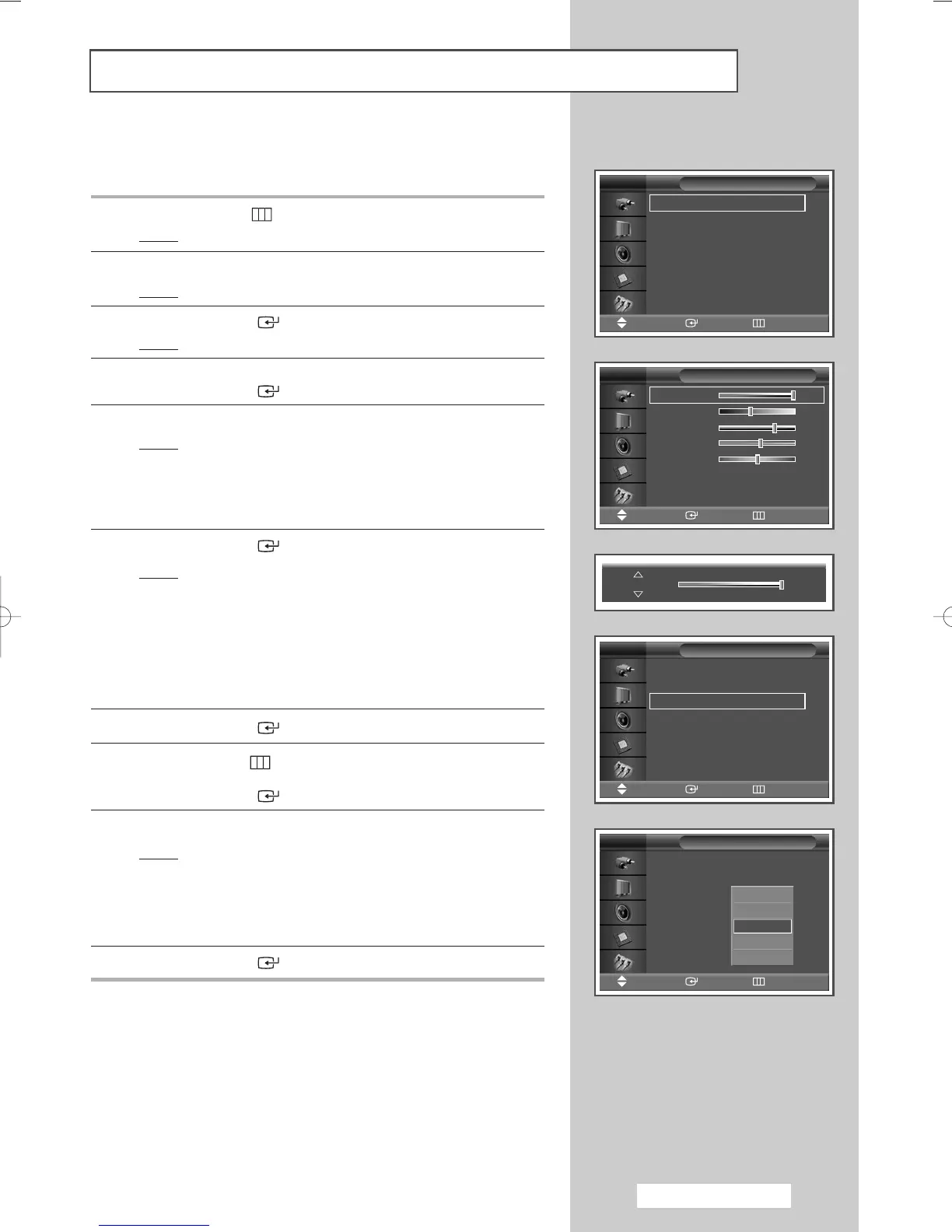
1 Press the MENU ()button.
Result
: The main menu is displayed.
2 Press the … or † button to select Picture.
Result
:
The
Picture menu is displayed.
3 Press the ENTER () button.
Result
:
The
Mode is selected.
4 Press the … or † button to select Custom.
Press the
ENTER () button.
5 Select the required option by pressing the … or † button.
Result
: The following options are available.
◆ Contrast - Brightness - Sharpness - Color -
Tint (NTSC only)
◆ Contrast - Brightness : PC or DVI Mode.
6 Press the ENTER () button.
Result
: The horizontal bar is displayed.
Press the
œ or √ button until you reach the optimal
setting.
➢
◆ Press the … or † button to select other option(s).
◆ When the picture mode is set to Custom, the settings
values may vary depending on the input source.
(ex. AV, Component, PC, or DVI.)
7 Press the ENTER () button.
8 Press the MENU () button to return to the Picture menu.
Press the
… or † button to select Color Tone.
Press the
ENTER () button.
9 Select the required option by pressing the … or † button.
Result
: The following
options
are available.
◆ Cool2 - Cool1 - Normal - Warm1 - Warm2
◆ Custom - Cool - Normal - Warm : PC Mode.
◆ Cool - Normal - Warm : DVI Mode.
10 Press the ENTER () button.
Customizing the Picture Settings
English - 17
Contrast 100
Mode : Dynamic
√√
Custom
√√
Color Tone : Normal
√√
Color Control
√√
Film Mode : Off
√√
Size : 16:9
√√
PIP
√√
Picture
Move Enter Return
TV
Mode : Dynamic
√√
Custom
√√
Color Tone : Normal
√√
Color Control
√√
Film Mode : Off
√√
Size : 16:9
√√
PIP
√√
Picture
Move Enter Return
TV
Mode : Dynamic
Custom
Color Tone : Normal
Color Control
Film Mode : Off
Size : 16:9
PIP
Picture
Move Enter Return
TV
Contrast 100
Brightness 45
Sharpness 75
Color 55
Tint G 50 R 50
Custom
Move Enter Return
TV
Cool2
Cool1
Normal
Warm1
Warm2
BN68-00848A-00Eng_0406 4/6/05 9:15 PM Page 17


 To Next Page