English - 34
Displaying the Setting Information
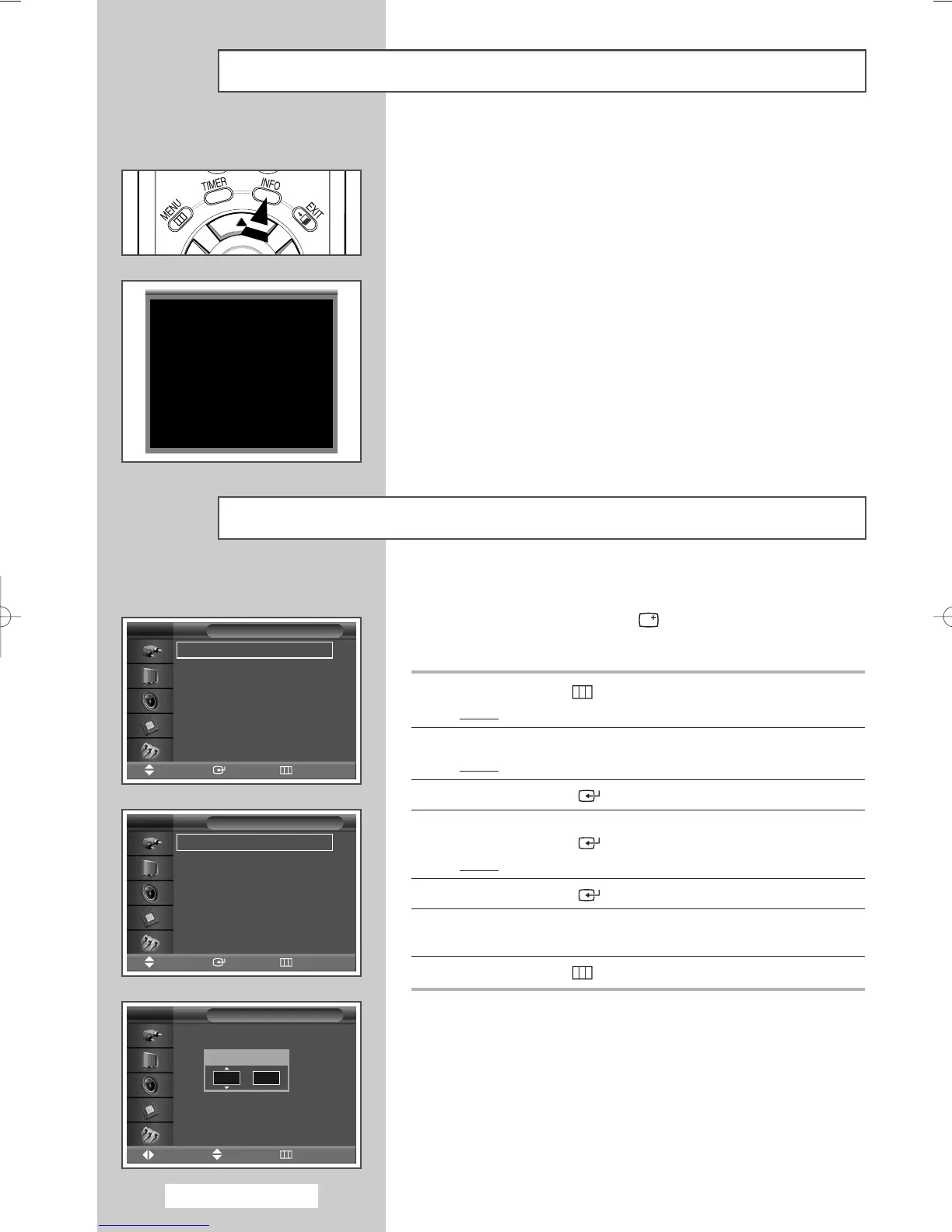
You can view the setting status you select by pressing the “INFO”
button on the remote control.
Setting and Displaying the Current Time
You can set the PDP Monitor’s clock so that the current time is
displayed by pressing the “INFO ( )” button. You must also set
the time if you wish to use the automatic on or off timers.
1 Press the MENU () button.
Result
: The main menu is displayed.
2 Press the … or † button to select Setup.
Result
: The
Setup menu is displayed.
3 Press the ENTER () button.
4 Press the … or † button to select Time.
Press the ENTER () button.
Result
: The Clock set is selected.
5 Press the ENTER () button again.
6 Press the œ or √ button to select Hour or min.
Set these by pressing the
… or † button.
7 Press the MENU () button.
AV
Stereo
Picture : Dynamic
Sound : Standard
Pseudo Stereo : Off
--
:
--
Clock Set
--
:
--
√√
On Timer
--
:
--
Inactivated
√√
Off Timer
--
:
--
Inactivated
√√
Time
Move Enter Return
TV
Clock Set
Move Adjust Return
TV
Time
√√
Language : English
√√
PC
√√
Setup
Move Enter Return
TV
Hour min
12 00
Y
BN68-00848A-00Eng_0406 4/6/05 9:16 PM Page 34


 To Next Page