English - 30
Preventing Screen Burn-in
To reduce the possibility of screen burn, this unit is equipped with
screen burn prevention technology. This technology enables you to
set picture movement up/down (Vertical Line) and side to side
(Horizontal Dot). The Time setting allows you to program the time
between movement of the picture in minutes.
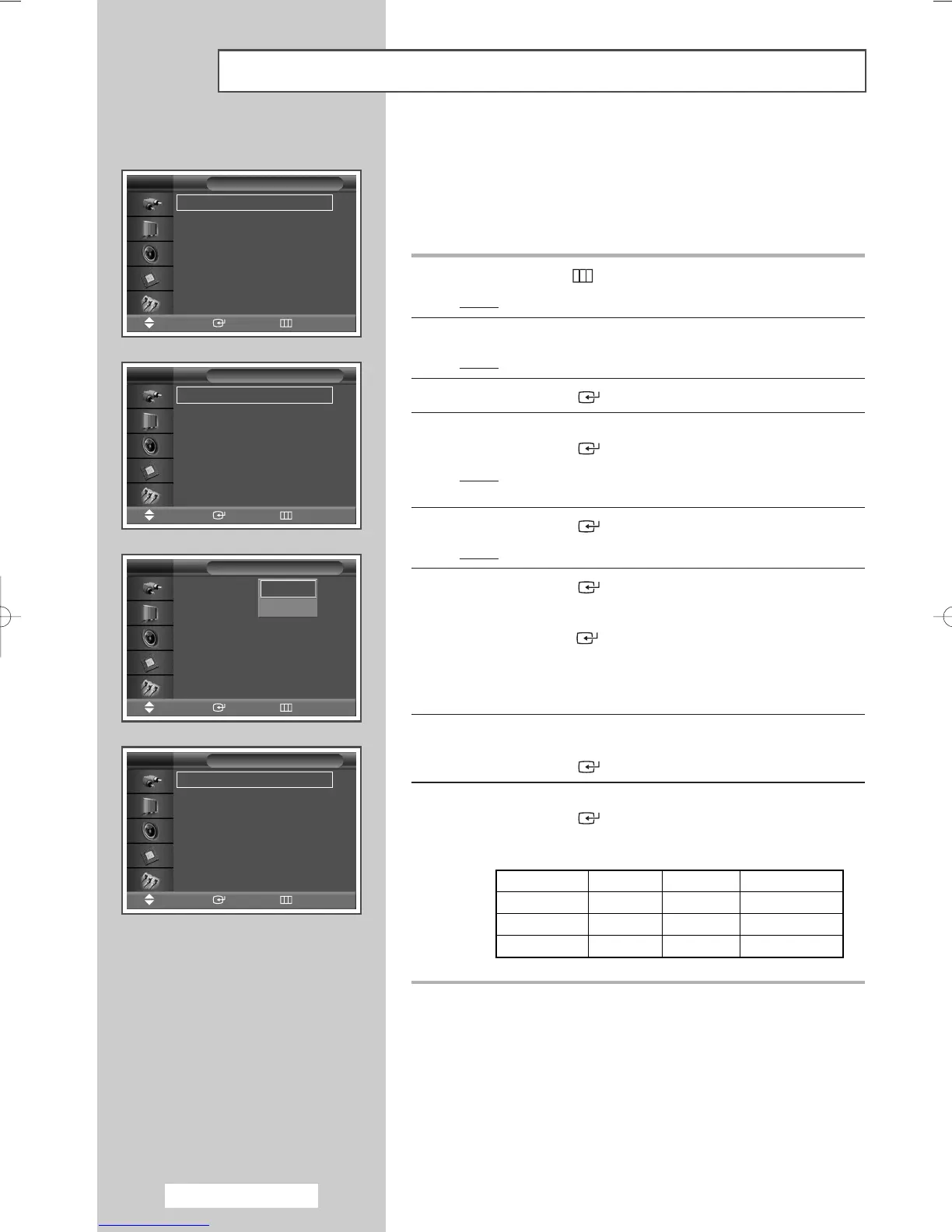
1 Press the MENU ()button.
Result
: The main menu is displayed.
2 Press the … or † button to select Function.
Result
: The
Function menu is displayed.
3 Press the ENTER () button.
4 Press the … or † button to select Screen Burn Protection.
Press the
ENTER () button.
Result
: The Screen Burn Protection menu is displayed
with the
Pixel Shift selected.
5 Press the ENTER () button again.
Result
: The Pixel Shift menu is selected.
6 Press the ENTER () button.
Select
On by pressing the … or † button for making the screen
move per regular hour and preventing the residual image.
Press the
ENTER () button.
➢
Pixel Shift: Using this function, you can minutely move
pixels on the PDP in horizontal or vertical direction to
prevent after image on the screen.
7 Select the required option (Horizontal Dot, Vertical Line, or
Time) by pressing the … or † button.
Press the
ENTER () button.
8 Press the … or † button until you reach the optimal setting.
Press the
ENTER () button.
➢
Optimum condition for pixel shift;
Horizontal Dot
Vertical Line
Time
PPM42M5S
2
4
4 min
PPM42M5H
2
4
4 min
PPM50/63M5H
4
4
4
min
Screen Burn Protection
√√
Safety Lock
√√
Multi Control
√√
Video Wall
√√
Fan : Off
√√
Function
Move Enter Return
TV
Pixel Shift
√√
Signal Pattern
√√
All White
√√
Timer
√√
Screen Burn Protection
Move Enter Return
TV
Pixel Shift : On
√√
Horizontal Dot : 4
√√
Vertical Line : 4
√√
Time : 4 min
√√
Pixel Shift
Move Enter Return
TV
Pixel Shift : Off
Horizontal Dot : 4
Vertical Line : 4
Time : 4 min
Pixel Shift
Move Enter Return
TV
Off
On
If
p
BN68-00848A-00Eng_0406 4/6/05 9:15 PM Page 30


 To Next Page