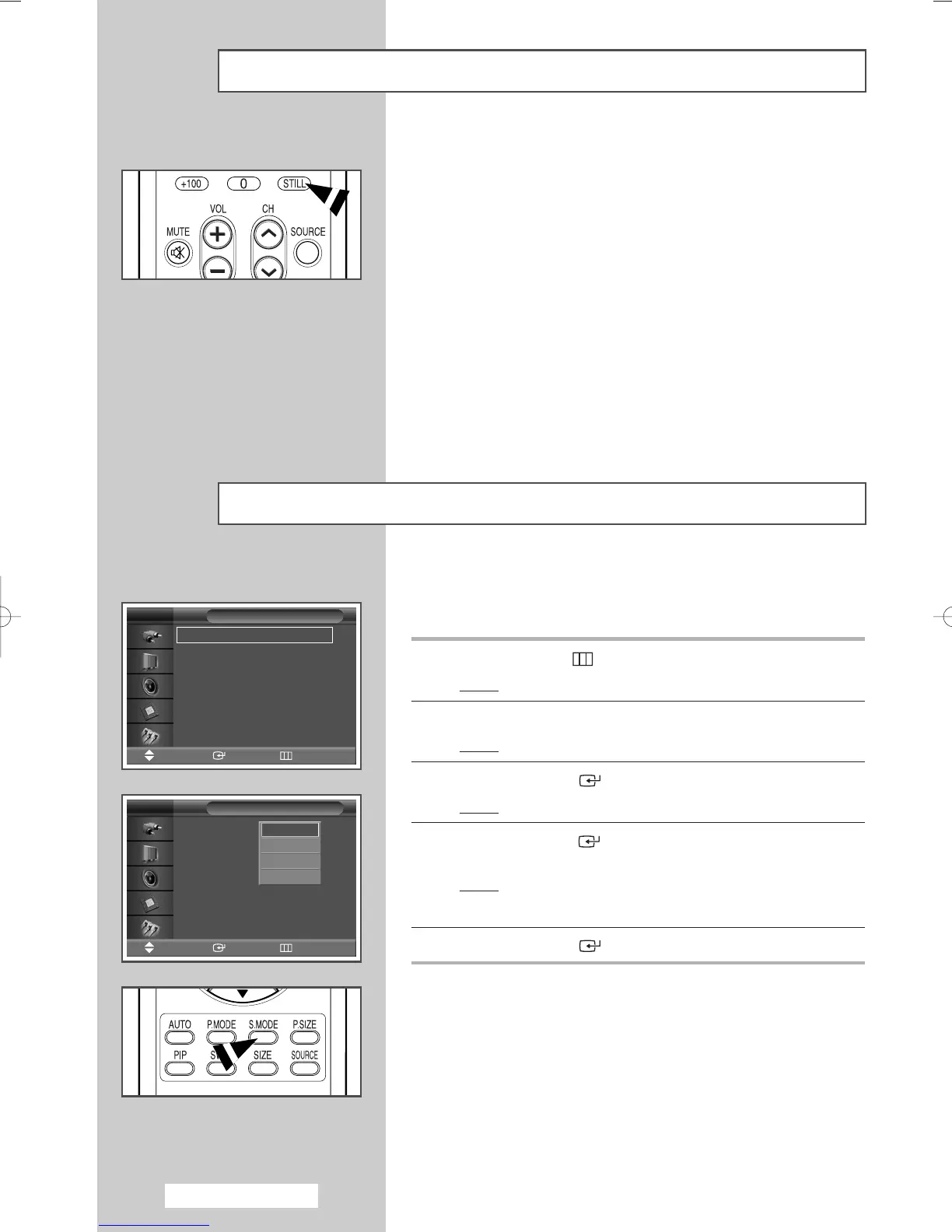
You can freeze the picture when watching a moving picture simply
by pressing the “STILL” button. To return to normal viewing, press
it again.
➢
The Still function in PIP mode will be applied to the main
picture and not to the sub picture.
Freezing the Current Picture
You can select the type of special sound effect to be used when
watching a given broadcast.
1 Press the MENU ()button.
Result
: The main menu is displayed.
2 Press the ▲ or ▼ button to select Sound.
Result
: The Sound menu is displayed.
3 Press the ENTER () button.
Result
: The Mode is selected.
4 Press the ENTER () button again.
Select the required option by pressing the
▲ or ▼ button.
Result
: The following options are available.
Standard - Music - Movie - Speech
5 Press the ENTER () button.
➢
You can select these options by simply pressing the
S.MODE (Sound Mode) button on the remote control.
Changing the Sound Standard
English - 24
Mode : Standard
√√
Pseudo Stereo : Off
√√
Sound
Move Enter Return
TV
Mode :Standard
Pseudo Stereo : Off
Sound
Move Enter Return
TV
Standard
Music
Movie
Speech
BN68-00848A-00Eng_0406 4/6/05 9:15 PM Page 24



 To Next Page