Setting the Picture (PC Mode)
English - 19
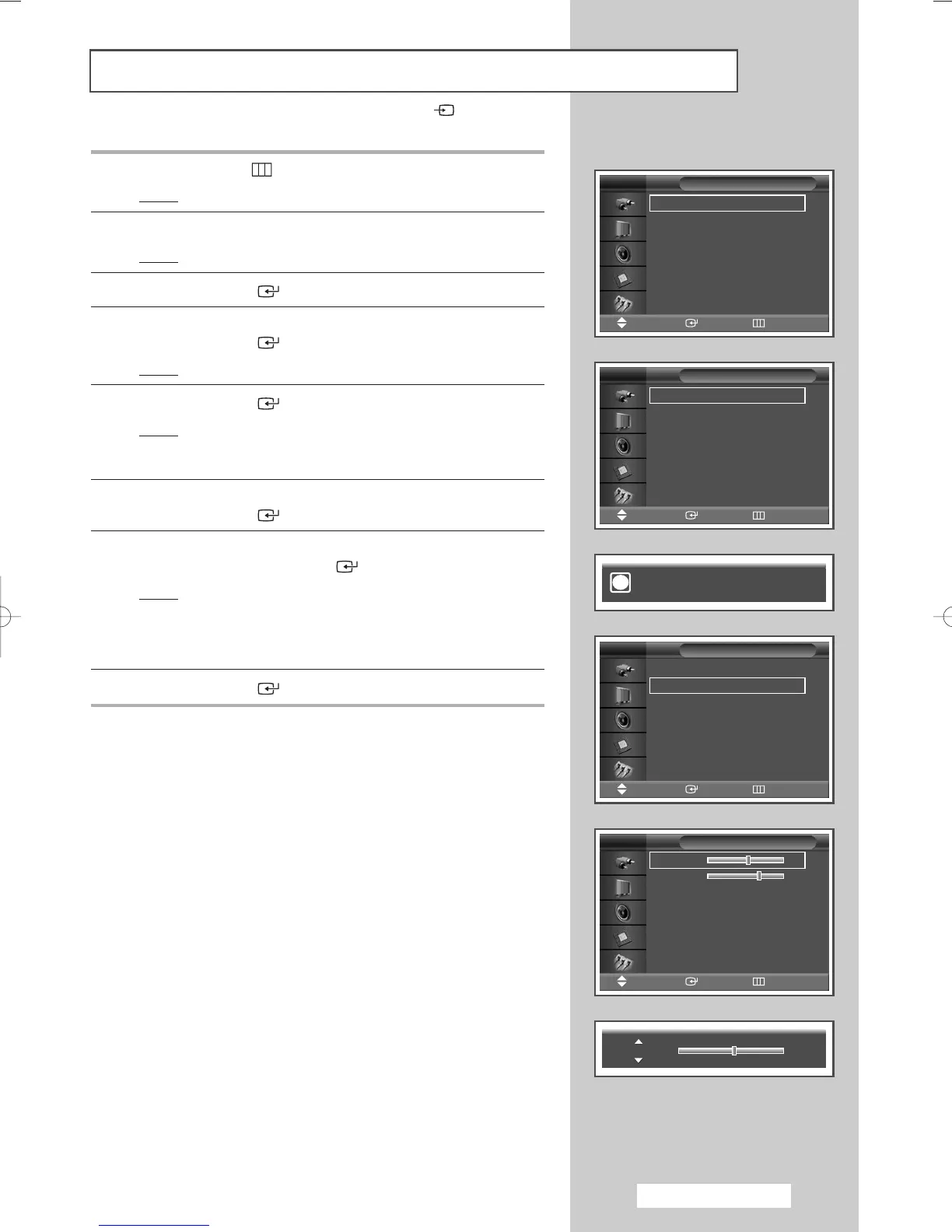
1 Press the MENU ()button.
Result
: The main menu is displayed.
2 Press the … or † button to select Setup.
Result
: The Setup menu is displayed.
3 Press the ENTER () button.
4 Press the … or † button to select PC.
Press the
ENTER () button.
Result
: The PC menu is displayed.
5 Press the ENTER () button again to select Auto Adjustment.
Result
: The screen quality and position are automatically reset.
The settings are all finished, and the PDP Monitor will
automatically return to the previous picture.
6 Press the … or † button to select Image Lock.
Press the ENTER () button.
7 Press the … or † button to select the option (Coarse or Fine) to
be adjusted. Press the
ENTER () button.
Result
: The horizontal bar is displayed.
Press the
œ or √ button until you reach the optimal
setting.
➢
Press the … or † button to select other option(s).
8 Press the ENTER () button.
➢
Preset to the PC mode by pressing the SOURCE () button.
Time
√√
Language : English
√√
PC
√√
Setup
Move Enter Return
TV
Auto Adjustment
√√
Image Lock
√√
Position
√√
Zoom
√√
Information
√√
PC
Move Enter Return
TV
Auto Adjustment
√√
Image Lock
√√
Position
√√
Zoom
√√
Information
√√
PC
Move Enter Return
TV
Coarse 50
√√
Fine 65
√√
Image Lock
Move Enter Return
TV
Auto Adjustment in Progress.
Please wait.
i
Coarse 50
BN68-00848A-00Eng_0406 4/6/05 9:15 PM Page 19


 To Next Page