English - 36
Switching the PDP Monitor On and Off Automatically
(continued)
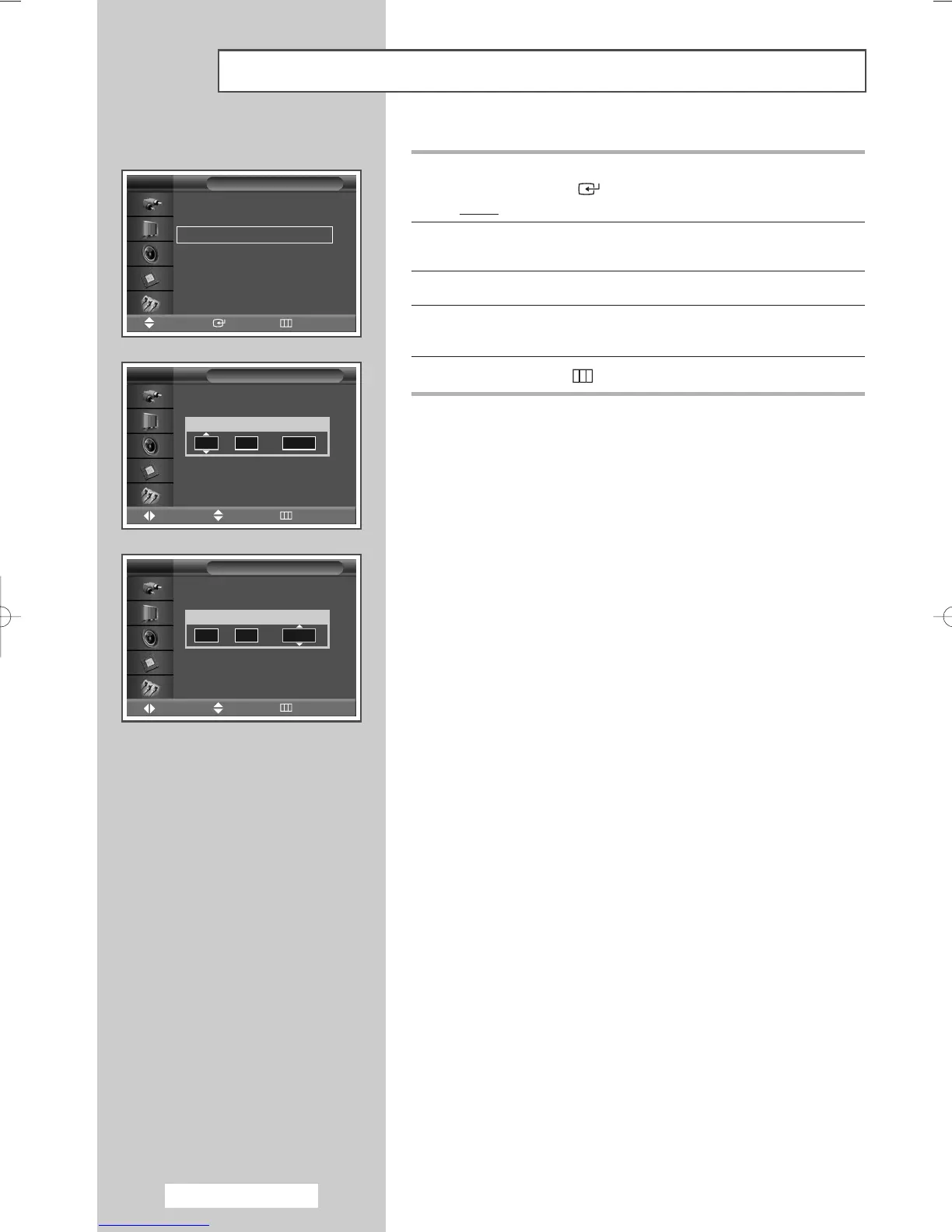
9 Press the … or † button to select Off Timer.
Press the
ENTER () button.
Result
: The Off Timer menu is displayed.
10 Select Hour or min by pressing the œ or √ button.
Set these by pressing the
… or † button.
11 Press the œ or √ button to select Activation.
12 To activate Off Timer with the setting entered, select Yes by
pressing the
… or † button.
13 Press the MENU () button.
➢
Auto Power Off
When you set the timer “On”, the PDP Monitor will
eventually turn off, if no controls are operated for 3 hours
after the PDP Monitor was turned on by timer.
This function is only available in timer “On” mode and
prevents overheating or leakages, which may occur if a
PDP Monitor is on for too long (when you are on vacation,
for example).
n
Off Timer
Move Adjust Return
TV
Hour min Activation
07 00 No
Off Timer
Move Adjust Return
TV
Hour min Activation
07 00 Yes
Clock Set 12 : 00
√√
On Timer 06 : 00 Activated
√√
Off Timer 00 : 00 Inactivated
√√
Time
Move Enter Return
TV
Fa
th
fa
T
in
w
BN68-00848A-00Eng_0406 4/6/05 9:16 PM Page 36


 To Next Page