13
GB
You can store up to:
15 FM stations
8 MW station
7 LW station
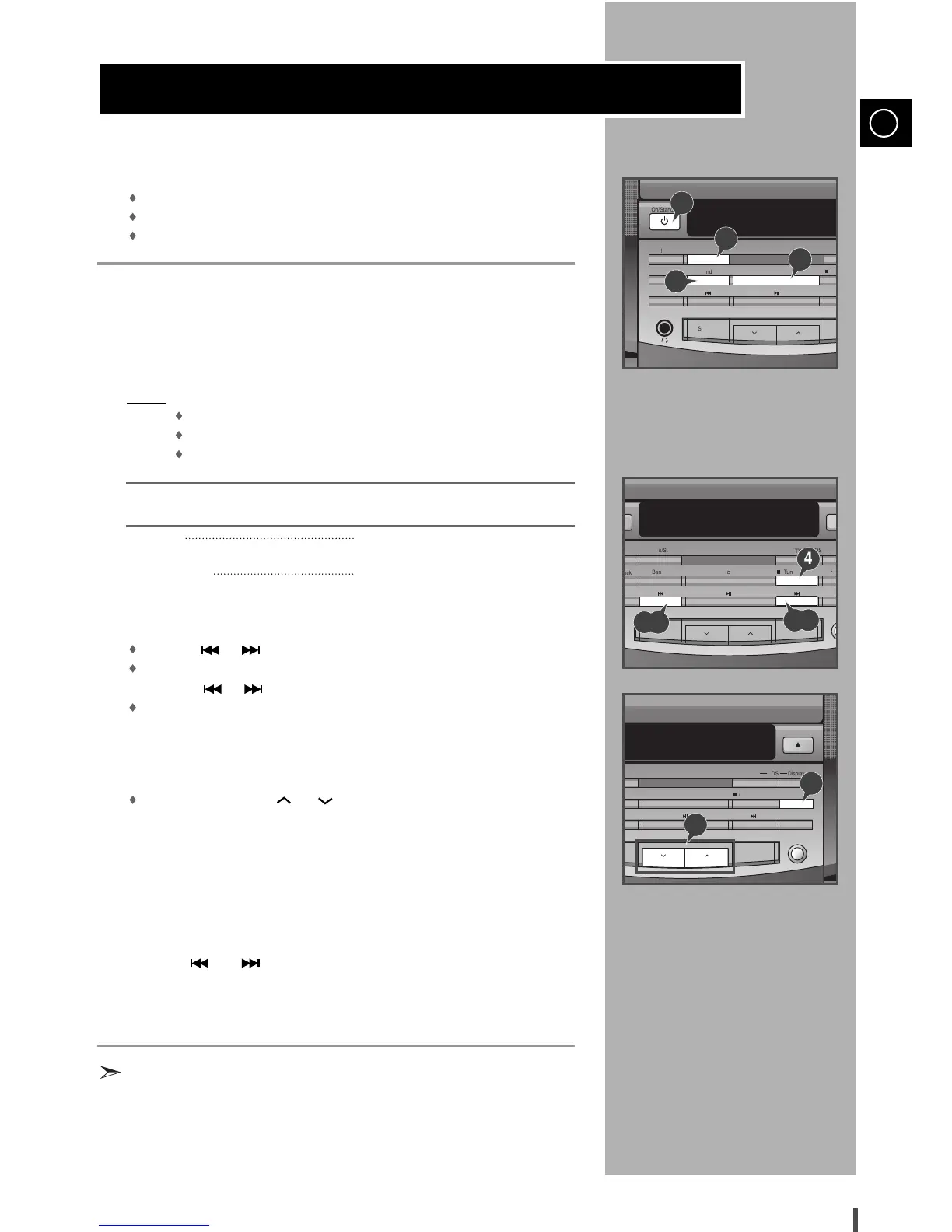
Switch the system on by pressing On/Standby.
Select the TUNER function by pressing Function on the front panel.
Select the required frequency band by pressing Band again on the front
panel.
Result: The appropriate indication is displayed:
FM Frequency Modulation
AM(MW) Medium Wave
LW Long Wave
To search for a station... Press Tuning Mode on the
front panel
Manually One or more times until MANUAL
is displayed.
Automatically One or more times until AUTO is
displayed.
Select the station to be stored by:
Pressing or on the front panel
To scroll through the frequencies faster when searching manually, hold
down the or buttons.
The automatic search procedure may stop on a frequency that does
not correspond to a radio station. If this happens, use the manual
search mode.
Adjust the volume by:
Pressing the Volume or buttons.
Select the stereo or mono mode by pressing Mono/St.
If you do not want to store the radio station found, revert to Step 4 and
search for another station.
Otherwise:
a Press Prog./Set.
b Press and to assign a programme number between 1 and 15.
c Press Prog./Set to store the radio station.
To store any other radio frequencies required, repeat Steps 3 to 8.
The PROGRAM function can be used to assign a new station to an
existing programme number.
Searching for and Storing the Radio Stations


 To Next Page