Listening to a Compact Disc
GB
8
When you have loaded a compact disc into the player, you can
begin playback.
Always treat your compact discs with care; refer, if necessary, to the sec-
tion entitled “Precautions When Using Compact Discs” on page 22.
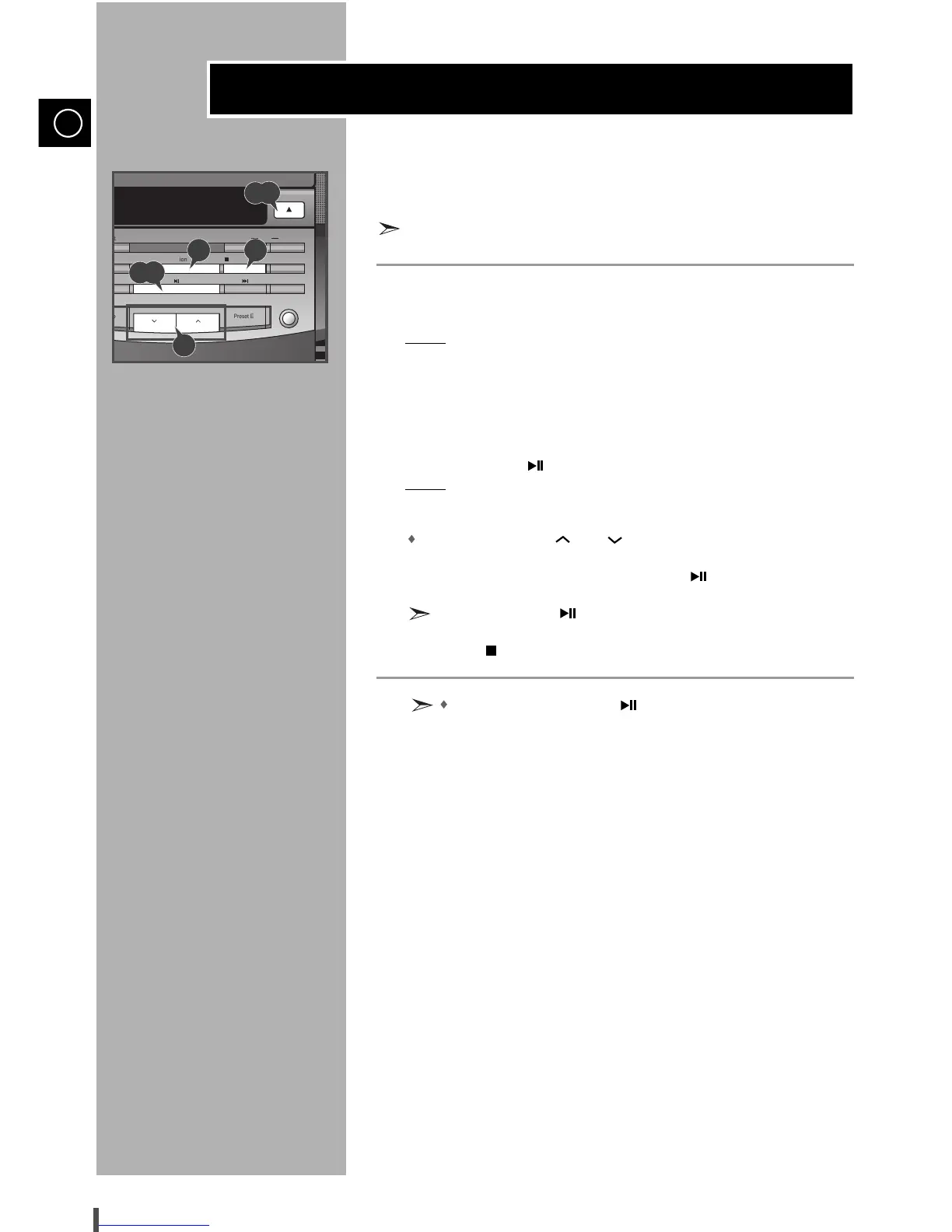
Select the CD function by pressing Function on the front panel.
Press the Open/Close button.
Result: The compartment opens.
Place your disc in the compartment, with the label on the disc facing
upwards.
Close the compartment by pressing the Open/Close button.
Press Play/Pause ( ) to start playing the disc.
Result: The display indicates the selected track and elapsed playing time.
Adjust the volume as required by:
Pressing the Volume and buttons.
To pause during playback, press Play/Pause ( ).
Press Play/Pause ( ) again to continue playing the disc.
Press Stop ( ) when you have finished.
If you press Play/Pause ( ) when no disc is loaded, the
“NO DISC” indication is displayed.
1
2
3
4
5
6
7
8


 To Next Page