20
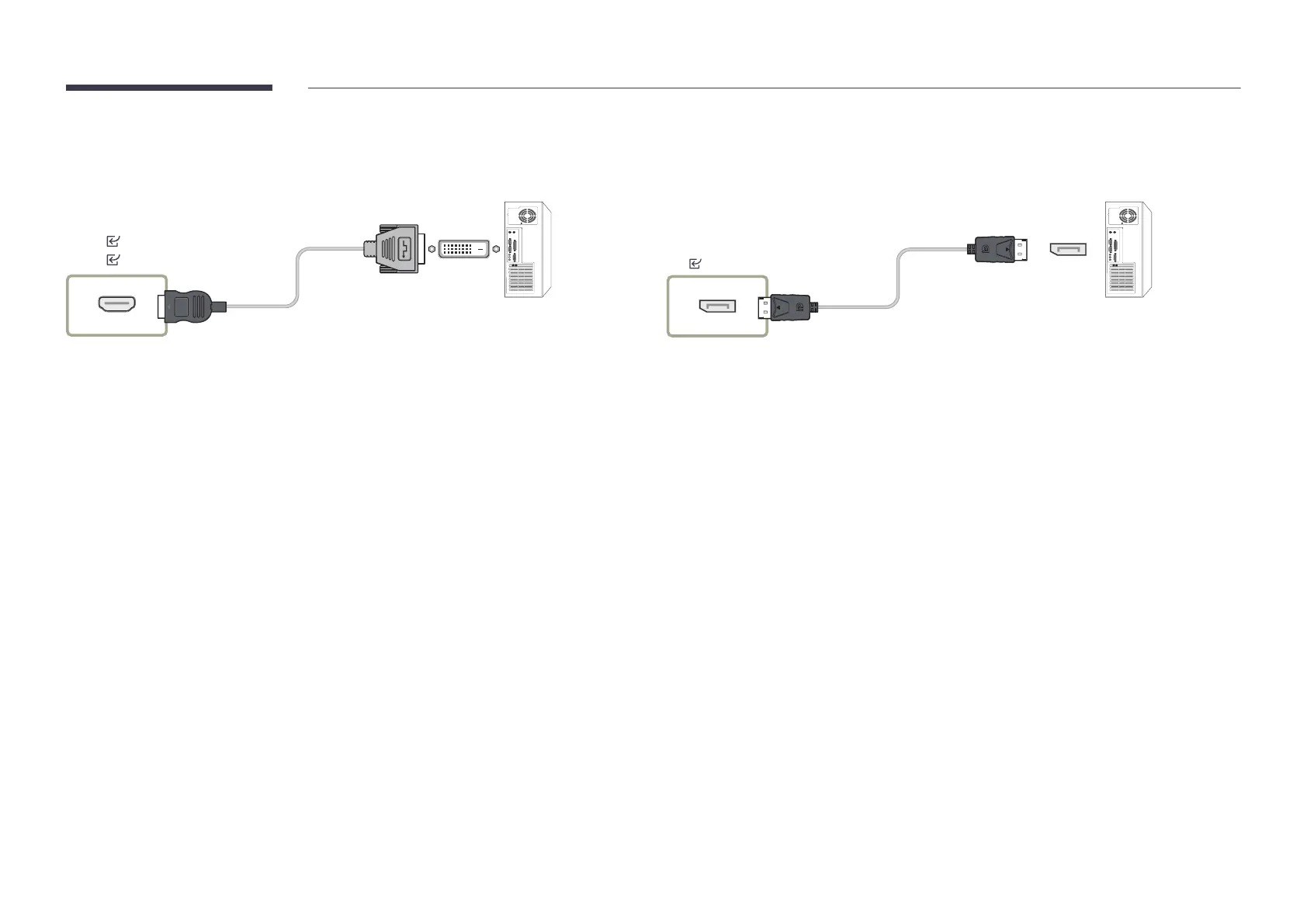
Connection Using an HDMI-DVI Cable
"
Connecting parts may differ in different products.
HDMI 1
HDMI 2
Connection Using an DP Cable
"
Connecting parts may differ in different products.
DP
Precautions for using DP
"
To increase the standby power capacity, the product stops DP communication when it is
turned off or in power-saving mode.
If the product in dual monitor mode is turned off or goes into power-saving mode,
monitor setting changes may not be updated. As a result, screen output may not be
displayed properly.
"
Some graphics cards that are not compliant with the DP standard may prevent the
Windows Booting/Bios screen from being displayed when the product is in power-saving
mode. If this is the case, make sure to turn on the product first before turning on your
PC.
"
Using a DP cable that is not VESA compliant may cause the product to function
improperly. Samsung shall not be held responsible for any issues from using a cable that
is not VESA compliant.
Make sure to use a DP cable that is VESA compliant.










 To Next Page