24
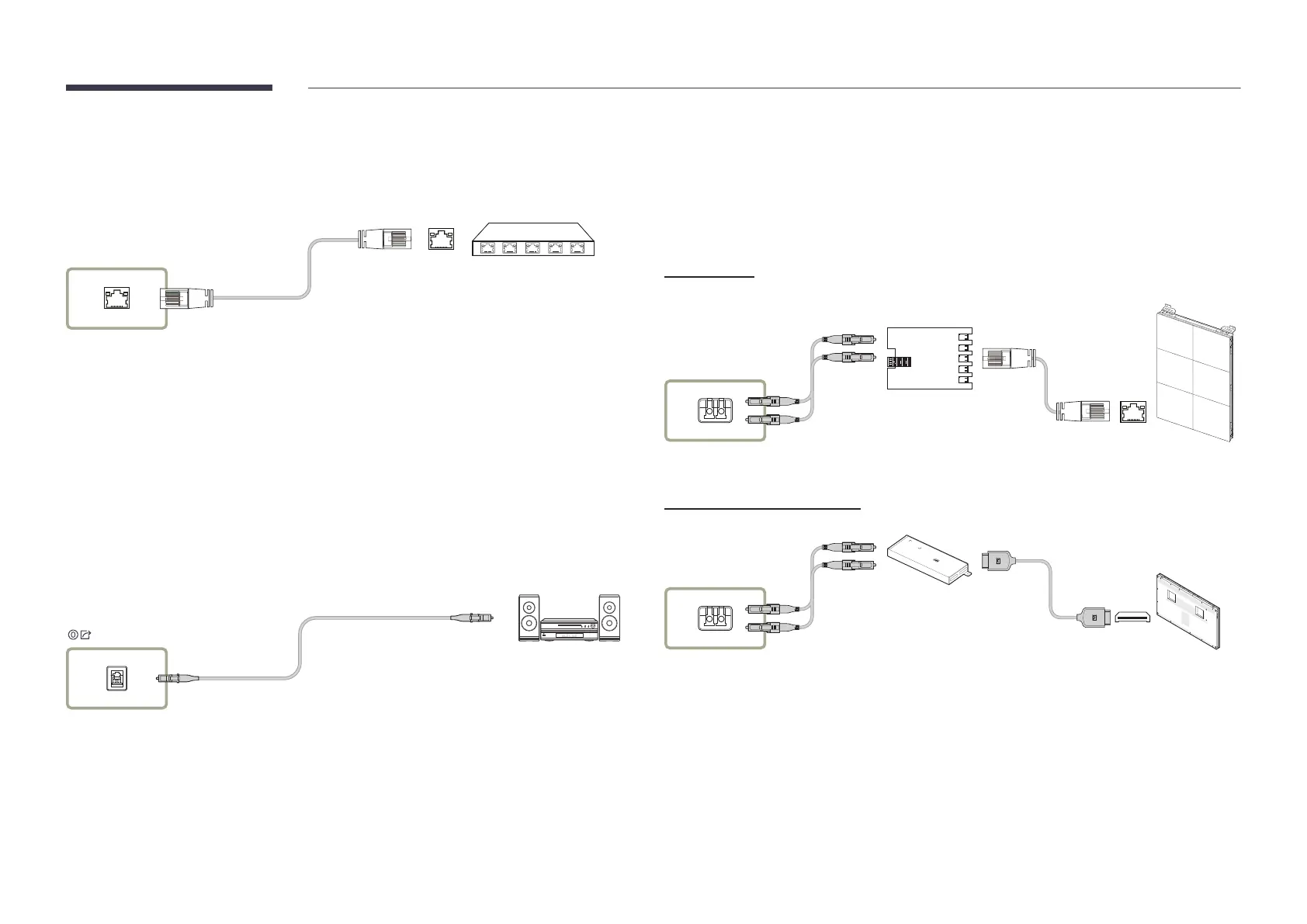
Connecting the LAN Cable
"
Connecting parts may differ in different products.
LAN
Use a cable of CAT 6 (*STP type) or higher.
*STP: Shielded Twisted Pair
"
Connect to a HUB or router that supports the DHCP function.
Connecting a Optical Cable
"
SBB-CV4B / SBB-CS4B model only
"
Connecting parts may differ in different products.
Connecting the One Connect cable
"
Connecting parts may differ in different products.
"
For more information refer to the installation guide.
SBB-CX4B
ONE CONNECT
Z-Card (ZONE Card)
SBB-CV4B / SBB-CS4B
ONE CONNECT
Use special caution to ensure that the connector is connected correctly. Incorrect connection
may cause malfunction.
Connect the cable to the connector in the direction shown in the figure. Insert the cable
gently until a “click” sound is audible.










 To Next Page