EasyManua.ls Logo

Samsung SM-T310 - Video

Samsung SM-T310
121 pages
Print Icon
To Next Page IconTo Next Page
To Previous Page IconTo Previous Page
Loading...
Media
75
Video
Use this application to play video files.
Tap
Video
on the Applications screen.
Avoid locking the devices screen while playing a DivX Video-On-Demand. Each time
you lock the screen while playing a DivX Video-On-Demand, one of your available
rental counts is lost.
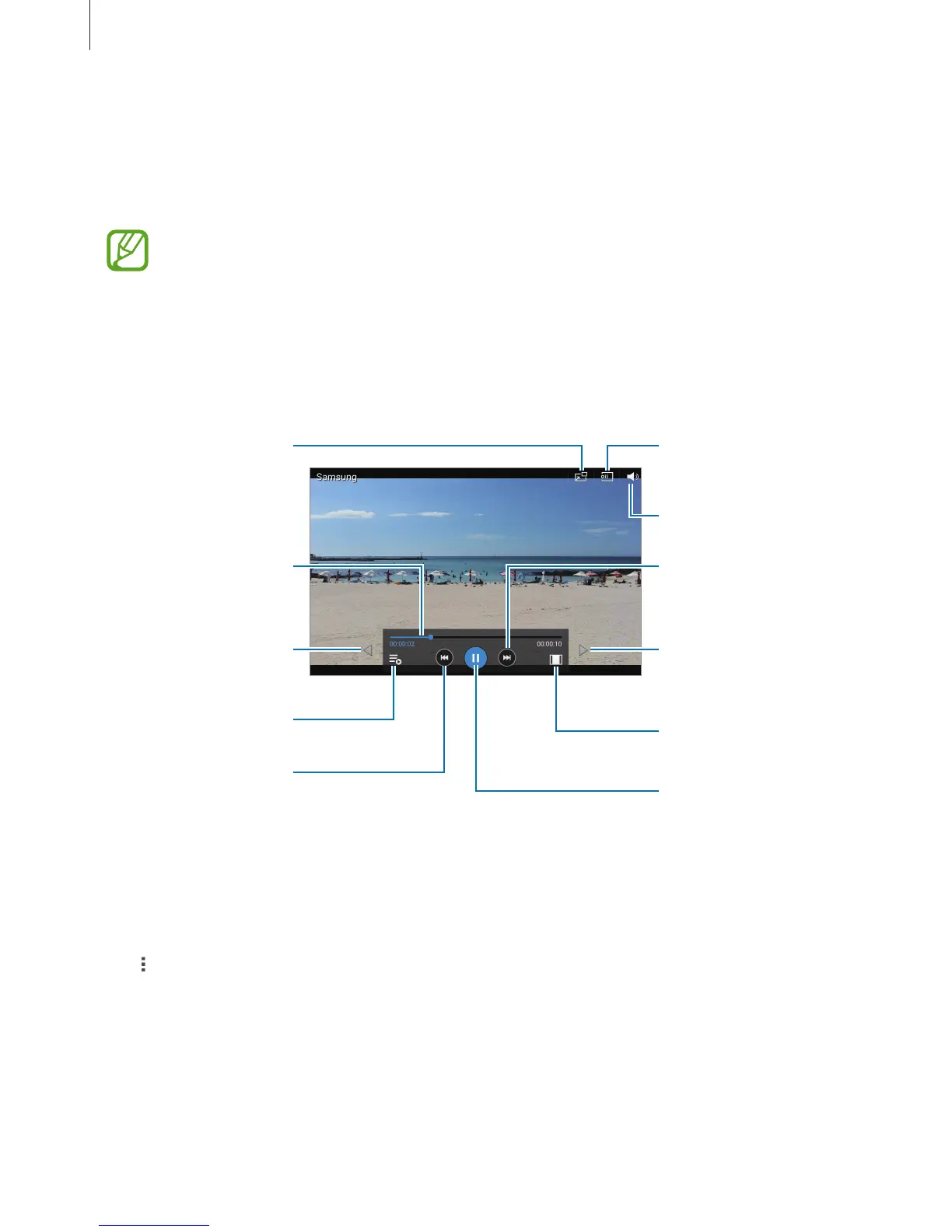
Playing videos
Select a video to play.
Change screen ratio.
Move forwards or
backwards by dragging
the bar.
Restart the current
video or skip to the
previous video. Tap and
hold to move
backwards quickly.
Skip to the next video.
Tap and hold to move
forwards quickly.
Adjust the volume.
Switch to oating
screen mode.
Pause and resume
playback.
Open the playlist.
Search for other
devices to play the file.
Move the control panel
to the left.
Move the control panel
to the right.
Deleting videos
Tap
Delete
, select videos, and then tap
Delete
.

Table of Contents

Other manuals for Samsung SM-T310

Related product manuals