84_ © SAMSUNG Electronics Co., Ltd.
Deskphone incoming call notification
Setting for deskphone incoming call notification. Depending on the notification
window check/uncheck, a notification bar is displayed when there is an incoming call.
You can set up screen off status, sound, or vibration, etc. Based on this setting, the
Smart CID function is working.
SDM shortcut
If you select this when the SDM is registered to the deskphone, the SDM shortcut
notification is registered to the notification bar.
Application info
Check the application information. You can do upgrade and NFC simple setting.
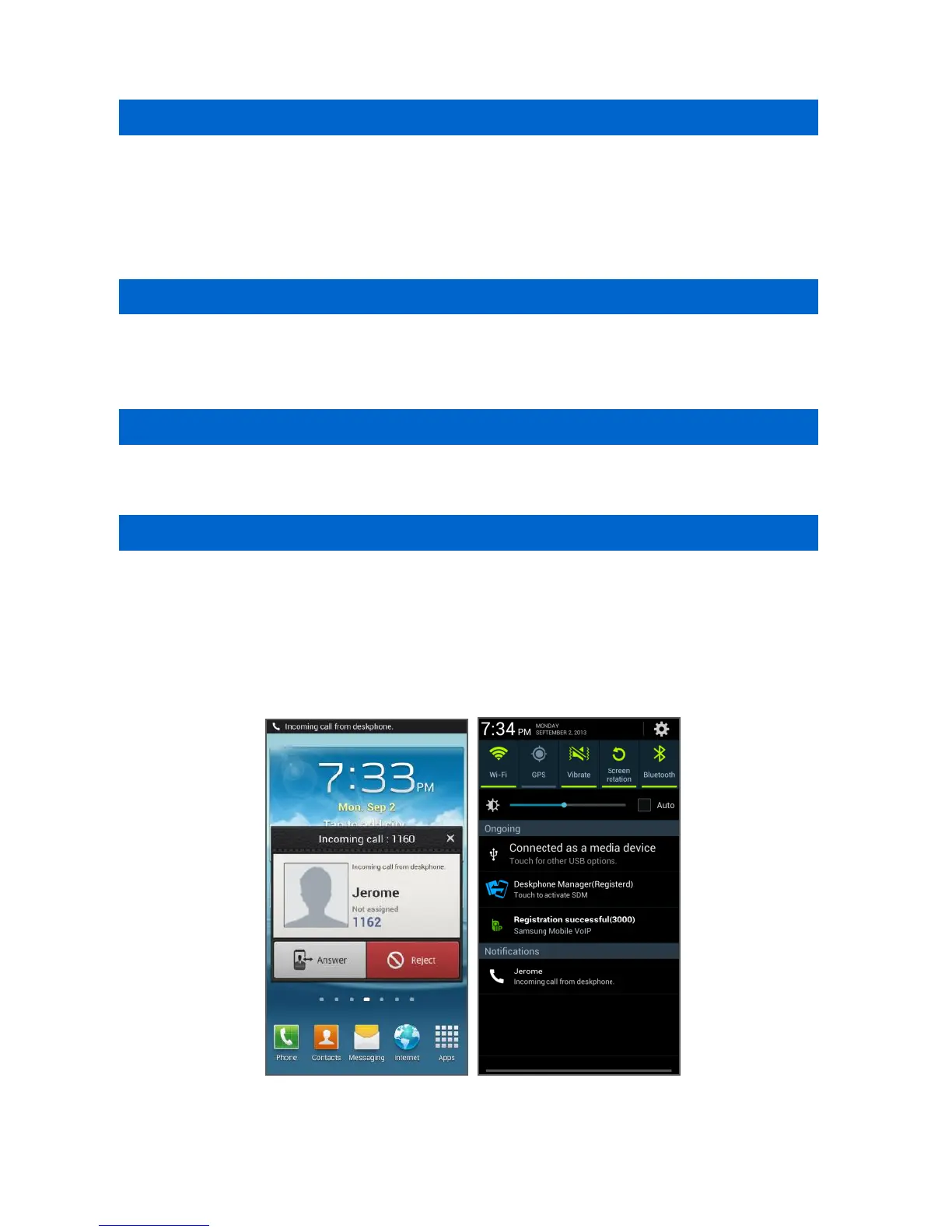
Smart CID
If you enabled Incoming call notification in Settings, the Smart CID is working
whenever there is an incoming call to the deskphone. When you press the Close
button (X), it is not displayed on the screen but it still remains in the notification bar.
Therefore, you can load it anytime. You can accept or reject a call.
When you accept a call, it is connected through the Samsung Mobile VoIP app.







 To Next Page