44_ © SAMSUNG Electronics Co., Ltd.
Message
You can manage voice messages by connecting to the Voicemail Box. You can also
send and receive text messages and save a created message temporarily
Voice Message/내선메세지/Email
You can save or check a voice message.
Select [Menu] [Message] [Voice Message/Station Message/Email], then you
can go to the Voicemail Box. Check voice messages by following instructions.
Some functions are not supported depending on system
Creating a Message
This is the function used to create and save a message to send.
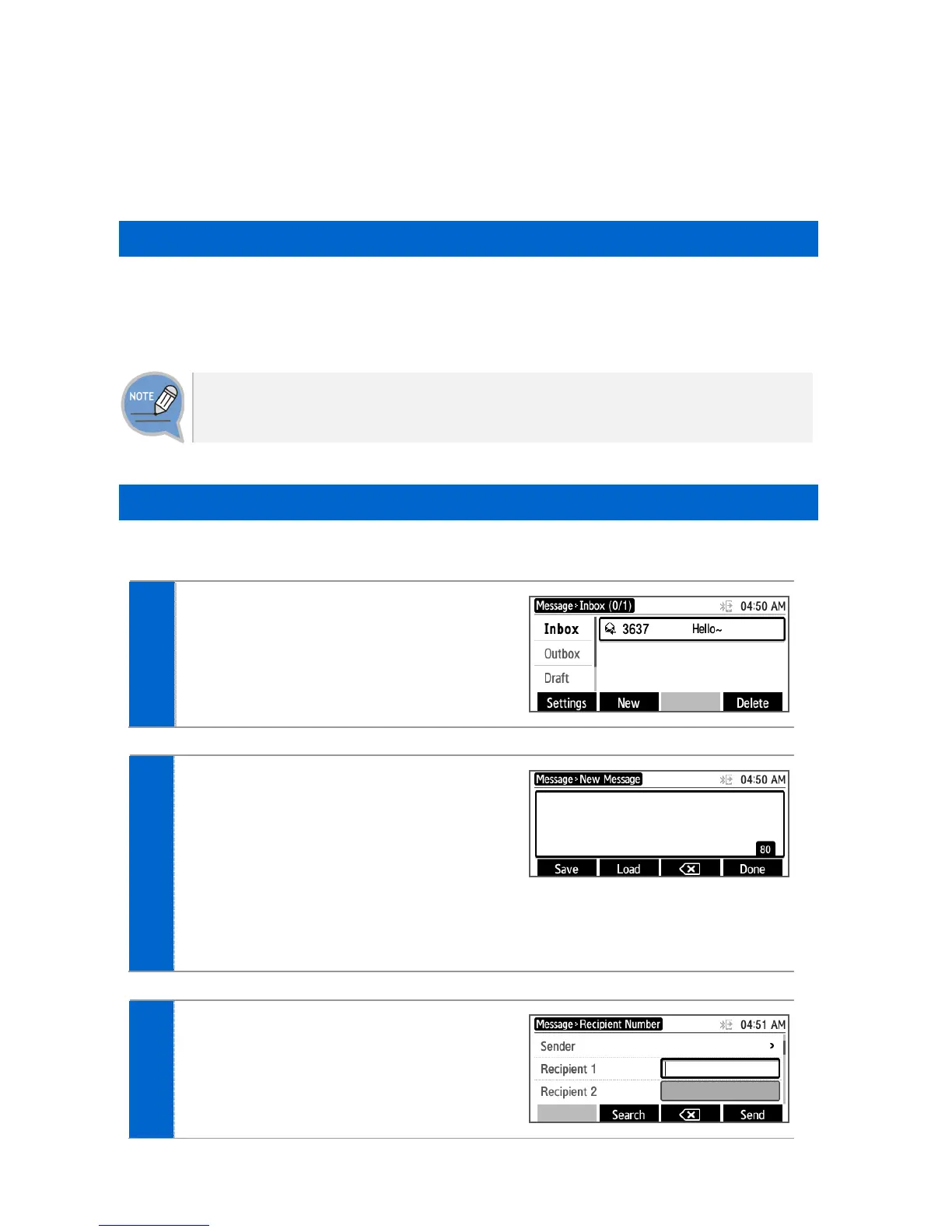
Press the [Menu] [Message]
[New] soft button.
After creating a message, specify a
recipient by pressing the [OK] button at
the right.
- [Save]: By pressing the below soft button, you
can save a created message into the
temporary box.
- [Load]: By pressing the below soft button,
you can load message from the temporary
box.
After entering a called number, press the
[Send] soft button.
Then the message is transmitted.
- [Search]: You can search a phone number in
the contacts.







 To Next Page