EasyManua.ls Logo

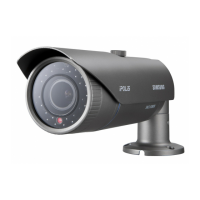
Samsung SNO-5080R - User Manual

Samsung SNO-5080R
94 pages
Print Icon
To Next Page IconTo Next Page
Loading...
NETWORK CAMERA
User Manual
SNO-5080R

Table of Contents

Other manuals for Samsung SNO-5080R

Questions and Answers

  • K
    Kelly ReynoldsAug 9, 2025
    I cannot connect to the Samsung Security Camera using a tab browser of Internet Explorer 7.0, what to do?
    • G
      Gina KentAug 9, 2025
      When connecting to your Samsung Security Camera, avoid using a tab browser in Internet Explorer 7.0. Because tab browsers share the same cookie information, it can result in connection errors. Instead, open a new browser window to connect to the system.
  • M
    Margaret JohnsonAug 14, 2025
    Why does my Samsung SNO-5080R viewer disconnect during monitoring?
    • C
      Corey ReidAug 14, 2025
      A viewer might disconnect during monitoring of your Samsung Security Camera due to several reasons. The disconnection can occur upon any changes to the camera or network configurations. Check all network connections to ensure they are stable. If your camera is connected over a PPPoE network, poor network conditions might also cause disconnections.
  • J
    Jennifer HallAug 18, 2025
    How to fix Samsung SNO-5080R Security Camera when it is not detected in the IP installer program?
    • H
      heather96Aug 19, 2025
      If your Samsung Security Camera is not detected in the IP installer program, turn off the firewall settings on your PC and then search for the camera again.
  • D
    Danny WhitakerAug 25, 2025
    What to do if images overlap on Samsung SNO-5080R?
    • E
      erinwallerAug 25, 2025
      If you're experiencing overlapping images with your Samsung Security Camera, check if multiple cameras are set to a single multicast address instead of different addresses. Using a single address for multiple cameras can cause images to overlap.
  • J
    Jesus GillespieAug 28, 2025
    Why is no JPEG file transferred via e-mail on occurrence of intelligent video analysis event of Samsung SNO-5080R Security Camera?
    • J
      Jodi FrazierAug 28, 2025
      If no JPEG file is transferred via e-mail when an intelligent video analysis event occurs with your Samsung Security Camera, even when the IV analysis function is enabled, verify the settings in the following sequence: 1. Check the Data & Time settings. 2. Ensure the IV analysis function is set to Enable. 3. Alarm Video Transmission must be enabled.
  • E
    Eduardo MccormickSep 3, 2025
    Can I configure set rules when the IV analysis function is set to disable on Samsung SNO-5080R?
    • D
      Dalton WoodSep 3, 2025
      Yes, you can set rules for events on your Samsung Security Camera, regardless of whether the intelligent video analysis setting is enabled or disabled.

Samsung SNO-5080R Specifications

General IconGeneral
BrandSamsung
ModelSNO-5080R
CategorySecurity Camera
LanguageEnglish

Related product manuals